
Instagram Account Usage Guidelines
Getting Started
Buying a ready-made Instagram account is one of the fastest ways for Nigerian creators, entrepreneurs, and brands to skip the slow, uncertain early stages of social media growth and enter the platform with an established presence. But the purchase itself is only half the equation.
What happens after the purchase, how you log in, how you secure the account, how you transition it into your brand’s identity, and how you grow from that foundation determines everything about whether your investment delivers returns.
Many buyers across Nigeria make the same avoidable mistakes. They rush into the account without reading the access details carefully. They log in from multiple devices simultaneously and trigger Instagram’s security systems. They change every account detail at once and cause algorithm disruption. They skip the security setup and lose access within days. And in some cases, they never fully understand what they actually purchased, ending up with an account they cannot use effectively.
This guide exists to close that gap.
Sizzle Social is Nigeria’s leading platform for buying ready-made Instagram accounts, pages, and social media profiles – and this page is the definitive usage guide for every account purchased through the platform. Whether you are a Nigerian entrepreneur looking to launch a business presence immediately, a creator building a content career, a brand that needs established social proof, or a digital marketer managing client accounts, what follows will walk you through every stage of getting your purchased Instagram account live, secured, and ready to grow.
Accessing Your Instagram Account
After your order has been completed, your Instagram Account Login Details will be delivered through the methods stated in the order description section of your Sizzle Social user dashboard
Your login details will typically include: Account username or email address, Temporary password or login credentials, Additional access information if required
Once you receive these credentials, you should log in as soon as possible to verify access and begin securing the account.
Delaying the first login may increase the risk of access complications, especially on platforms that monitor account activity closely.
🛡️ Instagram Account Log In & Usage Instructions
1. If you can’t log in because of wrong password / username, please contact us within 1 hour pf purchasing the account. DO NOT EVER try to reset the password. If you do not contact us within 1 hour, the warranty is void and we won’t replace the account.
2. Do not use dirty IP / Spam IPs / Banned IPs to log into our accounts. If accounts are repeatedly suspended when you log in or change something, then it is your IP that’s blacklisted and we won’t replace such accounts.
3. For Accounts to be in the best working state, After successful login please wait 1 – 3 hours before you start using the account to post or chat.
4. We do not support the usage of our accounts for fraud, scams, bullying, spam. You are responsible for any damage usage of our accounts may cause to others.
5. Always log in from your browser with link [ https://instagram.com ] to avoid checkpoint issues. Then switch to the normal Instagram App 24 Hours after logging in.
6. Within the 24 hours of log in, please change any necessary account or security information to make sure the account is fully yours [E.g: Email, Phone]. Only do this while still logged in via the browser.
7. Please DO NOT use a VPN to log into the account.
8. Do not use more than 5 accounts on one device / IP at a time.
9. We offer no warranty or support for login errors like: ID Verification or Approve Login From Device. If you are seeing such error, its because you have used multiple accounts on the same IP, or logged in with a VPN or your IP is compromised.
10. If you have used your Phone or Computer to log into several accounts and you keep getting suspended, this is because your IP is compromised and we take NO RESPONSIBILITY FOR THIS.
Understanding The Account Details Provided To You
When you buy an account from us, the account details provided to you/downloaded can come in the format below:
“FORMAT: username || password || email address || email password || 2FA Token |||—>>> vedjvanti130573 || 2zA5GYdY8y || jamblan1999@rambler.ru || kCUN@DmyMgDrdOX2 || MUJSRNK4KGXAHMRZMQ5NS7P33CZWOJDD |||—>>> PLEASE VISIT OUR WEBSITE TO READ LOGIN INSTRUCTIONS HERE: https://sizzle.ng/social-media-account-login-instructions”
Following the FORMAT above, let’s break it down.
-> username is vedjvanti130573
-> password is 2zA5GYdY8y
-> email address is jamblan1999@rambler.ru [This means you need to visit “www.rambler.ru” to log into the email address in case Instagram sends a CODE to the email. If the email address is abcd@gmail.com, then you should visit “gmail.com”. And so on.
-> email password is kCUN@DmyMgDrdOX2
-> 2FA Token is MUJSRNK4KGXAHMRZMQ5NS7P33CZWOJDD [If Instagram asks for a 2FA Code sent to your Phone or Authentication App, you will use this token to generate the code by visiting [www.2fa.live]. The FULL TUTORIAL FOR THIS IS AT THE END OF THIS PAGE.
If other information/credentials came with the account, simply follow the format stated in the TEXT file and you are good to go!
Log In Instructions
Step 1: Visit [ https://instagram.com ] from your browser. IMPORTANT: It MUST be from your browser for your first login and NOT the Instagram app.
Step 2: In the Username Field, paste the USERNAME provided to you.
Step 3: In the Password Field, paste the PASSWORD provided to you.
Step 4: After Logging In, if you are asked for a Verification or 2FA Code. Check where it was sent to. If the code was sent to the Email, Simply log into the email address provided above to access the code sent.
If you are asked to provide the code sent to your Authentication app or SMS, the tutorial below will show you how to get the 2FA Code used to secure the account. If you are not asked for a 2FA Code and you get direct access or the code was sent to Email instead, kindly ignore the steps below.
How To Generate 2FA Codes
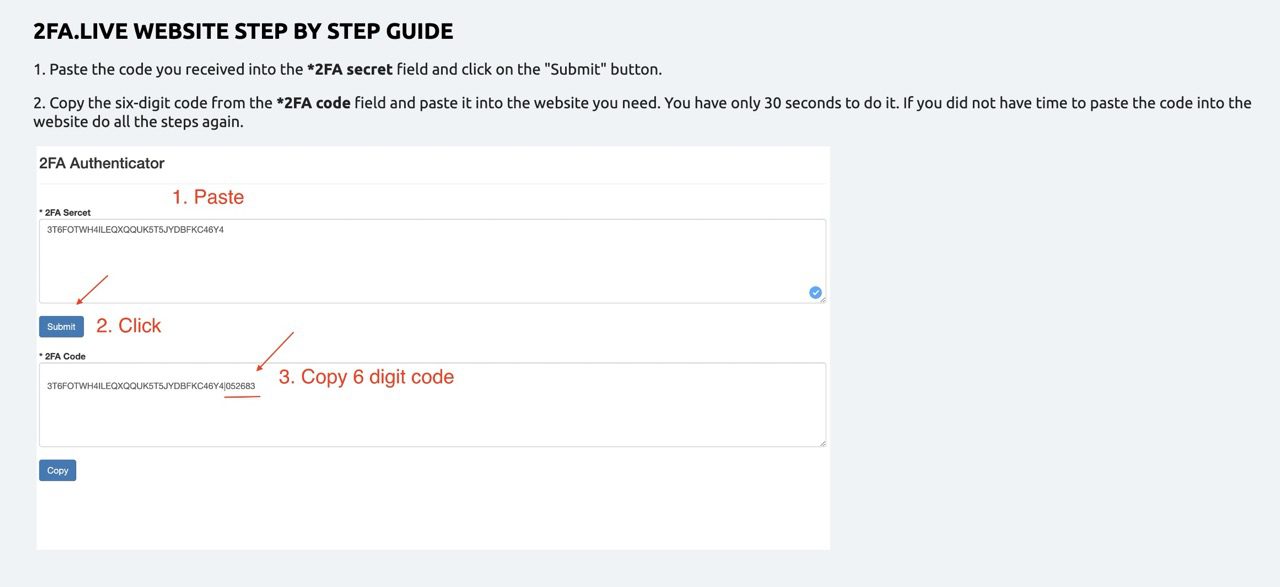
Step 1: Visit this website: [ https://www.2fa.live ]. Then copy the “2FA Token” provided in your login details and then paste it into the first box on the website, then click “Submit”
Step 2: The 2FA Code to Log In Will be Displayed in the second box on the website. Just check for the last 6 digits. It can be something like this:
“N644DAPKWWQJISUJHSMKMFSAC2L7A
What this simply means is that the 2FA code is “688396“. Quickly use the code to log in before it expires. And if it does expire, you can always generate another 2FA Code by repeating Step 1 & 2.
Once you follow this, you should get instant access to the account.
The image BELOW describes this process. It’s easy.
How To Generate 2FA Codes
Follow these steps if you have issues with www.2fa.live. If you have already generated a code with 2fa.live and its working fine, YOU DON’T NEED TO FOLLOW THESE STEPS AGAIN. This is just an ALTERATIVE METHOD.
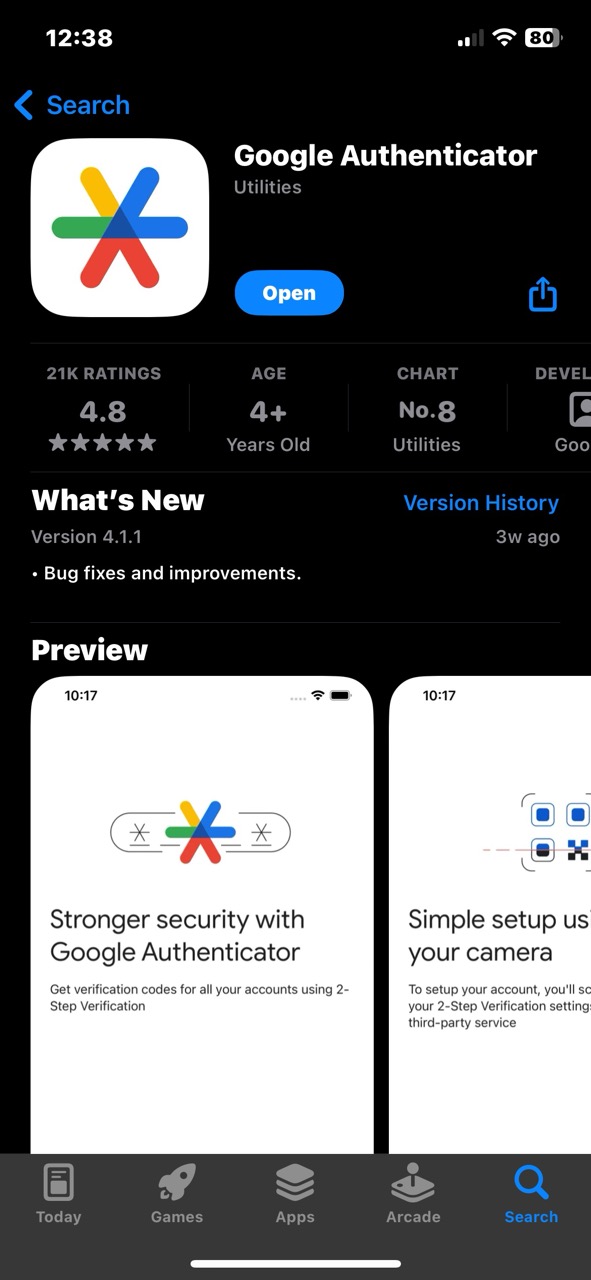
Step 1: Download [Google Authenticator App] on Playstore [For Android] or on Apple App Store [For iPhone/iPad].
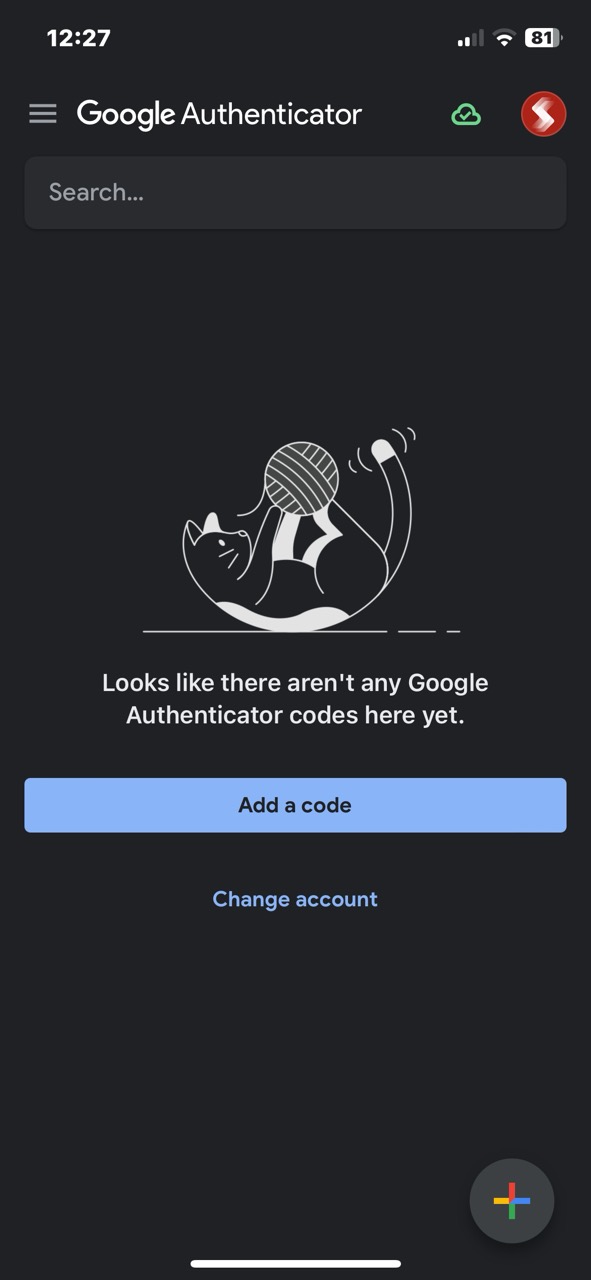
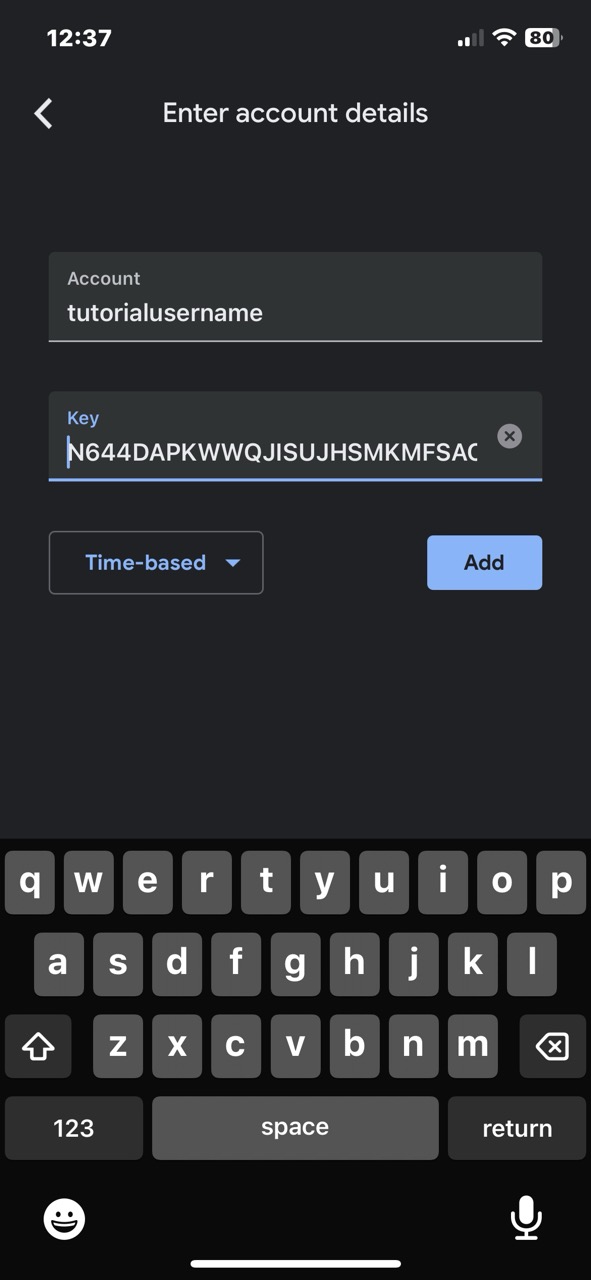
Step 2: Click “Add a Code” > Then Click “Enter a setup key“
Step 3: In the next step, you will see two fields. “Account” and “Key“.
- Simply PASTE the ‘username‘ of the account you bought from Sizzle inside the “Account” box.
- Then PASTE the “2FA Token” code inside the “Key” box.
- Select “Time-based“
- Then click the “Add” button.
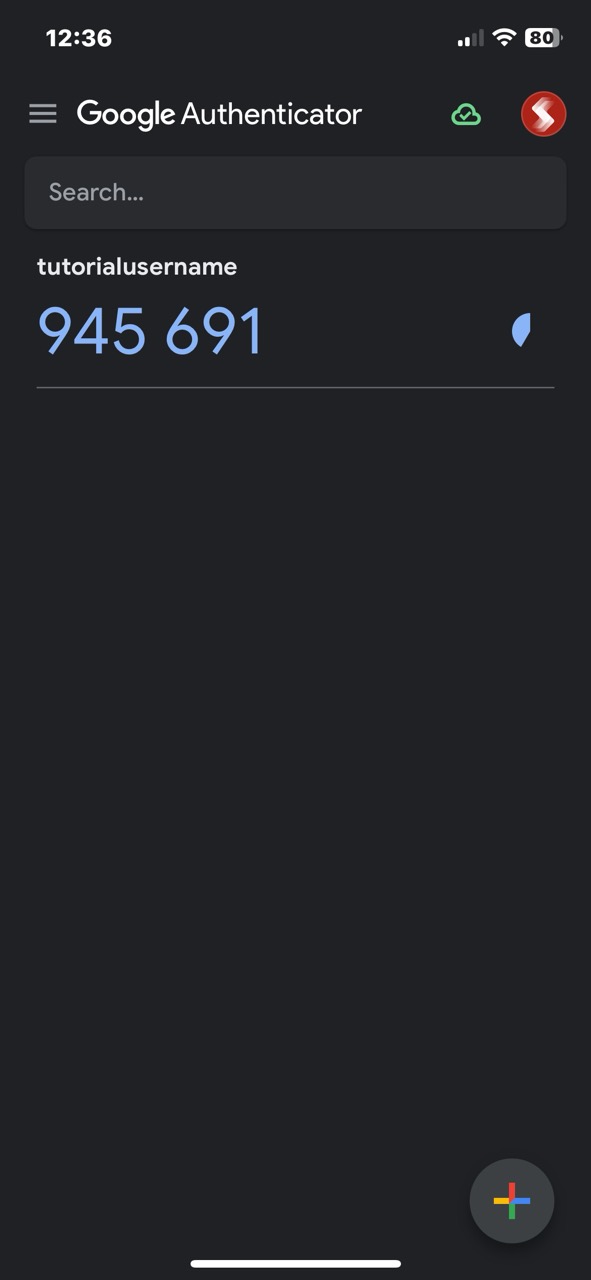
Step 4: Immediately you do this, Google Authenticator will start generating 6-digit codes for you to use to log into the accounts you purchased. Quickly use the code to log in before it expires. And if it does expire, you can always copy the next 6-digit Code Google generates for you.
Once you follow this, you should get instant access to the account.
The images BELOW describes this process. It’s easy.
Step-By-Step Guide: How to Log Into Your Purchased Instagram Account
Instagram continuously monitors login behavior, device changes, location shifts, and user activity patterns. These signals help the platform determine whether an account is being accessed by its rightful owner or whether suspicious activity is occurring.
When a purchased Instagram account is accessed incorrectly, the algorithm may interpret the login as a potential security risk.
This can lead to:
• Temporary login blocks • Verification challenges • Suspicious activity warnings • Account restrictions
Proper login procedures ensure that the transition from previous owner to new owner appears natural within Instagram’s security system.
Following the correct process protects the social proof signals attached to the account and ensures that the existing followers, engagement, and algorithm trust remain intact.
Step 1: Verify Account Credentials
After purchasing an account through Sizzle Social, users receive secure login credentials. These typically include:
• Username • Password • Email or phone verification access
Before attempting the first login, confirm that all credentials have been received correctly. This ensures the login process can be completed smoothly without interruptions.
It is also recommended to review any additional information provided during the purchase process, such as niche category, follower demographics, and previous activity style.
Understanding these signals helps guide the first stage of account management.
Step 2: Use the Official Instagram Application
Always log into the purchased account through the official Instagram mobile app or website.
Avoid third‑party login tools or automation software during the first login phase. These tools may trigger additional security checks that can delay access.
Using the official app ensures Instagram recognizes the login attempt as legitimate platform access.
Step 3: Complete Verification Requests
Instagram may request verification during the first login attempt.
These security checks may include:
• Email confirmation • SMS verification • Security code authentication
Complete these steps promptly. They are a normal part of Instagram’s security process when login locations change.
Once verification is completed successfully, the account will become fully accessible.
Step 4: Change Login Credentials Immediately
After gaining access to the account, users should immediately update the following security elements:
• Password • Recovery email • Recovery phone number
This ensures full control of the account and prevents any future access issues.
Updating login credentials is a standard best practice when managing Instagram accounts purchased through social media growth platforms.
Step 5: Enable Two‑Factor Authentication
Two‑factor authentication (2FA) adds an additional layer of protection.
Once enabled, every login attempt requires a secondary verification code sent to the account owner.
This prevents unauthorized access and protects the account’s followers, engagement history, and algorithm credibility.
For creators investing in social media growth strategies, protecting these signals is critical.
Stabilizing a Purchased Instagram Account
Avoid Sudden Behavioral Changes
One of the most common mistakes new account owners make is drastically changing account activity immediately after login.
Examples include:
• Posting multiple times within minutes • Following hundreds of accounts instantly • Sending mass direct messages
These behaviors can trigger Instagram’s anti‑spam systems.
Instead, gradual activity is recommended during the first few days.
Allow the account to transition naturally into its new management environment.
Maintain Content Relevance
Purchased Instagram accounts often belong to a specific niche or audience category.
For example:
• Fashion • Entertainment • Lifestyle • Business • Music promotion
Publishing content that aligns with the existing audience helps maintain engagement momentum.
Sudden niche changes can confuse followers and reduce engagement signals.
Creators who plan to shift niches should do so gradually over time.
Building Growth Momentum After Login
Leveraging Social Media Promotion Tools
Once the account is stabilized, users can begin implementing social media growth strategies designed to increase visibility and engagement.
Within Nigeria’s digital marketing ecosystem, platforms like Sizzle Social serve as comprehensive SMM service providers offering:
• Follower increase tools • Engagement boosting • Comment generation • Social media traffic growth
These tools help creators boost social media followers online, expand reach, and strengthen credibility.
Many Nigerian creators rely on Sizzle Social because it operates as:
• A Social Media Marketing Panel for Nigerians • A Fastest & Cheapest SMM Panel in Nigeria • A Trusted SMM Platform in Nigeria
Through this infrastructure, creators can scale audience visibility without relying entirely on unpredictable algorithm exposure.
Combining Purchased Accounts with SMM Growth Strategies in Nigeria
A purchased Instagram account already provides a strong starting position.
When combined with SMM panel services, the growth potential becomes significantly greater.
Sizzle Social supports multiple growth strategies including:
• Buy Instagram Followers in Nigeria • Buy TikTok Followers in Nigeria • Buy Twitter Followers in Nigeria • Buy YouTube Subscribers in Nigeria
These services help creators expand visibility across multiple platforms simultaneously.
As a Social Media Growth Tool Nigeria creators rely on, Sizzle Social allows users to manage promotion services efficiently from one central platform.