
Table of Contents
You open a brand-new shop in the center of Balogun Market. You hire a loud hype man, turn up the speakers, and open the gates. Hundreds of people push through the door on day one. They look around, drop their bags, glance at the empty counters, and quietly walk out. By evening, the shop is dead quiet. You sit on a plastic chair, staring at the ceiling, wondering what went wrong.
That is the exact feeling when your Discord Server Has Low Online Members.
You spent hours setting up roles, organizing categories, picking cute emojis, and sharing invite links across the web. The member counter on the left side of your screen says you have five hundred people. Yet, when you type a friendly message in the general chat, only the welcome bot replies to you. Crickets everywhere.
Building a digital space is easy, but keeping people around to talk is where the real work begins. According to global data published in the Kristian Larsen Discord Statistics Report, Discord hosts over 200 million monthly active users and more than 19 million active servers globally.
However, industry analysis reveals that over 90% of all Discord servers have fewer than 15 total members, and a massive percentage of larger servers suffer from total community inactivity. With over 850 million messages sent daily across the platform, competition for user attention is fiercer than ever.
Why Your Discord Server Has Low Online Members

A dead server rarely happens by accident. Most server owners assume people are just busy, but the truth is usually hidden inside your server layout, welcome setup, or conversation habits. Understanding why members go silent is the first step toward fixing the silence.
When you look at your server sidebar and see 500 total members but only 8 people marked as online, and zero chatting, you are experiencing a breakdown in community momentum. Digital spaces thrive on psychological social proof.
When someone logs into Discord, their eyes naturally scan for activity indicators: green online status dots, active typing indicators, and fresh timestamps in the main channels. If those signals are absent, a user subconsciously decides that “nothing is happening here” and moves on to an active community.
Platform benchmark data shows that the average Daily Active User to Monthly Active User (DAU/MAU) ratio across top social communities hovers around 12% to 20%. When a quiet Discord community drops below a 2% daily active ratio, it enters an operational tailspin. Low online member counts stem from a structural mismatch between member expectations and actual server realities.
People join servers with excitement;they want entertainment, real-time connection, networking, or exclusive insights. However, if the server fails to capture that initial spark within their first few minutes, the user silences notifications, collapses the server icon into an archive folder, or forgets it exists entirely.
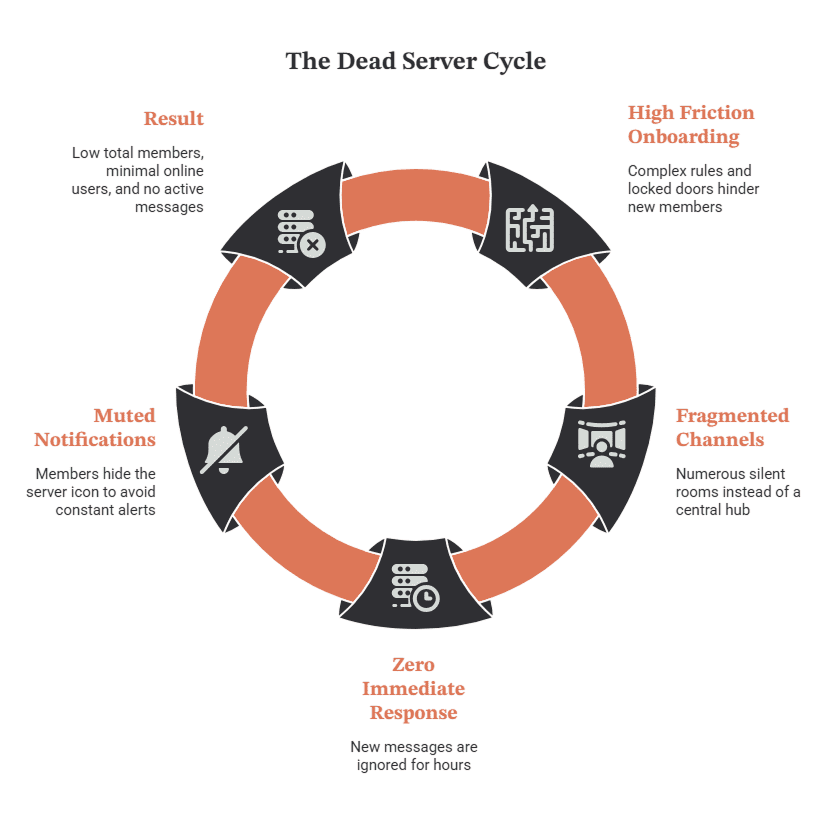
Moreover to break this cycle, you must diagnose the exact structural and operational flaws suppressing your active numbers. It is not just about bringing more users through the door; it is about fixing the broken, high-friction environment inside so that every visitor finds an immediate reason to stay, chat, and return.
For creators and community builders looking to expand their presence beyond chat apps, exploring general social growth platforms can provide foundational insights into building multi-channel audience momentum.
Why Members Join But Never Participate
When someone clicks your invite link, they give you about ten seconds of their attention. If they do not immediately see where to jump in, they pull back.
Many new members experience what community builders call “first message anxiety.” Walking into a chat with total strangers feels like stepping into a crowded party where everyone already has an inside joke. If nobody greets them personally or gives them an easy topic to talk about, they mute the server and never speak. They joined because your topic interested them, but they stayed quiet because the environment felt cold or intimidating.
In classic digital interaction research, pioneer researcher Jakob Nielsen introduced the 90-9-1 Rule of Participation Inequality, which states that in typical online communities, 90% of users are lurkers who never contribute, 9% contribute occasionally, and only 1% account for almost all active posting.
However, modern community benchmark studies from Grazitti Interactive reveal that structured communities using active facilitation, gamification, and low-barrier entry points can increase active participation to over 76%.
| Community Factor | Silent Server (High Anxiety) | Active Server (Low Barrier) |
| First Impression | Blank general chat or welcome bot pings | Active daily prompt or warm moderator greeting |
| Conversation Entry | Complex industry topics or private jokes | Simple, open questions anyone can answer |
| Response Speed | 2–6 hours delay (or no response at all) | Reply received within 2–5 minutes |
| Social Dynamics | Intimidating cliques and closed groups | Inclusive atmosphere with tagged starter roles |
When a new user types a message and receives no reply for three hours, they experience digital rejection. They will rarely attempt to speak a second time. To combat first message anxiety, server owners must implement an immediate engagement system where moderators, active regulars, or automated welcome triggers instantly acknowledge every new arrival with an easy conversation starter.
How too Many Channels Create Confusion

Creating fifty channels for a server with twenty active people is a quick way to kill conversation. You might think having separate channels for gaming, anime, music, food, pets, tech, and fitness makes your space look professional. In reality, it spreads your few active messages so thin that every single channel looks abandoned.
When a user sees thirty text channels and each one has a last message sent three days ago, they assume the whole community is dead. One lively general chat is always better than ten silent niche channels.
Consider the simple mathematics of community activity. If your server generates 50 messages per day and you spread them across 25 channels, each channel receives an average of 2 messages per day. To an outside observer, every room feels abandoned. However, if those same 50 messages are concentrated into a single #general-chat hub, that channel feels continuous, lively, and worth joining.
To streamline your server channel layout effectively:
- Consolidate similar categories: Merge #memes, #food, and #pets into a single #media-lounge channel to build unified conversation volume.
- Hide inactive channels: Archive or hide specialized topic rooms until your daily active message count exceeds 500 messages per day across core hubs.
- Implement temporary threads: Encourage members to create temporary threads for niche topics rather than cluttering the permanent sidebar with empty channels.
- Set channel posting thresholds: Establish strict operational guidelines;if a specialized channel falls below 15 messages per week, instantly merge it back into the primary general room.
What Weak Onboarding Does To Activity
Imagine arriving at a venue and being forced to read a twenty-page contract, click five verification buttons, and guess which door leads to the party. That is what bad onboarding feels like.
If new members are met with wall-of-text rules, broken reaction roles, or locked channels that require mysterious steps to open, they will close the app. If your welcome process feels like an entrance examination instead of a warm greeting, people will abandon the server before sending a single word.
Excessive friction at entry is the leading cause of immediate user drop-off. UX industry standards demonstrate that every extra step added to an onboarding sequence causes a 20% to 30% drop in user conversion. Common onboarding mistakes include:
- Reaction-Role Overload: Forcing new users to pick from 40 different color and interest roles before unlocking basic text channels.
- Aggressive Bot Verification: Requiring multi-step CAPTCHA challenges or external account links that fail on mobile devices.
- Unclear Next Steps: Dropping users into a read-only #rules channel with zero guidance on where the main conversation is happening.
- Delayed Channel Access: Forcing new joins to wait through mandatory 10-minute read-only timer delays before permitting their first greeting message.
To optimize your onboarding, implement Discord’s native Community Onboarding tools.
Ask no more than 2–3 simple setup questions (e.g., “What is your main interest?” or “How did you find us?”), auto-assign essential roles, and immediately redirect the user to your active general chat with an open question ready to answer.
Why Members Stop Returning After Joining
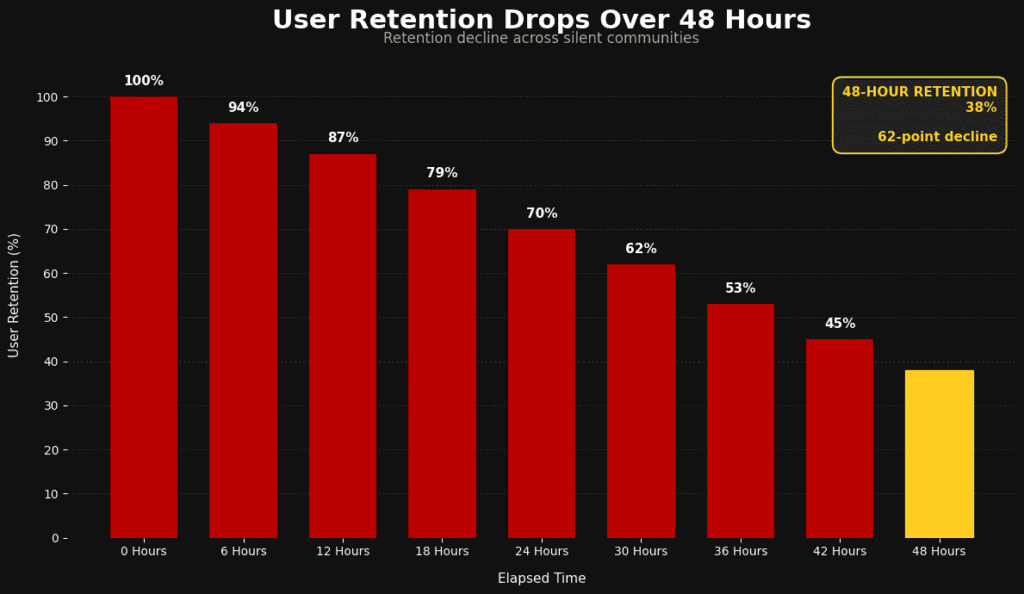
People leave their notifications turned off for most servers. If nothing brings them back during their first forty-eight hours, your server drops to the bottom of their sidebar, buried under dozens of other communities.
Members stop returning when a server lacks momentum. If there are no recurring discussions, no active hosts, and no clear reasons to open the app, your server becomes just another icon on a long list of muted groups.
The critical window for member retention is the first 48 hours post-join. Research highlighted by CMX Hub Community Benchmarks emphasizes that long-term community retention hinges on early habit formation.
Furthermore, classic business analytics from Bain & Company demonstrate that increasing customer or community retention rates by just 5% boosts overall long-term engagement and value by 25% to 95%.
To guarantee return visits, community managers must establish structural hooks:
- Scheduled Daily Beats: Publish consistent morning prompts, daily polls, or feature posts at predictable times to create a reliable daily routine.
- Ping-Worthy Announcements: Use @here tags sparingly for genuinely exciting events, free giveaways, or live discussions rather than administrative updates.
- Direct Social Mentions: When a discussion touches on a topic a new member mentioned in their introduction, tag them back into the chat (e.g., “@User, we were just talking about that camera gear you mentioned!”).
- Reward Early Milestones: Trigger automated 24-hour check-in bot messages praising new members for completing their first profile customization or sending their initial 5 messages.
How to Increase Discord Server Activity

Turning a quiet group into an active room requires structure and intention. You cannot just wait for members to start talking on their own; you must build an environment that invites participation.
Server activity is engineered, not accidental. Successful Discord administrators do not sit back hoping that hundreds of random strangers will magically entertain one another. Instead, they act as community facilitators;setting up topic seeds, staging interactive events, encouraging regular contributors, and removing conversation blockers. When you proactively increase Discord server activity, you shift your server’s trajectory from passive lurking to organic, user-generated dialogue.
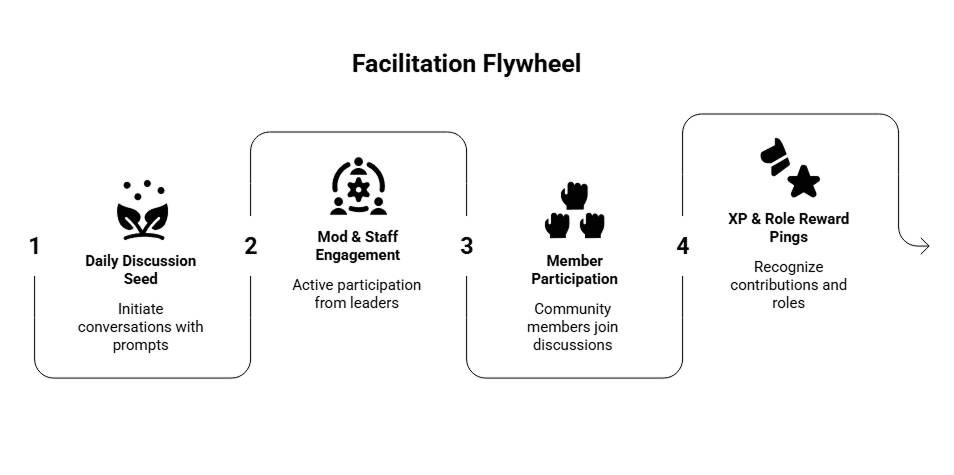
Building momentum relies on establishing a repeatable operational framework called the Facilitation Flywheel. This flywheel operates on a four-stage continuous loop: daily topic seeding, staff and moderator engagement, open member participation, and public role-based gamification rewards.
When executing this framework, your goal is to reduce the cognitive effort required for a member to type a response. Instead of forcing users to invent new topics, you provide structured conversational prompts that naturally draw out personal opinions, experiences, and banter.
By aligning your moderation team around active facilitation shifts and maintaining predictable engagement touchpoints, you build an environment where online members feel compelled to check the app multiple times a day. If you want to streamline your platform workflows further, checking out the official Sizzle Social Tutorials offers practical walkthroughs on digital community management.
What Makes Members Want To Participate
People talk when they feel seen, valued, and entertained. Nobody joins a community just to read announcements from an admin; they join to connect with humans who share their passions.
To make members want to participate, adopt proactive moderation and facilitation strategies:
- Give quick responses: When a new person posts, ensure an admin or moderator replies within a few minutes. A fast initial response signals that the chat is alive and responsive.
- Ask open questions: Instead of posting dead-end statements, phrase messages to encourage responses. Replace “Great win today!” with “What was the most clutch play in today’s match?”
- Acknowledge contributions: Highlight cool art, good takes, or helpful answers given by members. Pin outstanding community contributions to the channel or feature them in weekly roundups.
Transforming conversation quality requires replacing closed statements with open prompts:
| Closed Statement (Kills Chat) | Open Facilitation (Sparks Discussion) |
| “New update dropped today.” | “The new update just dropped! What is the first feature you are testing?” |
| “Welcome to the server @User.” | “Welcome @User! What game are you sinking the most hours into this week?” |
| “Thanks for sharing your art.” | “This design is awesome @User! How long did it take you to finish the shading?” |
In addition to open facilitation phrases, implement a “Staff Mentor” system where moderators are explicitly tasked with replying to unanswered posts within 5 minutes, ensuring zero messages go ignored during peak activity hours.
How Daily Prompts Restart Conversations

Spontaneous chatter can be rare in small communities. Daily prompts give everyone a simple, low-pressure reason to type something in chat.
You do not need complicated topics. Simple, debate-worthy questions work best because they require zero technical expertise to answer:
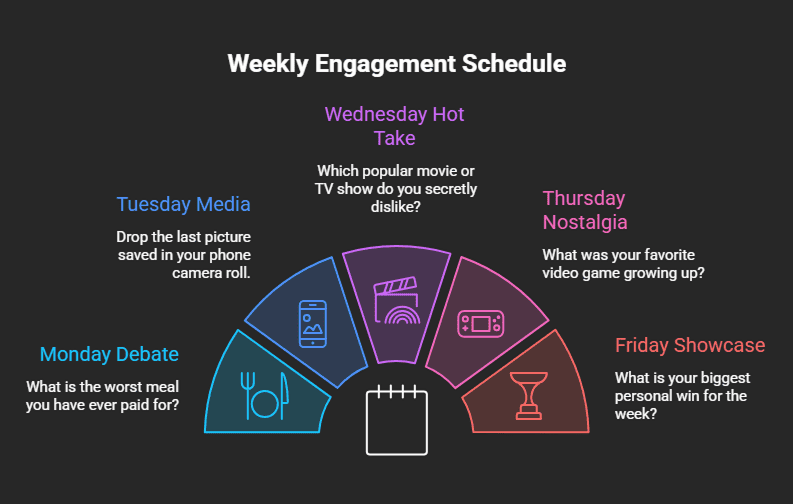
Automated bots (such as Carl-bot, Dyno, or YAGPDB) can post these questions every morning on a scheduled timer. To ensure the prompt sparks activity, staff members must post the first 2–3 answers immediately after the bot message appears. Once new members see moderators having fun in the replies, they feel comfortable jumping in.
To maximize daily prompt engagement across time zones:
- Schedule for Peak Hours: Trigger prompts during regional lunch hours or early evening relaxation windows (e.g., 12:00 PM or 7:00 PM WAT/UTC).
- Incorporate Visual Media: Attach funny GIFs or meme templates to daily prompt messages to increase visual appeal in the channel feed.
- Pin Daily Prompts: Keep the active daily prompt pinned at the top of #general-chat for 24 hours so late-logging members can easily find and answer it.
Why Events Give Members A Reason To Return
Events create fixed points on the calendar that force members to pay attention. A casual server with no scheduled activities relies entirely on luck for chatter.
Organize simple, recurring weekly events that do not require heavy preparation:
- Voice Chat Game Nights: Host free, accessible browser games like Skribbl.io, Gartic Phone, Among Us, or Jackbox Party Packs where anyone can join without downloading huge files.
- Watch Parties: Stream YouTube mini-documentaries, anime episodes, or sports match highlights in a voice or video channel using Discord’s native screenshare or Activity apps.
- Stage Q&A Sessions: Host short live audio discussions around a specific niche topic, interviewing a guest speaker or featuring community members.
Promote events at least 48 hours in advance using Discord’s native Events tab. According to internal Discord platform usage analytics, communities that consistently schedule weekly events experience a 35% higher returning user rate than servers relying solely on unstructured text chat. Automated push notifications sent by the Events tool bring inactive members back into the server right when live interaction begins.
How Roles Can Encourage Community Participation

Roles are more than just colored tags next to a username; they are rewards that mark status, reputation, and belonging inside your space.
Set up leveling bots (like MEE6, Arcane, or AmariBot) that automatically grant custom roles as members send text messages and hang out in voice channels.
Data from MEE6 bot installations;active on over 21 million Discord servers;shows that gamified XP role systems increase overall text message volume by up to 40% among core users. Create unique, fun role names that directly reflect your community’s theme.
Enhance your role system with functional perks:
- Cosmetic Customization: Allow active levels to unlock vibrant username colors and custom server icons.
- Exclusive Access: Lock private VIP channels, early-access content, or special giveaway entries behind level milestones.
- Interest Ping Roles: Implement self-assignable roles (e.g., @GameNight, @TechTalk, @Giveaway) via reaction buttons so members can opt into specific notifications without receiving unwanted server pings.
- Leaderboard Recognition: Post a weekly “Top 5 Chatters” leaderboard announcement every Sunday, granting the top user a temporary “Chat Champion” badge and role permissions.
How to Revive A Quiet Discord Community
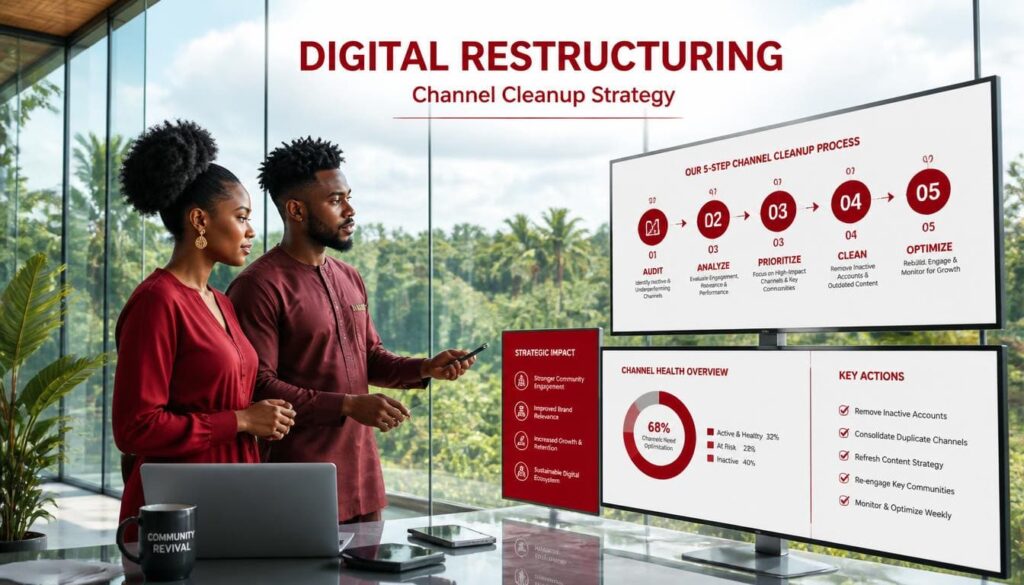
If your server has been dead for weeks or months, trying to revive it without a clear strategy will leave you exhausted. Here is the step-by-step framework to bring life back to your digital space.
Reviving a silent community is fundamentally different from launching a brand-new one. In an inactive server, you are fighting against established negative momentum; existing members have already formed the habit of ignoring your icon. If you send an @everyone ping in a messy, dead server without prior cleanup, members will simply leave or mute the group permanently.
A successful turnaround requires an organized four-phase strategy: audit, clean, seed, and boost. When executing a strategy to revive a quiet Discord community, you must systematically remove digital clutter, optimize channel accessibility, seed fresh conversation threads, and inject fresh, enthusiastic members into your general chat. This multi-step process disrupts the pattern of silence and creates an immediate impression of vibrant growth.
By combining internal server cleanup with targeted external growth solutions, you create the critical mass necessary to convert lurking accounts into active daily participants.
How to Identify Your Inactive Members
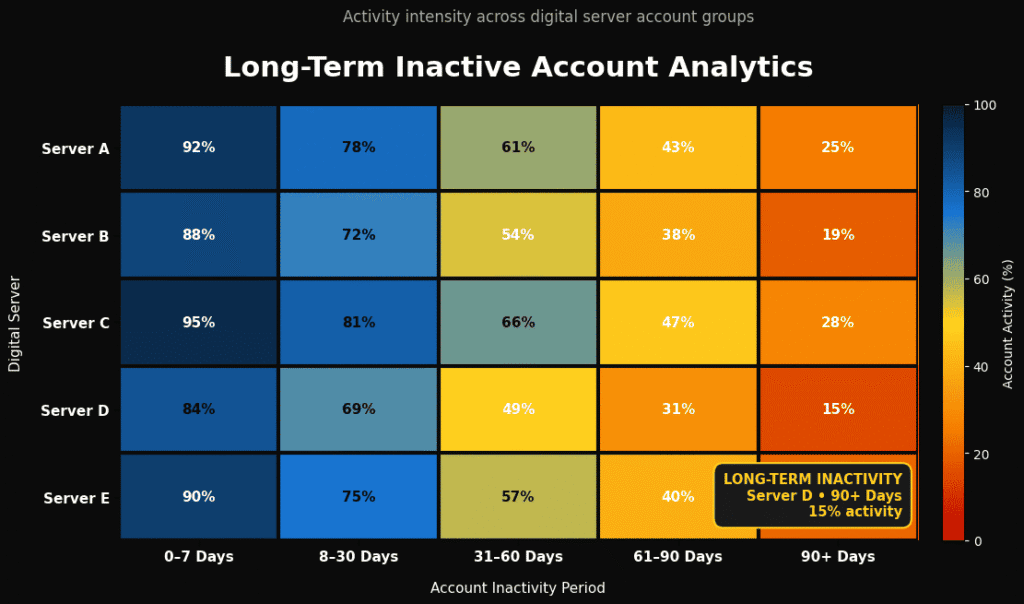
Before launching a comeback strategy, inspect your current member list. Look at your total member count versus your daily online count.
Use Discord’s built-in Prune tool (found under Server Settings > Members) to evaluate inactive Discord members. The Prune tool shows exactly how many members have not logged in or posted in over 7, 30, or 90 days and do not possess assigned roles.
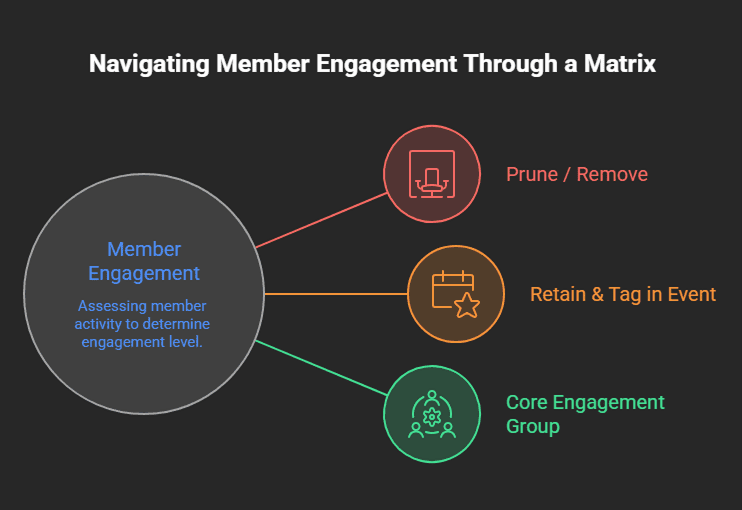
Pruning long-dead, unverified accounts cleanses your server analytics and improves your ratio of online-to-total members. A server displaying 80 online out of 150 total members looks significantly healthier and more attractive to newcomers than a server showing 80 online out of 5,000 ghost members.
Key actions for account auditing include:
- Prune zero-role ghosts: Safely prune accounts that have been inactive for over 30 days without custom roles.
- Identify dormant veterans: Re-engage inactive users who hold leveled roles by tagging their interest roles during server revival announcements.
- Audit bot accounts: Remove outdated, offline, or redundant utility bots that clutter the online member sidebar.
What To Change Before Inviting More People
Never invite new people into an unorganized, quiet server. Fix the room before inviting guests back inside.
Execute this 3-step pre-launch checklist:
- Delete Empty Channels: Merge dead channels into one or two main text hubs (#general-chat and #media-and-memes). Hide empty categories from public view.
- Refresh Your Welcome Message: Make your welcome channel short, friendly, and actionable. Include a 3-step quick-start guide and tag key channels.
- Set Up Conversation Starters: Post 3–5 interesting, open-ended topics or polls in your main chat before starting promotional campaigns, ensuring new visitors walk into an active screen.
Additionally, update your server visual identity; upload a crisp icon, set up professional channel banners, and polish role colors to signal to returning members that a brand-new era has begun.
Step 1: Find Discord Promotion Options On Sizzle Social
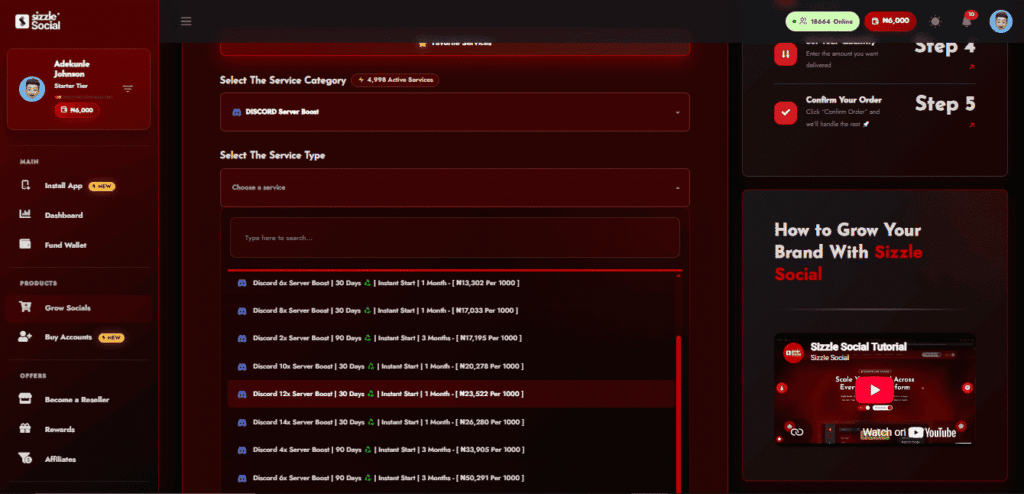
Once your server structure is clean and ready, you need a fresh stream of active interest to kickstart momentum. Adding new blood is often the spark that gets old members chatting again.
Visit Sizzle Social, Nigeria’s premier social media growth and promotion platform. Navigate to the SMM Panel section and explore the dedicated Discord growth services via their Discord SMM Panel offering. Leveraging professional Discord SMM panel promotion provides immediate social proof, inflating your visible online baseline and attracting organic users.
Sizzle Social provides fast, reliable, and affordable promotional tools designed to boost your server visibility, inflate your active member baseline, and draw engaged users to your community. To explore their complete ecosystem of promotional options across multiple networks, you can browse the main SMM Panel directory.
Why server owners choose Sizzle Social for growth campaigns:
- Localized payment processing: Fund your dashboard balance instantly using debit cards, Nigerian bank transfers, or USSD codes.
- Rapid order execution: Member packages begin processing shortly after submission, providing swift numerical boosts.
- Scalable growth tiers: Select package sizes tailored to your exact budget and server expansion goals.
Step 2: Choose A Service That Fits Your Community
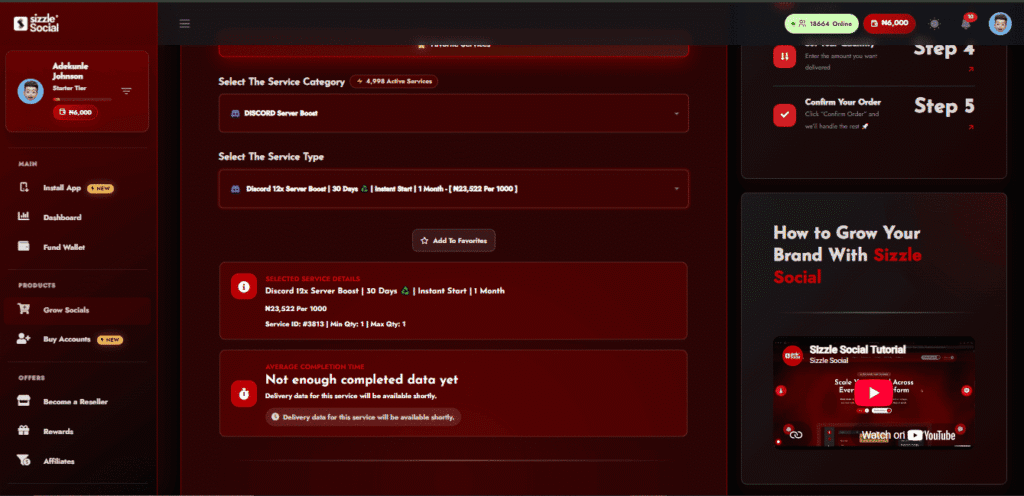
Inside the Sizzle Social dashboard, compare the available Discord promotion packages. Select a service option that aligns with your current goals, whether you need a sudden surge of members to build immediate social proof or steady community growth over time.
Before placing your order, verify your server’s technical settings:
- Invite Link Expiration: Ensure your server invite link is set to “Expire After: Never” and “Max Number of Uses: No Limit”.
- Channel Permissions: Ensure @everyone has permissions to view channels and send messages in your primary lounge hub.
- Verification Level: Temporarily set your Discord Verification Level to “Low” or “Medium” so new joins can chat immediately without SMS lockouts.
Taking time to adjust these parameters prevents order delivery failures and ensures incoming members enter your server seamlessly.
Step 3: Place Your Order And Monitor Activity
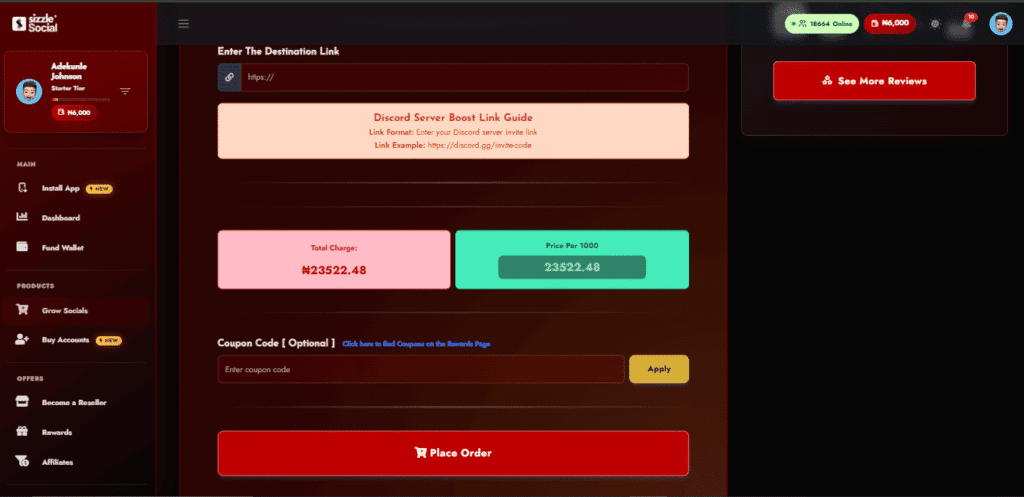
Submit your server invite link on Sizzle Social, choose your desired quantity, and confirm your order. Wallet funding is fast and seamless using local payment options, bank transfers, USSD, or cards.
As your order processes and fresh accounts land in your server, execute your immediate greeting plan:
- Be Present in Chat: Sit in the general lounge as members arrive to offer personal welcomes.
- Launch a Live Daily Prompt: Ping your main discussion role or post an engaging poll right as the member count rises.
- Host an On-the-Spot Mini-Event: Fire up a voice channel or stream a casual game to give incoming members an instant reason to stay online.
Monitoring your order progress in real time allows staff members to coordinate active greeting shifts during peak delivery periods, converting raw member volume into active daily conversation.
How to Keep Discord Members Active
Bringing members into your server is only half the battle. Long-term activity depends on retention, moderation, and consistent engagement habits.
Community retention is an ongoing operational commitment. Sustainable Discord server engagement requires constant care, attentive staff hosts, clear behavioral boundaries, and an environment where members feel recognized. By establishing predictable event cycles and monitoring analytical health indicators, you convert casual visitors into long-term community regulars.
Operating a high-retention Discord server requires transitioning from passive moderation to active community leadership. When your community members build meaningful relationships within your channels, your server becomes a routine daily destination.
For creators and managers looking to scale presence across other channels alongside Discord, reviewing the dedicated social growth platform tools can streamline multi-platform visibility.
What Engagement Signals Should You Track
To know if your server is healthy, keep an eye on key metrics inside your Server Insights tab (available for communities with Community features enabled):
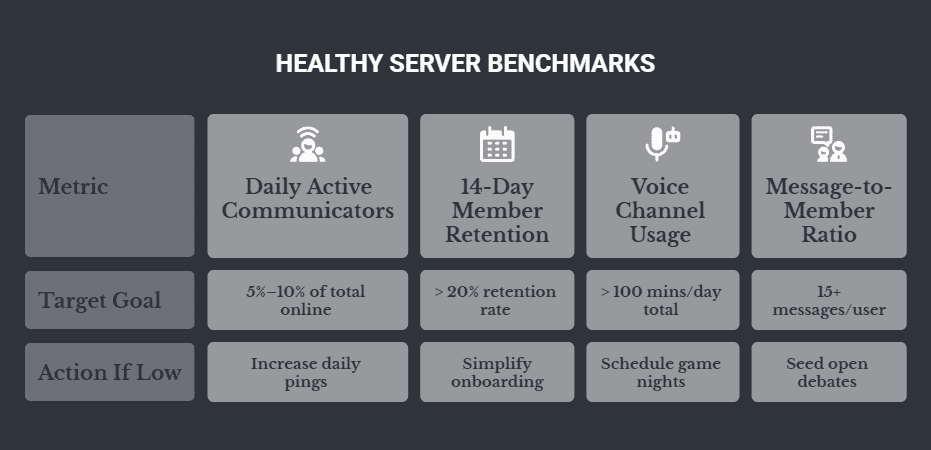
If your total member count increases while your daily communicators stagnate at three users, your onboarding and daily facilitation strategies require immediate adjustment.
Key engagement metrics to log weekly:
- Daily Active Communicators (DAC): The number of unique members who send at least one text message per day.
- New Member Retention: The percentage of new arrivals who return to send a message 14 days after joining.
- Voice Activity Duration: Total aggregate minutes spent by members in voice channels weekly.
Why Member Retention Matters For Activity
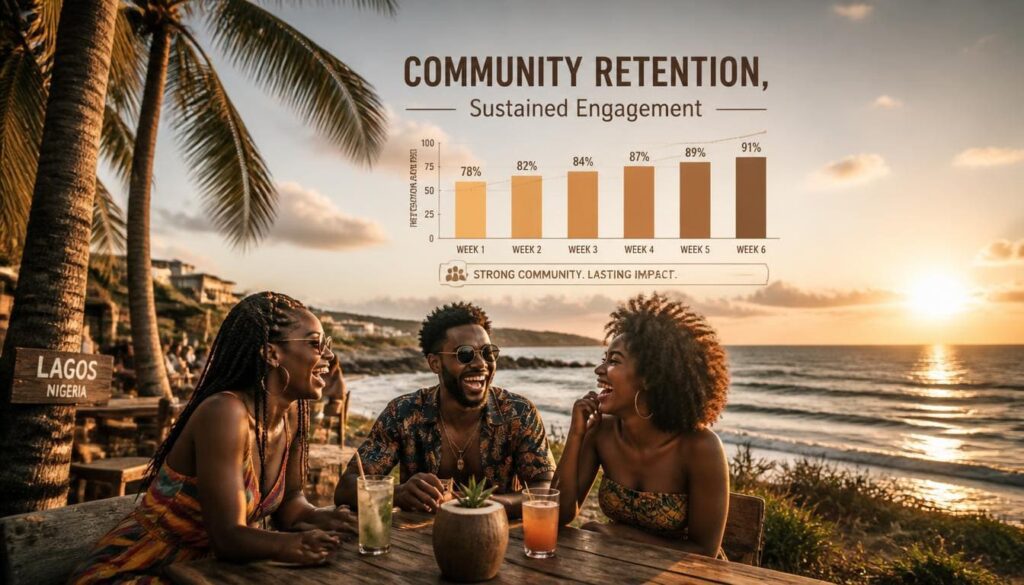
Getting 1,000 people to join does not help if 990 leave or mute the server within two days.
High member turnover drains staff energy and demoralizes your active core.
Focusing on retention means making every member feel like part of an exclusive club. When people form real friendships inside your server, they open Discord specifically to talk to those friends;keeping your online numbers naturally high without constant promotional pings.
Here’s how you boost long-term retention:
- Build Sub-Groups: Encourage micro-communities around specific games or hobbies using opt-in roles.
- Reward Loyalty: Create special milestone roles for members celebrating 6-month or 1-year anniversaries in your server.
- Recognize Helpful Members: Give active users helper tags so they feel empowered to answer questions from newcomers.
- Host Community Spotlights: Regularly interview outstanding community members in dedicated stage events or newsletter posts.
How to Balance Growth With Engagement
Rapid growth without structural guardrails inevitably causes operational chaos. When hundreds of new users or community members join a platform at once, long-standing participants often feel overwhelmed, lose their sense of belonging, and pull back from active discussions. Balancing aggressive scaling with deep, meaningful engagement requires implementing structured rules and proactive community management frameworks:
- Schedule Moderator Shifts: Assign active moderators to greet new arrivals in structured shifts during major promotion campaigns, ensuring that every newcomer feels welcomed and guided.
- Maintain Central Focus: Keep discussions tightly focused on your core community theme during high-traffic growth periods before opening secondary rooms or distracting off-topic channels.
- Utilize Self-Roles: Implement reaction roles so members can opt into specific topics of interest without cluttering the primary general chat with overwhelming notifications.
- Establish Clear Onboarding Guidelines: Create automated welcome flows that educate new members on community values, rules, and best practices right from their first login, preventing friction before it starts.
- Reward Genuine Contributions: Highlight active members who consistently answer questions or help newcomers, transforming casual participants into loyal community advocates.
When To Adjust Your Discord Strategy
No community strategy lasts forever, and what worked when your server had fifty members will inevitably stall as you scale past five hundred. Recognizing the inflection point for a strategic pivot is crucial for maintaining server health and long-term engagement.
If you notice a consistent drop in daily interactions or member retention for two straight weeks, it is time to execute a comprehensive strategy refresh:
- Test New Event Formats: Shift away from stale or low-turnout activities by swapping text-only trivia for interactive voice chat game nights or live stream watch parties.
- Run an Anonymous Survey: Gather direct, unfiltered feedback from your core members to identify which channels they actually read, what events they enjoy, and why they hesitate to participate in public chats.
- Re-Brand Visual Layouts: Refresh your server icon, channel header banners, custom role colors, and emoji sets to give the entire digital space a clean, modernized, and exciting feel.
- Re-Evaluate Channel Structure: Merge slow-moving, fragmented topic channels back into central lounge hubs to restore visible chat density and make the server feel active at a glance.
Is Your Discord Community Quiet For A Reason?
Low online activity in a Discord community is rarely caused by a single issue. It is usually a combination of small bottlenecks: confusing onboarding steps, overcrowded channel lists, weak conversation triggers, poor member retention, or simply a lack of reasons for people to log back in.
Before you burn out trying to completely redesign your server or throw random changes at the wall, take a step back and diagnose your specific bottleneck using an operational workflow.
To permanently fix a low online member count and transform your quiet room into a self-sustaining digital hub, execute an action plan focused on streamlining channel architecture and creating proactive engagement habits.
Ready to turn your inactive server into a vibrant, high-energy community? Take control of your community growth today; visit Sizzle Social to secure active engagement packages and scale your platform authority!
Frequently Asked Questions
A dead server rarely happens by accident. Most server owners assume people are just busy, but the truth usually sits inside the server layout, welcome setup, or conversation habits. When you see five hundred total members but only eight marked online and zero chatting, you are experiencing a breakdown in community momentum. Digital spaces thrive on psychological social proof. When someone logs into Discord, their eyes naturally scan for activity indicators such as green online status dots, active typing indicators, and fresh timestamps in main channels. If those signals are absent, a user subconsciously decides that nothing is happening here and moves on to an active community. Platform benchmark data shows that the average daily active user to monthly active user ratio across top social communities hovers around twelve to twenty percent. When a quiet Discord community drops below a two percent daily active ratio, it enters an operational tailspin. Low online member counts stem from a structural mismatch between member expectations and actual server realities. People join servers with excitement, wanting entertainment, real time connection, networking, or exclusive insights. If the server fails to capture that initial spark within their first few minutes, the user silences notifications, collapses the server icon into an archive folder, or forgets it exists entirely.
When someone clicks your invite link, they give you about ten seconds of their attention. If they do not immediately see where to jump in, they pull back. Many new members experience what community builders call first message anxiety. Walking into a chat with total strangers feels like stepping into a crowded party where everyone already has an inside joke. If nobody greets them personally or gives them an easy topic to talk about, they mute the server and never speak. They joined because your topic interested them, but they stayed quiet because the environment felt cold or intimidating. Classic digital interaction research from Jakob Nielsen introduced the ninety nine one rule of participation inequality, which states that in typical online communities, ninety percent of users are lurkers who never contribute, nine percent contribute occasionally, and only one percent account for almost all active posting. However, modern community benchmark studies from Grazitti Interactive reveal that structured communities using active facilitation, gamification, and low barrier entry points can increase active participation to over seventy six percent. When a new user types a message and receives no reply for three hours, they experience digital rejection. They will rarely attempt to speak a second time. To combat first message anxiety, server owners must implement an immediate engagement system where moderators, active regulars, or automated welcome triggers instantly acknowledge every new arrival with an easy conversation starter.
Creating fifty channels for a server with twenty active people is a quick way to kill conversation. You might think having separate channels for gaming, anime, music, food, pets, tech, and fitness makes your space look professional. In reality, it spreads your few active messages so thin that every single channel looks abandoned. When a user sees thirty text channels and each one has a last message sent three days ago, they assume the whole community is dead. One lively general chat is always better than ten silent niche channels. Consider the simple mathematics of community activity. If your server generates fifty messages per day and you spread them across twenty five channels, each channel receives an average of two messages per day. To an outside observer, every room feels abandoned. However, if those same fifty messages are concentrated into a single general chat hub, that channel feels continuous, lively, and worth joining. To streamline your server channel layout effectively, consolidate similar categories by merging memes, food, and pets into a single media lounge channel to build unified conversation volume. Hide inactive channels and archive specialized topic rooms until your daily active message count exceeds five hundred messages per day across core hubs. Implement temporary threads to encourage members to create threads for niche topics rather than cluttering the permanent sidebar with empty channels. Set channel posting thresholds so that if a specialized channel falls below fifteen messages per week, it is instantly merged back into the primary general room.
Imagine arriving at a venue and being forced to read a twenty page contract, click five verification buttons, and guess which door leads to the party. That is what bad onboarding feels like. If new members are met with wall of text rules, broken reaction roles, or locked channels that require mysterious steps to open, they will close the app. If your welcome process feels like an entrance examination instead of a warm greeting, people will abandon the server before sending a single word. Excessive friction at entry is the leading cause of immediate user drop off. UX industry standards demonstrate that every extra step added to an onboarding sequence causes a twenty to thirty percent drop in user conversion. Common onboarding mistakes include reaction role overload, where new users must pick from forty different color and interest roles before unlocking basic text channels. Aggressive bot verification requires multi step CAPTCHA challenges or external account links that fail on mobile devices. Unclear next steps drop users into a read only rules channel with zero guidance on where the main conversation is happening. Delayed channel access forces new joins to wait through mandatory ten minute read only timer delays before permitting their first greeting message. To optimize your onboarding, implement Discord’s native community onboarding tools. Ask no more than two or three simple setup questions, auto assign essential roles, and immediately redirect the user to your active general chat with an open question ready to answer.
People leave their notifications turned off for most servers. If nothing brings them back during their first forty eight hours, your server drops to the bottom of their sidebar, buried under dozens of other communities. Members stop returning when a server lacks momentum. If there are no recurring discussions, no active hosts, and no clear reasons to open the app, your server becomes just another icon on a long list of muted groups. The critical window for member retention is the first forty eight hours post join. Research highlighted by CMX Hub community benchmarks emphasizes that long term community retention hinges on early habit formation. Classic business analytics from Bain and Company demonstrate that increasing customer or community retention rates by just five percent boosts overall long term engagement and value by twenty five to ninety five percent. To guarantee return visits, community managers must establish structural hooks. Scheduled daily beats publish consistent morning prompts, daily polls, or feature posts at predictable times to create a reliable daily routine. Ping worthy announcements use here tags sparingly for genuinely exciting events, free giveaways, or live discussions rather than administrative updates. Direct social mentions work when a discussion touches on a topic a new member mentioned in their introduction, tagging them back into the chat. Reward early milestones by triggering automated twenty four hour check in bot messages praising new members for completing their first profile customization or sending their initial five messages.
Turning a quiet group into an active room requires structure and intention. You cannot just wait for members to start talking on their own. You must build an environment that invites participation. Server activity is engineered, not accidental. Successful Discord administrators do not sit back hoping that hundreds of random strangers will magically entertain one another. Instead, they act as community facilitators, setting up topic seeds, staging interactive events, encouraging regular contributors, and removing conversation blockers. When you proactively increase Discord server activity, you shift your server’s trajectory from passive lurking to organic user generated dialogue. Building momentum relies on establishing a repeatable operational framework called the facilitation flywheel. This flywheel operates on a four stage continuous loop: daily topic seeding, staff and moderator engagement, open member participation, and public role based gamification rewards. When executing this framework, your goal is to reduce the cognitive effort required for a member to type a response. Instead of forcing users to invent new topics, you provide structured conversational prompts that naturally draw out personal opinions, experiences, and banter. By aligning your moderation team around active facilitation shifts and maintaining predictable engagement touchpoints, you build an environment where online members feel compelled to check the app multiple times a day.
People talk when they feel seen, valued, and entertained. Nobody joins a community just to read announcements from an admin. They join to connect with humans who share their passions. To make members want to participate, adopt proactive moderation and facilitation strategies. Give quick responses so that when a new person posts, an admin or moderator replies within a few minutes. A fast initial response signals that the chat is alive and responsive. Ask open questions instead of posting dead end statements. Replace great win today with a question such as what was the most clutch play in today’s match. Acknowledge contributions by highlighting cool art, good takes, or helpful answers given by members. Pin outstanding community contributions to the channel or feature them in weekly roundups. Transforming conversation quality requires replacing closed statements with open prompts. Instead of saying a new update dropped today, say the new update just dropped and ask what the first feature members are testing. Instead of a plain welcome message, welcome the user and ask what game they are sinking the most hours into this week. Instead of thanking someone for sharing art, compliment the design and ask how long it took to finish the shading. In addition to open facilitation phrases, implement a staff mentor system where moderators are explicitly tasked with replying to unanswered posts within five minutes, ensuring zero messages go ignored during peak activity hours.
Spontaneous chatter can be rare in small communities. Daily prompts give everyone a simple, low pressure reason to type something in chat. You do not need complicated topics. Simple, debate worthy questions work best because they require zero technical expertise to answer. A Monday debate could ask what the worst meal members have ever paid for. A Tuesday media prompt could ask members to drop the last picture saved in their phone camera roll. A Wednesday hot take could ask which popular movie or TV show they secretly dislike. A Thursday nostalgia prompt could ask what their favorite video game was growing up. A Friday showcase could ask what their biggest personal win for the week is. Automated bots such as Carl bot, Dyno, or YAGPDB can post these questions every morning on a scheduled timer. To ensure the prompt sparks activity, staff members must post the first two or three answers immediately after the bot message appears. Once new members see moderators having fun in the replies, they feel comfortable jumping in. To maximize daily prompt engagement across time zones, schedule for peak hours by triggering prompts during regional lunch hours or early evening relaxation windows such as noon or seven in the evening West Africa Time. Incorporate visual media by attaching funny GIFs or meme templates to daily prompt messages. Pin daily prompts and keep the active prompt pinned at the top of general chat for twenty four hours so late logging members can easily find and answer it.
Events create fixed points on the calendar that force members to pay attention. A casual server with no scheduled activities relies entirely on luck for chatter. Organize simple, recurring weekly events that do not require heavy preparation. Voice chat game nights can host free, accessible browser games like Skribbl io, Gartic Phone, Among Us, or Jackbox Party Packs where anyone can join without downloading huge files. Watch parties can stream YouTube mini documentaries, anime episodes, or sports match highlights in a voice or video channel using Discord’s native screenshare or activity apps. Stage question and answer sessions by hosting short live audio discussions around a specific niche topic, interviewing a guest speaker or featuring community members. Promote events at least forty eight hours in advance using Discord’s native events tab. According to internal Discord platform usage analytics, communities that consistently schedule weekly events experience a thirty five percent higher returning user rate than servers relying solely on unstructured text chat. Automated push notifications sent by the events tool bring inactive members back into the server right when live interaction begins. For server owners who want to complement these organic efforts with structured promotion, Sizzle Social offers Discord growth services that help inflate visible activity and attract new members during event launches.
Roles are more than just colored tags next to a username. They are rewards that mark status, reputation, and belonging inside your space. Set up leveling bots like MEE6, Arcane, or AmariBot that automatically grant custom roles as members send text messages and hang out in voice channels. Data from MEE6 bot installations, active on over twenty one million Discord servers, shows that gamified experience role systems increase overall text message volume by up to forty percent among core users. Create unique, fun role names that directly reflect your community’s theme. Enhance your role system with functional perks. Cosmetic customization allows active levels to unlock vibrant username colors and custom server icons. Exclusive access locks private VIP channels, early access content, or special giveaway entries behind level milestones. Interest ping roles let members implement self assignable roles such as game night, tech talk, or giveaway via reaction buttons so they can opt into specific notifications without receiving unwanted server pings. Leaderboard recognition posts a weekly top five chatters leaderboard announcement every Sunday, granting the top user a temporary chat champion badge and role permissions. When combined with daily facilitation and consistent events, a well designed role system transforms passive lurkers into active participants who check the server regularly to maintain their status and unlock new perks.
If your server has been dead for weeks or months, trying to revive it without a clear strategy will leave you exhausted. Reviving a silent community is fundamentally different from launching a brand new one. In an inactive server, you are fighting against established negative momentum. Existing members have already formed the habit of ignoring your icon. If you send an everyone ping in a messy, dead server without prior cleanup, members will simply leave or mute the group permanently. A successful turnaround requires an organized four phase strategy: audit, clean, seed, and boost. When executing a strategy to revive a quiet Discord community, you must systematically remove digital clutter, optimize channel accessibility, seed fresh conversation threads, and inject fresh, enthusiastic members into your general chat. This multi step process disrupts the pattern of silence and creates an immediate impression of vibrant growth. By combining internal server cleanup with targeted external growth solutions, you create the critical mass necessary to convert lurking accounts into active daily participants. Many server owners use Sizzle Social to handle the boost phase, since the platform provides reliable Discord promotion packages that deliver visible member activity while internal cleanup and conversation seeding are completed.
Before launching a comeback strategy, inspect your current member list. Look at your total member count versus your daily online count. Use Discord’s built in prune tool, found under server settings and members, to evaluate inactive Discord members. The prune tool shows exactly how many members have not logged in or posted in over seven, thirty, or ninety days and do not possess assigned roles. Pruning long dead, unverified accounts cleanses your server analytics and improves your ratio of online to total members. A server displaying eighty online out of one hundred fifty total members looks significantly healthier and more attractive to newcomers than a server showing eighty online out of five thousand ghost members. Key actions for account auditing include pruning zero role ghosts safely by removing accounts that have been inactive for over thirty days without custom roles. Identify dormant veterans by re engaging inactive users who hold leveled roles, tagging their interest roles during server revival announcements. Audit bot accounts by removing outdated, offline, or redundant utility bots that clutter the online member sidebar. After pruning, never invite new people into an unorganized, quiet server. Fix the room before inviting guests back inside by deleting empty channels, merging dead channels into one or two main text hubs, refreshing your welcome message with a short three step quick start guide, and posting three to five interesting open ended topics or polls in your main chat before starting promotional campaigns.
Once your server structure is clean and ready, you need a fresh stream of active interest to kickstart momentum. Adding new blood is often the spark that gets old members chatting again. Visit Sizzle Social, a leading social media growth and promotion platform, and navigate to the SMM panel section to explore dedicated Discord growth services through their Discord SMM panel offering. Leveraging professional Discord SMM panel promotion provides immediate social proof, inflating your visible online baseline and attracting organic users. Sizzle Social provides fast, reliable, and affordable promotional tools designed to boost your server visibility, inflate your active member baseline, and draw engaged users to your community. Server owners choose Sizzle Social for growth campaigns because of localized payment processing, which allows funding your dashboard balance instantly using debit cards, Nigerian bank transfers, or USSD codes. Rapid order execution means member packages begin processing shortly after submission, providing swift numerical boosts. Scalable growth tiers let you select package sizes tailored to your exact budget and server expansion goals. Before placing your order, verify your server’s technical settings. Ensure your server invite link is set to expire after never and max number of uses no limit. Ensure everyone has permissions to view channels and send messages in your primary lounge hub. Temporarily set your Discord verification level to low or medium so new joins can chat immediately without SMS lockouts. Taking time to adjust these parameters prevents order delivery failures.
To know if your server is healthy, keep an eye on key metrics inside your server insights tab, available for communities with community features enabled. If your total member count increases while your daily communicators stagnate at three users, your onboarding and daily facilitation strategies require immediate adjustment. Key engagement metrics to log weekly include daily active communicators, which is the number of unique members who send at least one text message per day. New member retention measures the percentage of new arrivals who return to send a message fourteen days after joining. Voice activity duration tracks total aggregate minutes spent by members in voice channels weekly. The message to member ratio should reach fifteen or more messages per user. Healthy server benchmarks suggest that daily active communicators should represent five to ten percent of total online members. If this number is low, increase daily pings and facilitation prompts. The fourteen day member retention rate should stay above twenty percent. If it is low, simplify onboarding. Voice channel usage should exceed one hundred minutes per day in total. If it is low, schedule more game nights and watch parties. Tracking these signals allows you to adjust your strategy before small problems become permanent silence. Sizzle Social also provides resources and promotional support that can help server owners maintain steady growth while they focus on improving these internal engagement metrics.
Rapid growth without structural guardrails inevitably causes operational chaos. When hundreds of new users or community members join a platform at once, long standing participants often feel overwhelmed, lose their sense of belonging, and pull back from active discussions. Balancing aggressive scaling with deep, meaningful engagement requires implementing structured rules and proactive community management frameworks. Schedule moderator shifts by assigning active moderators to greet new arrivals in structured shifts during major promotion campaigns, ensuring that every newcomer feels welcomed and guided. Maintain central focus by keeping discussions tightly focused on your core community theme during high traffic growth periods before opening secondary rooms or distracting off topic channels. Utilize self roles so members can opt into specific topics of interest without cluttering the primary general chat with overwhelming notifications. Establish clear onboarding guidelines by creating automated welcome flows that educate new members on community values, rules, and best practices right from their first login, preventing friction before it starts. Reward genuine contributions by highlighting active members who consistently answer questions or help newcomers, transforming casual participants into loyal community advocates. No community strategy lasts forever, and what worked when your server had fifty members will inevitably stall as you scale past five hundred. If you notice a consistent drop in daily interactions or member retention for two straight weeks, it is time to execute a comprehensive strategy refresh. Test new event formats, run anonymous surveys, re brand visual layouts, and re evaluate channel structure. For server owners who want to combine organic community building with reliable promotional support, Sizzle Social offers tools and resources that help balance growth with authentic engagement.