
Table of contents
- Instagram SMM Panel Tutorial Nigeria: Getting Started on Sizzle Social From Scratch
- How to Buy Instagram Followers Using the SMM Panel
- SMM Panel Visual Guide in Nigeria: Creating Your Sizzle Social Account (Screenshot Walkthrough)
- Step-by-Step SMM Order Process: Funding Your Wallet and Placing Your First Instagram Order
- SMM Panel P ayment in Naira: How to Fund Your Sizzle Social Wallet (3 Methods)
- SMM Panel Registration Screenshots: Navigating to the New Order Page
- How to Fill Instagram Username Order Form: Completing the Order Details (Screenshot Guide)
- Safe Instagram Panel Usage Guide: Settings, Timing, and Habits That Protect Your Account
- Drip Feed Settings Screenshots: How to Select Safe Gradual Delivery on Sizzle Social
- Post Timing With Panel Boost: The Exact Window for Ordering After You Post
- Dashboard Navigation for Beginners: Every Page on Sizzle Social Explained
- SMM Panel Dashboard Walkthrough: The 6 Core Pages and What Each One Does
- Child Panel Reseller Guide: Using Sizzle Social as the Backend for Your Own SMM Business
- Results Tracking SMM Panels: How to Monitor, Measure, and Scale Your Instagram Growth
- How to Monitor Delivery Progress From Dashboard: Reading Your Order Status in Real Time
- ROI Tracking Instagram Growth: How to Calculate Whether Your Panel Investment Paid Off
- What separates growing creators from struggling ones on Instagram?
- Frequently Asked Questions
Posting consistently on Instagram in Nigeria and getting nothing back is a special kind of pain. The kind that makes you want to close the app and go watch Afrobeats videos instead which is exactly why many creators eventually look for a guide on How To Use an Instagram SMM Panel to bridge the gap between effort and results.
But here’s what changed everything for over 200,000 Nigerian creators, brands, and freelancers: It was just Understanding how the Instagram SMM panel works in Nigeria. Knowing how to use a panel gives you the edge most creators are quietly using but nobody talks about and this guide covers everything you’d need.
So what is an SMM panel, exactly? Think of it as a digital service store, one where you browse, fund, and order social media growth for your Instagram account in minutes, without surrendering your password or hiring an agency.
Whether you’re a Lagos-based fashion creator trying to grow your boutique’s page, a Kano small business owner pushing your brand on Instagram, or a freelancer building a social media reselling side hustle, this complete step-by-step SMM order process walkthrough is your roadmap.
We’re covering registration, wallet funding, placing your first order, account safety, and tracking results, all of it, start to finish.
Instagram SMM Panel Tutorial Nigeria: Getting Started on Sizzle Social From Scratch
Before any order, before any Naira leaves your wallet, before anything at all, there are exactly three things you need to use an Instagram SMM panel on Sizzle Social. And no, a degree in computer science is not one of them.
Your phone is fine. A ₦2,000 wallet top-up is more than enough to get started. Here’s what actually matters, because skipping any one of these will cost you time you don’t have.
How to Buy Instagram Followers Using the SMM Panel
Most beginners skip this prep stage and then wonder why their first order runs into issues. Don’t be that person. These three requirements take less than five minutes to sort, and they make everything else in this visual guide SMM panels Naija tutorial run without a hitch:
1. A free Sizzle Social account: Created at Sizzle Social using just your email address. No referral code required, no subscription fee, no card at registration. Your account is live and ready to use the moment you verify your email, that’s it. Sixty seconds total.
2. A funded Naira wallet: Sizzle Social runs on a pre-loaded wallet system. You deposit the Naira amount you plan to spend, and every service in the 1,000+ catalog is purchased directly from that balance. No per-order card charges, no surprise dollar conversions, no transaction fees stacked on top of each order. What you fund is what you use.
3. Your Instagram profile or post URL: This is the only account information Sizzle Social ever needs from you. For follower orders, copy your Instagram profile link. For post-level services (likes, saves, comments, Reel views), copy the direct URL to the specific post or Reel you want to boost. Your password never enters the picture, not at signup, not at checkout, not ever.
SMM Panel Visual Guide in Nigeria: Creating Your Sizzle Social Account (Screenshot Walkthrough)
Account creation on Sizzle Social is simpler than signing up for a Gmail account, but a lot of people overthink it. Here is the exact four-step process, follow it in order and you’ll land on your dashboard in under two minutes. As Sizzle Social’s own beginner walkthrough page shows, the platform is deliberately designed to remove technical barriers:
1. Go to SizzleSocial.ng: Open your browser, Chrome, Safari, Opera Mini, or whatever you use on your phone or laptop, and navigate to SizzleSocial.ng.
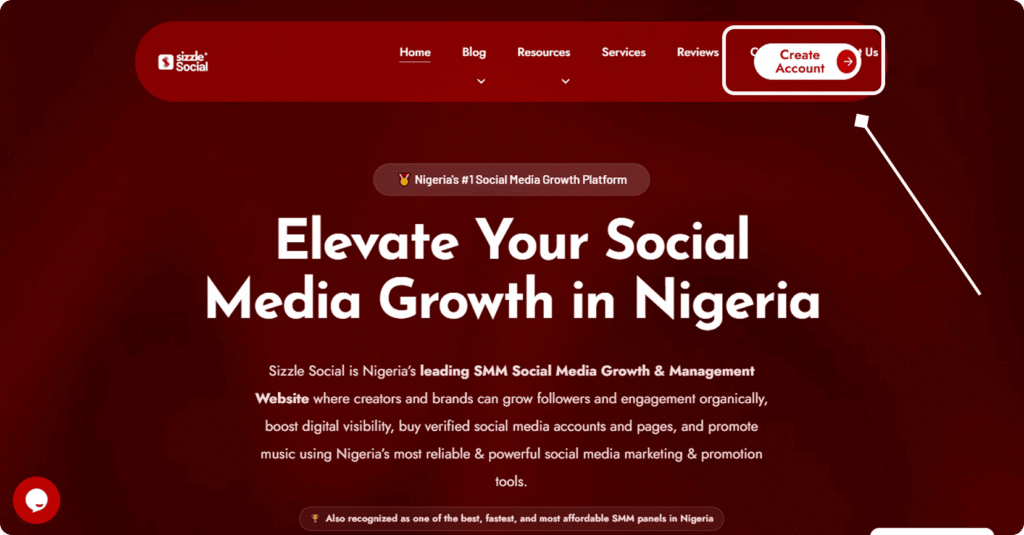
On the homepage, click the ‘Sign Up’ or ‘Register’ button in the top navigation bar. The registration form loads on the next page. Don’t overthink this part.
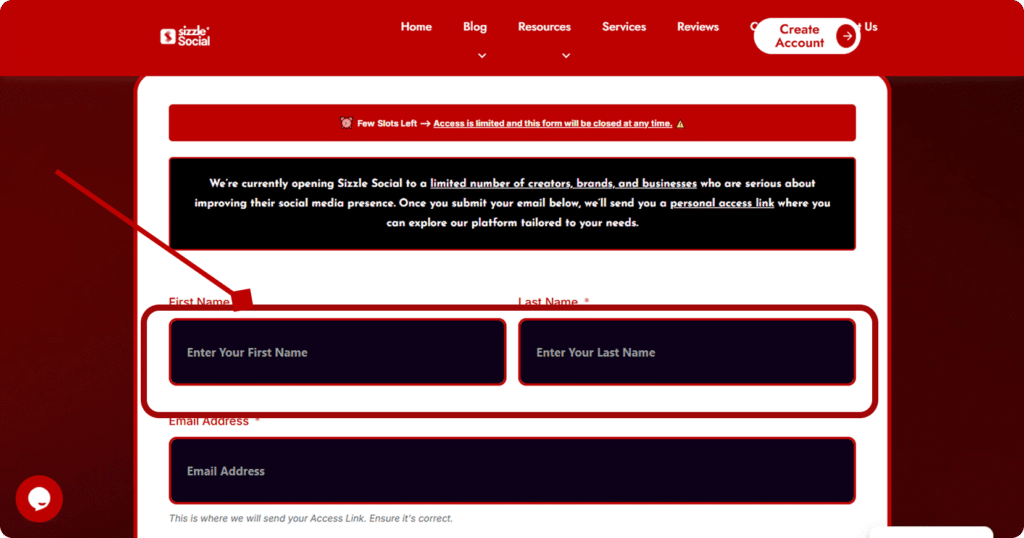
2. Fill in your registration details: Enter your full name, a valid email address, and a strong password. You do not need to provide your phone number, your Instagram login credentials, or any social media account details at this stage. Just click ‘Create Account’ when you’re done. Short, clean, no nonsense.
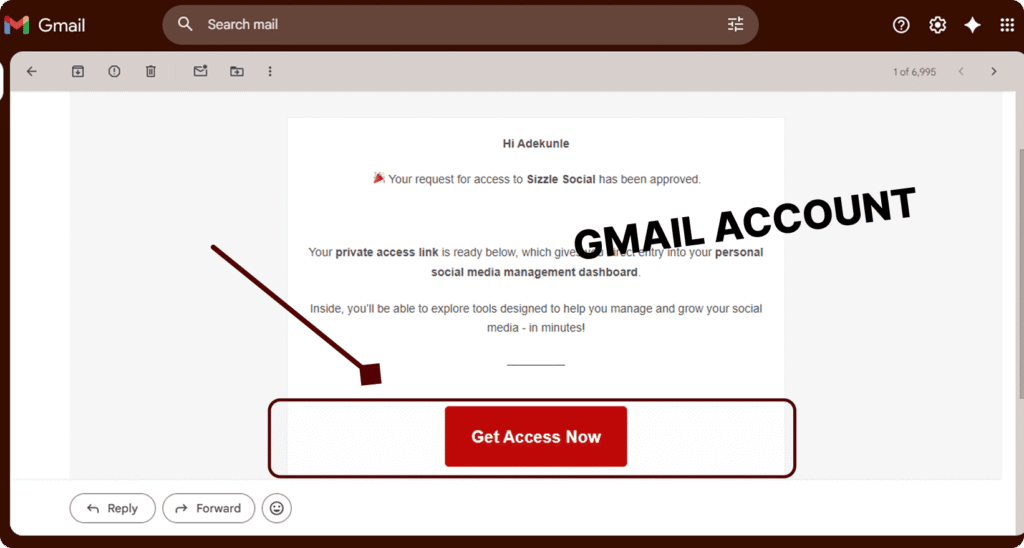
3. Verify your email address: Check your inbox for a verification message from Sizzle Social. Click the verification link inside the email. This activates your account and grants you access to the full dashboard. If the email isn’t in your inbox within 2 minutes, check your spam folder, it sometimes lands there, especially with MTN or Glo email addresses.
4. Log into your dashboard: Return to Sizzle Social and log in using the email and password you just registered with. You land directly on the main dashboard, your Instagram growth control center, where all the action happens.
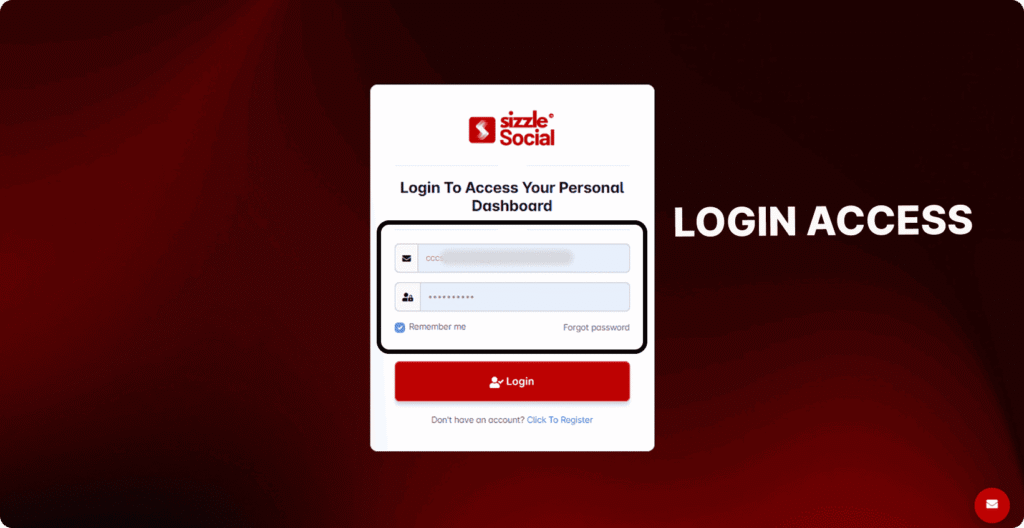
Once you hit ‘Create Account’, this is the registration form screen you’ll see, notice how clean and minimal it is. No unnecessary fields, no hidden requirements. Just your email and password:
Pro Tip: Use a real email address you check regularly, every order confirmation, delivery update, and 24/7 support reply is sent to your registered email. Missing a delivery notification because you used a throwaway address is avoidable wahala you don’t need.
Step-by-Step SMM Order Process: Funding Your Wallet and Placing Your First Instagram Order
This part is the heartbeat of the entire step-by-step SMM order process, and if you get this right the first time, everything else becomes automatic. Most first-time users get confused exactly here: they’ve registered, they’re looking at the dashboard, and then… paralysis because of too many options.
Not sure where to start. No stress. We’re walking through it field by field, step by step. As marketing consultant Neil Patel notes on his blog, SMM panel usage is most effective when users understand the platform mechanics before spending, and that’s exactly what this section is for.
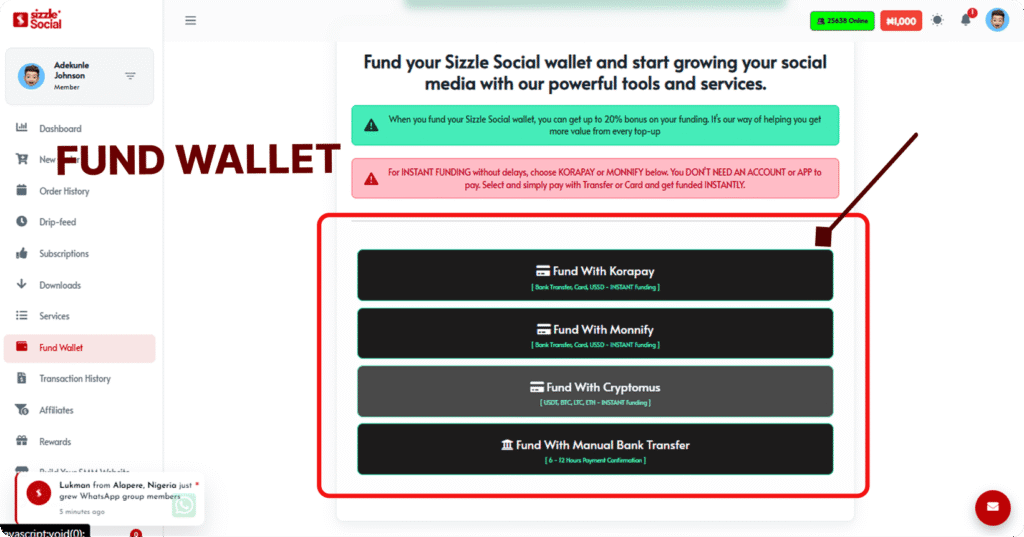
The Add Funds page is the first place you’ll go after registration. It’s straightforward, choose your payment method, enter your Naira amount, and your wallet credits within minutes. Here’s what that screen looks like:
SMM Panel Payment in Naira: How to Fund Your Sizzle Social Wallet (3 Methods)
Sizzle Social has three payment Naira SMM panels funding options; all built for the Nigerian market. No dollar accounts. No international payment drama. No exchange rate surprises. Here’s how each one works.
Bank Transfer. Click ‘Add Funds’ in your dashboard navigation, select ‘Bank Transfer’, enter the Naira amount you want to deposit, and complete the transfer from your Nigerian bank app or internet banking portal. GTBank, Access, Zenith, First Bank, all work seamlessly here.
Korapay: Click “Fund With Korapay” to instantly top up your wallet using bank transfer, or card, no app needed.
Monnify: Click “Fund With Monnify” to fund your wallet instantly via bank transfer or debit card, payment method.
Cryptomus: Click “Fund With Cryptomus” to fund your wallet instantly using USDT, Bitcoin, Litecoin, or Ethereum cryptocurrency payments.
SMM Panel Registration Screenshots: Navigating to the New Order Page
Wallet funded? Good. Now it’s time to actually place your first Instagram panel order. This is the SMM panel registration screenshots phase, where you go from user to active campaigner. Follow these steps exactly, and your first order will be in the queue within 5 minutes of completing this section:
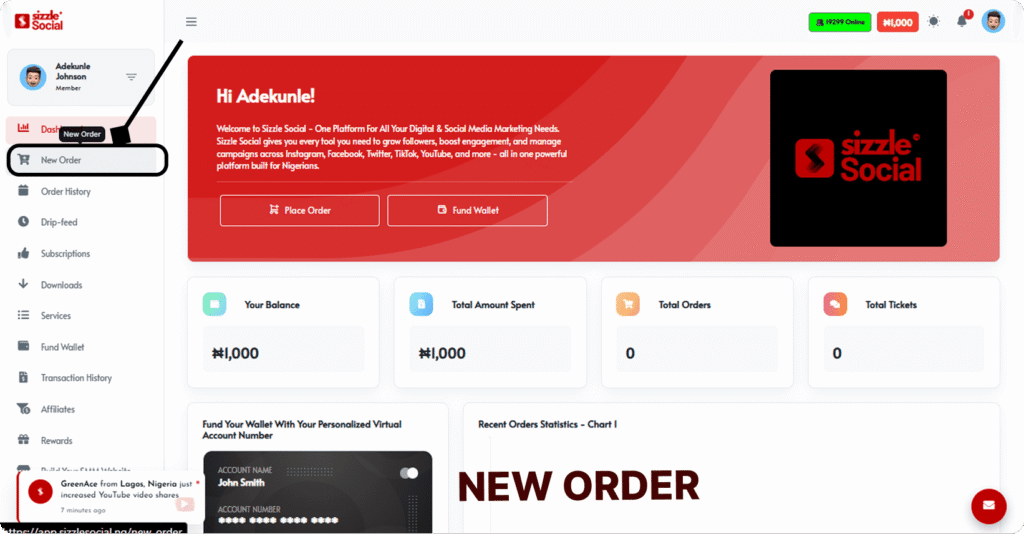
- Click ‘New Order’ in the dashboard menu: After funding, locate the ‘New Order’ button in your left-side navigation menu. This is the central ordering interface for all Instagram, and multi-platform, growth services on Sizzle Social. Everything starts from this page.
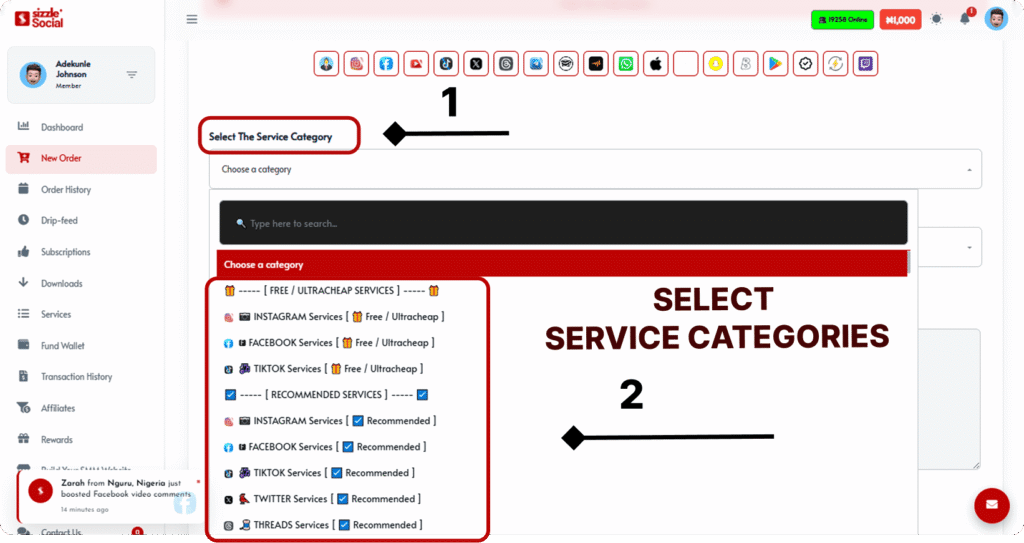
- Click and select your Instagram Service from the Service Category dropdown: Click the dropdown menu at the top of the New Order page. A scrollable list of all service categories appears, Instagram, TikTok, YouTube, Facebook, Audiomack, and more. Click ‘Instagram’ to filter for all Instagram-specific services only.
3. Read the service description carefully: Below the service dropdown, a description box appears with: quality tier, delivery speed, retention expectation, and any special notes.
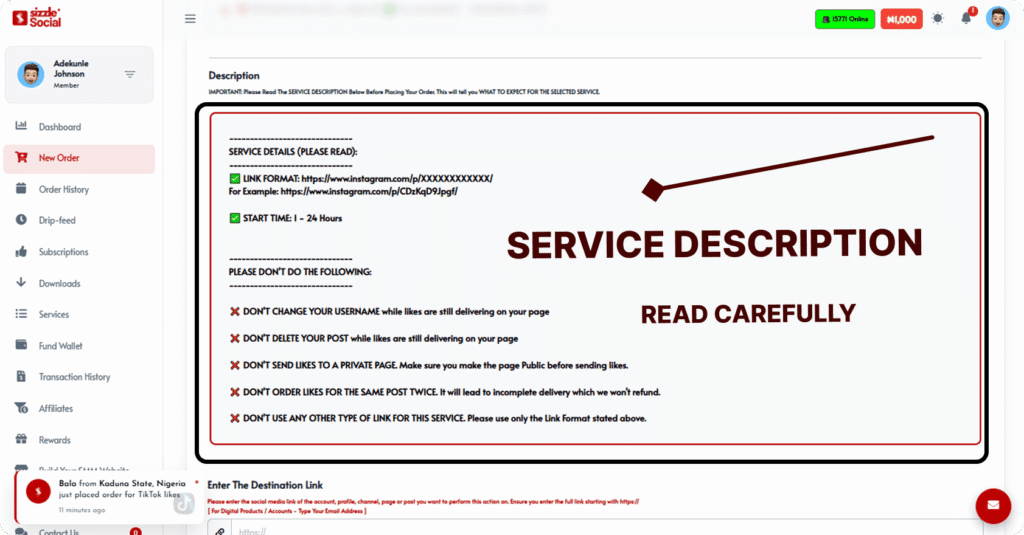
Read this before you proceed. It tells you exactly what you’re buying. Skipping the description is how people end up ordering the wrong tier for their account size.
How to Fill Instagram Username Order Form: Completing the Order Details (Screenshot Guide)
This is where your order actually gets born. These three fields, the URL, the quantity, and the submit button, are the entire transaction process. Simple as it sounds, a wrong URL here means delivery failure. So, follow Steps 4 through 6 exactly:
4. Paste your Instagram URL or username: In the ‘Link’ or ‘Username’ field, paste your Instagram profile URL (for follower orders) or your post URL (for likes, views, saves, or comment orders).
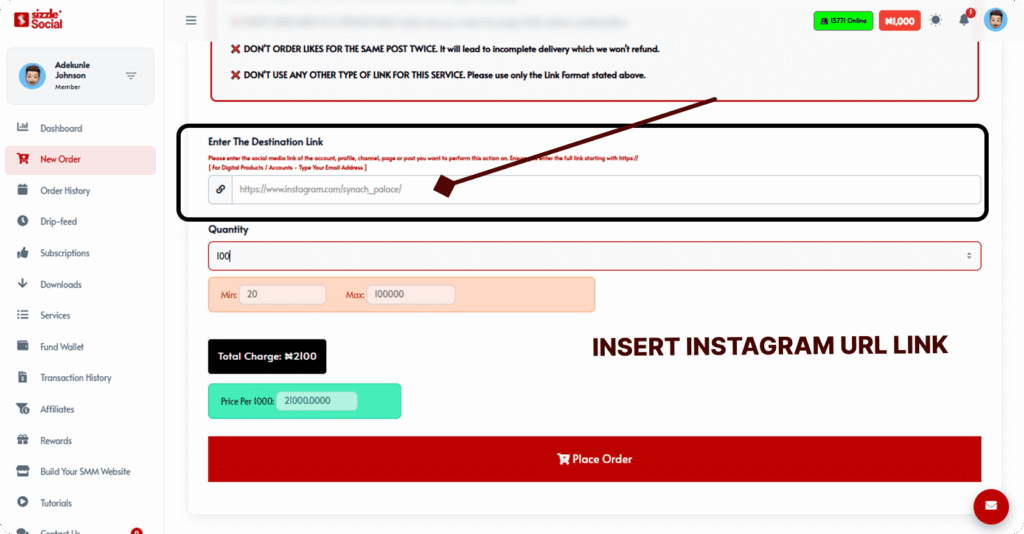
Always copy the link directly from Instagram, typing it manually risks a typo that causes complete delivery failure.
5. Enter your desired quantity: Type the number of followers, likes, views, or comments you want. The quantity must fall within the service’s stated minimum and maximum limits, both are shown next to the quantity field.
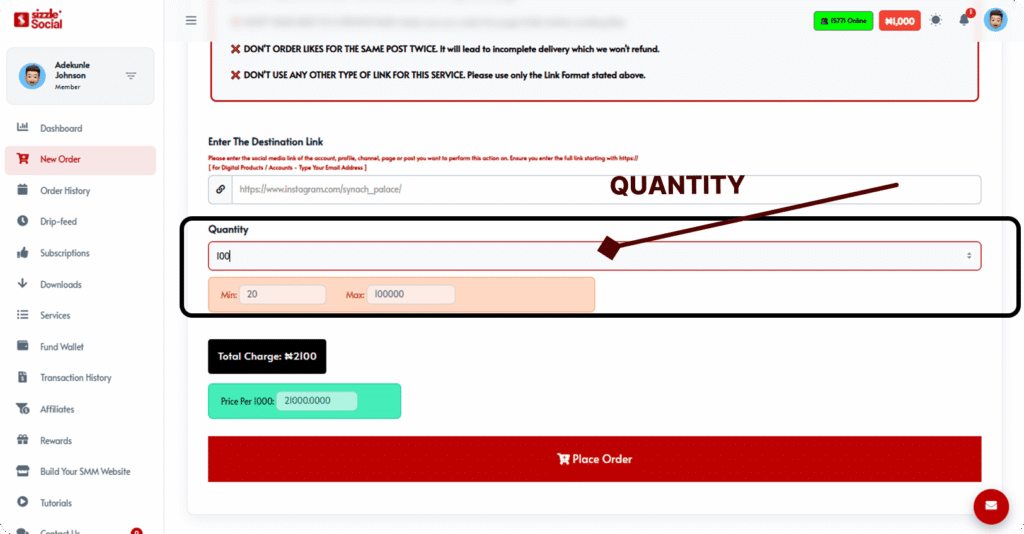
The platform auto-calculates your total Naira cost in real time as you type. Watch it update live.
6. Confirm the total charge and click Submit Order: Review the order summary: service name, quantity, target URL, and total Naira cost deducted from your wallet. If everything checks out, click ‘Submit Order’.
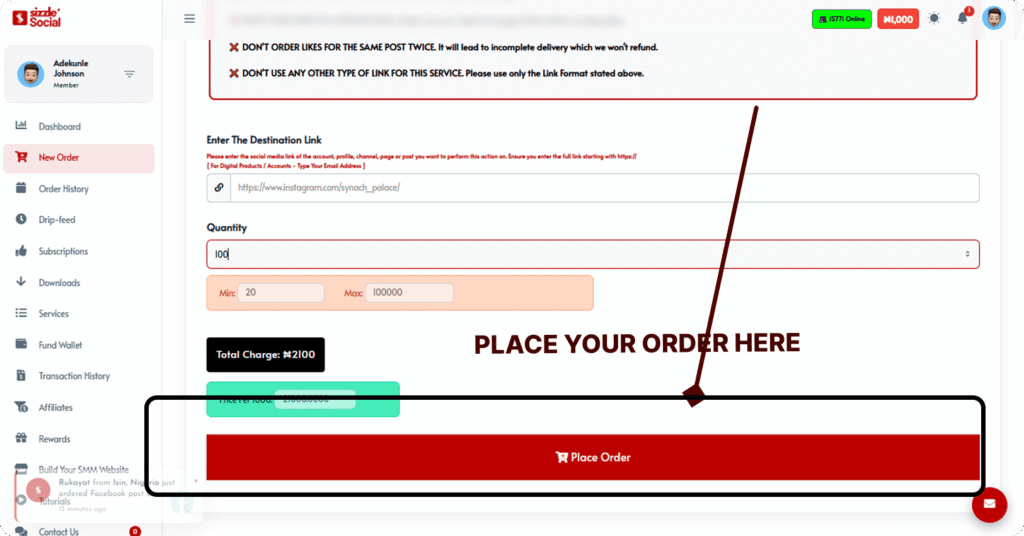
Your wallet deducts immediately. Your order enters the processing queue. You’re officially running a campaign.
To make things even clearer, here’s a quick-reference table covering every field in the Sizzle Social order form, bookmark this or screenshot it for your first order:
| Field | What to Enter | Beginner Note |
| Service Dropdown | Select from catalog | Choose ‘Instagram Followers, Gradual Drip’ for your very first order if you’re new to SMM panels |
| Link / URL Field | Paste Instagram URL | Profile URL for followers; Post URL for likes, views, saves, comments. Copy directly from Instagram, never type manually |
| Quantity Field | Number between min–max limits | Stay within the stated min/max; starting small on your first order is always smarter |
| Charge Display | Auto-calculated in ₦ | Confirms your exact total cost before you submit, no hidden fees, no surprises |
| Submit Order Button | Confirms and processes order | Click only when all fields are verified, orders cannot be cancelled after submission |
Safe Instagram Panel Usage Guide: Settings, Timing, and Habits That Protect Your Account
Here’s where most beginners either thrive or make expensive mistakes, and it’s not about the panel at all. It’s about how you use it. A safe Instagram panel usage guide isn’t just a list of don’ts. It’s a strategic framework for making your SMM investments work with the algorithm, not against it.
As social media analyst Matt Navarra noted in a 2024 tweet on X (Twitter), Instagram’s algorithm update cycles are becoming more aggressive about identifying unnatural engagement patterns, which makes the how and when of your orders just as important as the what. Understanding the Instagram grow followers algorithm in Nigeria helps you time your boosts to mimic organic momentum.
Let’s build those habits properly from the start.
Drip Feed Settings Screenshots: How to Select Safe Gradual Delivery on Sizzle Social
The drip feed settings on Sizzle Social are the difference between a smooth growth curve and a suspicious spike that Instagram’s systems flag. Here’s how to navigate them correctly every single time, especially if you care about your account’s long-term health:
- When browsing the Instagram followers service list, look specifically for service names containing the words ‘Gradual’, ‘Drip Feed’, or ‘Slow Delivery’. These are the algorithm-safe options. They distribute follower delivery across days rather than hours, which looks exactly like the kind of organic growth Instagram expects from a healthy, active account.
- In the service description box, check the delivery timeline. A genuine gradual service will specify: delivery spread across 3, 7, or 14 days. Choose the timeline that matches your account’s existing growth velocity, if you’re normally gaining 50 followers per week organically, a 7-day gradual delivery of 500 followers is proportional and safe.
- For accounts above 5,000 followers, always select a gradual or drip-feed service for follower orders. For brand-new accounts under 500 followers, instant delivery is acceptable for small quantities (under 300 followers) without significant risk. The reason: percentage changes matter more than absolute numbers to Instagram’s detection systems.
Post Timing With Panel Boost: The Exact Window for Ordering After You Post
Timing is everything on Instagram, and post timing with panel boost is a skill most users never learn. The mistake is either placing an SMM order immediately as the post goes live (before Instagram has even indexed it) or waiting too long (hours later, when the algorithm’s first-hour evaluation window has already closed).
Here’s the correct approach:
The optimal SMM boost window opens 2–5 minutes after your Instagram post or Reel goes live. This brief wait allows Instagram to fully index your content before delivery begins, preventing URL recognition errors and ensuring your purchased engagement lands on a properly discoverable post.
For maximum algorithm impact, follow this exact sequence: publish post → wait 2–5 minutes → open Sizzle Social New Order → select your boost service (Likes + Saves for regular posts; Views + Likes for Reels) → submit order.
Your purchased engagement then arrives within Instagram’s critical first-hour evaluation window, the period during which the algorithm decides how widely to distribute your content to non-followers.
For Stories: the window is tighter. Place your Story View order within 10–15 minutes of posting. Stories expire after 24 hours and Instagram’s Story algorithm evaluates peak engagement in the first 2 hours, delaying your boost past that window significantly reduces its distribution impact.
Nigerian creators can validate before they scale without risking a large Naira investment on an untested service tier. If you’ve been sitting on the fence about trying a beginner SMM dashboard tutorial Nigeria-style setup, the barrier to entry is genuinely as low as Sizzle Social makes it.
Dashboard Navigation for Beginners: Every Page on Sizzle Social Explained
The Sizzle Social dashboard looks like a lot when you first log in, and that’s understandable. There are menus, stats, buttons, and service categories all asking for your attention at once. But here’s the thing: there are only six core pages that matter, and each one does exactly one job.
Master these six, and you’ll never be lost on this platform again. As Sizzle Social’s own dashboard tutorial page confirms, the interface is built for clarity, if you can navigate a banking app, you can navigate this. The SMM panel dashboard walkthrough below covers every page you’ll actually use:
Before we go part by part, here’s an annotated overview of the full dashboard navigation, every page labelled and explained at a glance. This is the map you need:
SMM Panel Dashboard Walkthrough: The 6 Core Pages and What Each One Does
Growth is built page by page, shaped by habit, and rewarded through consistency, and understanding each dashboard page is the foundation of that habit. Here’s every page you need to know:
- Dashboard (Home): Your account overview. Shows your current wallet balance, your most recent orders, and quick-access buttons for New Order and Add Funds. This is the first screen after login, think of it as the control room for your entire Instagram growth strategy.
- New Order: The central transaction page where every campaign begins. Contains the service dropdown, URL input field, quantity selector, real-time Naira cost calculator, and the Submit Order button. All Instagram growth starts here.
- Services: The full catalog of 1,000+ services organized by platform. Use this page to browse and compare services before heading to New Order. Each listing shows its price per 1,000 units, minimum and maximum quantity limits, and estimated delivery speed. Research here; order on the New Order page.
- Funds: The wallet top-up page. Select your payment method (bank transfer, local card, or crypto), enter your Naira amount, and complete the payment. Your balance is ready within 1–5 minutes of a successful transaction.
- Orders: Your complete order history with live status tracking. See every campaign you’ve placed, Pending, Processing, Completed, or Partial, with delivery progress and service details for each one. This is where you monitor results and catch delivery issues early.
- Statistics: Sizzle Social’s public performance dashboard. Displays total registered users (200,000+), total orders processed (500,000+), and active services available. This is the transparency page, the one that proves the platform is operating at real scale.
Child Panel Reseller Guide: Using Sizzle Social as the Backend for Your Own SMM Business
Here is the part most tutorial articles don’t cover, because most people don’t know it exists. Sizzle Social’s reseller API turns a single Sizzle Social account into the engine of a full child panel reseller business.
Nigerian freelancers and digital agencies use this system to offer Instagram, TikTok, and YouTube SMM services to clients at retail prices while Sizzle Social handles all fulfillment automatically in the background. Your clients see your branded panel; Sizzle Social does the delivery work.
According to Sizzle Social’s affiliate and reseller earnings guide, this model is one of the fastest-growing digital income streams among Nigerian freelancers in 2026:
Sizzle Social’s reseller API connects your own SMM website to Sizzle Social’s delivery infrastructure, your clients place orders on your platform, and Sizzle Social fulfills them automatically in the background. They never need to know you’re using Sizzle Social as your backend provider.
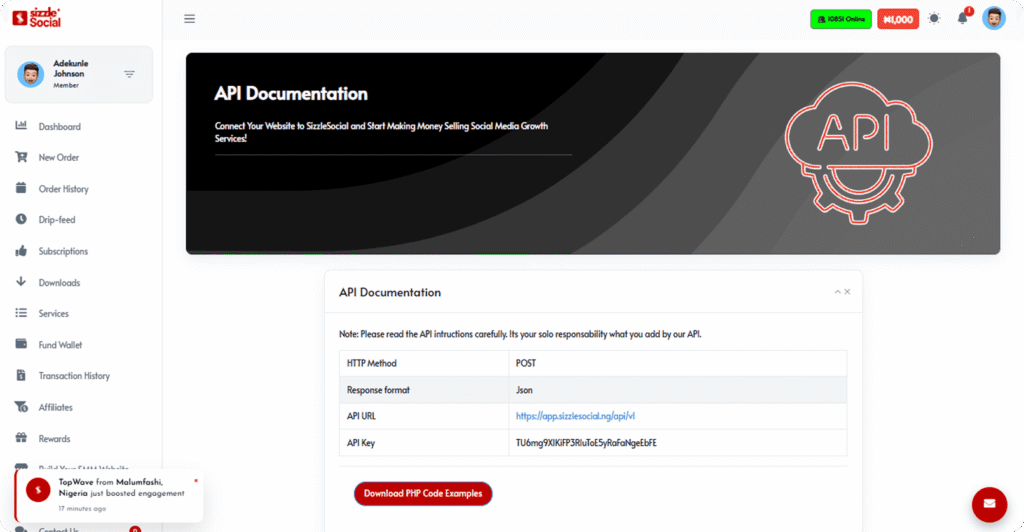
To access the API: log into your dashboard, find the ‘API’ section in the navigation menu. Your unique API key is listed there. Copy it and follow Sizzle Social’s API documentation to connect your reseller panel to the fulfillment infrastructure.
Nigerian freelancers and digital marketing agencies in Nigeria use this setup to offer Instagram SMM services at retail prices while Sizzle Social handles all delivery, processing, and order tracking, turning one dashboard account into a fully automated, client-facing SMM business.
The API setup page on Sizzle Social shows your unique key and connection documentation clearly. This is what the reseller integration screen looks like, straightforward enough for any freelancer willing to spend 30 minutes on setup:
For a clean summary of every dashboard page, its primary function, best practice, and when to use it, here’s your reference table:
| Page | Primary Function | Best Practice | Usage Frequency |
| Dashboard (Home) | Account overview | Check wallet balance before every order session | First page after every login |
| New Order | Place all campaign orders | Start here for every Instagram order, no exceptions | Most-used page: daily |
| Services | Browse full service catalog | Research and compare services here before ordering | Pre-order research: always |
| Add Funds | Top up Naira wallet | Fund before running low, bank, card, or crypto all work | Use when wallet balance is low |
| Orders | Track all order statuses live | Check 5–30 min after submission to catch issues early | Monitor progress actively |
| Statistics | Platform performance transparency | Check before signup to verify platform scale and reliability | Trust verification: on first visit |
| API | Reseller integration access | For agencies and freelancers automating client order fulfillment | Advanced users and resellers only |
Results Tracking SMM Panels: How to Monitor, Measure, and Scale Your Instagram Growth
Placing your first order is step one. Knowing whether it actually worked, and deciding what to do next based on that data, is where most beginners stop short. Results tracking SMM panels isn’t complicated, but it requires being deliberate.
Every Naira you spend on an SMM campaign should generate data that tells you what to repeat, what to scale, and what to avoid. The before and after screenshots in Nigeria protocol below is the simplest and most effective tracking system for Nigerian creators working with SMM panels, no analytics software required, just consistent documentation.
Your Orders history page is the first place to check after submitting any campaign. The live status indicators, Pending, Processing, Completed, Partial, give you real-time delivery updates without needing to check Instagram every five minutes.
How to Monitor Delivery Progress From Dashboard: Reading Your Order Status in Real Time
The four order status labels on your monitor delivery progress dashboard each have specific meanings, and each one requires a different response from you. Here’s exactly what each one means and what to do:
Pending: Your order has been submitted and is queued for processing. This status typically resolves within 30 seconds to 5 minutes for most Instagram services. If Pending persists beyond 15 minutes, refresh your dashboard. Large orders and gradual delivery services intentionally queue longer before beginning delivery.
Processing: Delivery is actively underway. For follower orders, your Instagram follower count will be visibly increasing during this phase. For likes and views, your post metrics will be rising. Check Instagram directly during Processing to confirm live delivery is happening, it’s genuinely satisfying to watch it work!
Completed: The full ordered quantity has been delivered. Your campaign is finished and the order is logged in your history. If results on Instagram don’t match what was ordered, this is the correct moment to contact Sizzle Social’s 24/7 support team with your Order ID. This transparency is part of why many users consider this a proven method to grow Instagram followers in Nigeria.
Partial: The service could not complete full delivery, common when Instagram temporarily limits delivery to a specific profile or when a service tier reaches capacity. Contact support immediately with your Order ID and the partial quantity you observed. Do not place a duplicate order until support resolves the original, especially if you are trying to grow from zero Instagram followers in Nigeria.
ROI Tracking Instagram Growth: How to Calculate Whether Your Panel Investment Paid Off
The single question every Nigerian creator and business should be asking after every SMM campaign: was that worth it? This is where ROI tracking Instagram growth becomes the practice that separates purposeful spending from random boosting. Here are three ROI calculation frameworks, from simple to advanced:
- Follower ROI calculation: Total Naira spent ÷ followers retained at 30 days = cost per retained follower. Example: ₦3,000 spent → 800 followers retained at 30 days = ₦3.75 per retained follower. Compare this to what you’d spend on Instagram ads to reach and convert an equivalent number of profile followers, the comparison typically favors the panel significantly for pure follower growth.
- Engagement ROI calculation: Compare the reach and impressions on a boosted post versus your average unboosted post reach. If a ₦1,500 SMM boost doubled a post’s reach and drove 20 profile visits from non-followers, your cost-per-new-audience-touchpoint is ₦75, far below typical Instagram paid advertising CPMs in Nigeria for the same exposure volume.
- Business ROI calculation: For brands and small businesses, track whether increased follower counts and boosted post engagement correlate with WhatsApp inquiries, website visits, or direct sales in the 30 days following your SMM campaigns. This linkage connects panel investment to real commercial outcomes, the metric that matters most for Nigerian business owners using Instagram as a sales channel.
Here’s your complete order status reference table, what each status means, how long it lasts, what’s happening in the background, and what action you should take:
| Status | Typical Duration | What’s Happening | Action Required |
| Pending | 30 sec – 15 min | Order is queued; system routing delivery | Wait 15 min; refresh dashboard; contact support if still Pending after 30 min |
| Processing | Minutes to several days (gradual services) | Delivery is actively underway | Check Instagram directly, follower count or post metrics should be moving |
| Completed | N/A | Full ordered quantity delivered successfully | Screenshot results; check 7-day retention; assess for scaling next campaign |
| Partial | N/A | Incomplete delivery, partial quantity reached target | Contact 24/7 support immediately, provide Order ID and quantity observed delivered |
What separates growing creators from struggling ones on Instagram?
Now you have the complete Instagram SMM panel tutorial in Nigeria playbook, from creating your Sizzle Social account in under 60 seconds, to funding your Naira wallet without touching a dollar, to submitting your first order and tracking it live on your dashboard.
You know how to use gradual drip delivery to protect your account. You know the 2–5 minute post-timing window for maximum algorithm impact. You know how to test small, evaluate retention, and scale only what’s proven to work.
The difference between Nigerian creators who consistently grow on Instagram and those who post endlessly without results often comes down to one thing: systems. Not talent, not budget, not luck, systems. Sizzle Social gives you the system.
The step-by-step SMM order process is repeatable. The Naira pricing is accessible. The dashboard is built for beginners. And the results, when you test smart, scale intelligently, and pair panel boosts with genuine organic content, are very real for Nigerian creators and businesses at every level.
As SizzleSocial’s own ‘0 to 10K followers’ strategy guide demonstrates, consistent use of a quality SMM panel combined with organic content effort is one of the most reliable growth paths available to Nigerian Instagram users in 2026. The knowledge is in your hands now, what you do with it is entirely up to you.
Frequently Asked Questions
An Instagram SMM panel is a third-party web platform that lets you purchase social media growth services, followers, likes, views, saves, story views, Reel plays, and comments, at set Naira prices from one central dashboard. You fund a wallet, browse a catalog of services, paste your Instagram URL, choose a quantity, and submit. The panel processes the order automatically through its internal infrastructure or connected reseller APIs. This is fundamentally different from Instagram Ads, which charges per click or impression, requires ad creative, targeting setup, and Meta Business account access, and takes 24–48 hours to pass through a review process. An SMM panel delivers engagement directly to your existing profile or post, no targeting, no creative brief, no ad review. Think of Instagram Ads as a tool for reaching new audiences; think of an SMM panel as a tool for boosting the signals on content you’ve already published. The best results come from using both strategically, not one in isolation.
Safety depends almost entirely on how you use the platform, not whether you use it. The main risks are ordering too fast on a fresh account, choosing low-quality services that deliver obviously fake-looking accounts, and running panel orders simultaneously with Instagram ads (which can cause unusual engagement spikes that attract algorithm scrutiny). Sizzle Social addresses the first two risks directly: it offers gradual drip-feed services that spread follower delivery over 3, 7, or 14 days, and drop-protected, high-quality tiers that use better account profiles. The practical rule is: start small (100–300 units on your first test order), choose gradual delivery for accounts above 500 followers, and maintain consistent organic content alongside your panel use. Accounts that order thousands of followers overnight on brand-new pages face the most risk. Disciplined, paced usage on accounts with genuine content almost never causes platform issues. Sizzle Social also never asks for your Instagram password, your credentials are always 100% yours.
Delivery speed varies based on the service tier you choose. For most Instagram Likes and Views services, delivery starts within seconds of order confirmation, small orders under 1,000 units typically complete within 15–60 minutes. For Instagram Followers, speed depends on whether you chose instant or gradual delivery: instant follower services begin within minutes and complete 500 followers in a few hours; gradual drip-feed services intentionally spread the same 500 followers across 3 to 14 days, depending on the tier selected. Story Views have the tightest window, place your order within 10–15 minutes of your Story going live, since Stories expire in 24 hours and most delivery happens in the first 2–4 hours. Reel Views typically begin within seconds and deliver continuously over time for larger orders. Your Sizzle Social Orders dashboard shows real-time status, Pending, Processing, Completed, or Partial, so you’re never guessing where your campaign stands.
No dollar account needed, Sizzle Social is built entirely around the Nigerian Naira (₦). The platform supports three funding methods: Bank Transfer (Nigerian internet banking or bank app, balance credited within 1–5 minutes); Local Card Payment (Nigerian Mastercard or Visa through a secure local gateway, no international card or currency conversion involved); and Crypto Deposit (Bitcoin, USDT, and other major cryptocurrencies converted to equivalent Naira balance, processed in 5–15 minutes based on network confirmation speed). All transactions fund a pre-loaded Naira wallet. Once funded, every subsequent order deducts directly from that wallet balance. no per-order card charges, no repeat transaction fees. This wallet system is especially practical for agencies and frequent users who place multiple orders weekly, since one funding event can cover several campaigns. It’s genuinely one of the most frictionless payment setups for Nigerian digital marketers on any SMM platform.
Yes, while Instagram is Sizzle Social’s most popular service category, the platform supports 1,000+ services across more than a dozen social networks. Supported platforms include: TikTok (followers, likes, views, shares), YouTube (subscribers, views, watch hours, likes), Facebook (page likes, post engagement, video views), Twitter/X (followers, likes, retweets), LinkedIn (followers, connections), Telegram (channel members, post views), Snapchat, SoundCloud, Audiomack, and Spotify. This makes Sizzle Social a genuine all-in-one growth panel for Nigerian creators and businesses with multi-platform presence. Rather than managing separate panels with separate wallets for each network, everything lives in one Naira wallet. Nigerian musicians promoting on Audiomack, podcasters building Spotify streams, and creators running simultaneous campaigns across TikTok and Instagram all benefit from this centralized approach. The Services catalog is organized clearly by platform, so browsing across networks before committing to an order is straightforward.
A Partial status means the system delivered some of what you ordered but couldn’t complete the full quantity. This typically happens for three reasons: Instagram temporarily limits delivery to a specific profile (often accounts that recently changed their username or privacy settings), the service provider reached capacity mid-delivery, or the target URL had an issue during processing. When you see a Partial status, the first action is to copy your Order ID from the Orders page and contact Sizzle Social’s 24/7 support team immediately. Include the Order ID, the service name, the quantity you expected, and the quantity that was actually delivered. In most verified Partial cases, the resolution is either a re-delivery of the remaining quantity, a credit of the undelivered value back to your Naira wallet, or a resubmission through an alternative service provider. Do not place a duplicate order for the same service before support confirms resolution, doing so can result in double-charging.
This is the number one cause of delivery failures, so it’s worth doing correctly every single time. For follower orders: open your Instagram app on mobile → go to your profile page → tap the three-dot menu (•••) in the top right corner → tap ‘Copy Profile URL’. This gives you the exact format Sizzle Social’s system needs: https://www.instagram.com/yourusername/. For post orders (likes, saves, views, comments): navigate to the specific post or Reel on Instagram → tap the three-dot menu on the post itself → tap ‘Copy Link’. For Story views: the Story must be live and active when you place the order, copy the Story link from the share option within the active Story. Never type your Instagram username manually into the link field; a single typo or missing character causes the delivery system to fail. A simple verification step: paste the copied URL into your mobile browser first and confirm it opens your correct profile or post before submitting your order.
Sizzle Social’s service catalog starts at very accessible price points, with many Instagram engagement services available at minimum order quantities costing under ₦500. For a first-time user who wants to test the platform properly, a starting wallet balance of ₦1,500–₦2,500 is practical. This is enough to: run one test follower order at minimum quantity (e.g., 100–200 followers), run one test engagement order (e.g., 300 Reel views or 200 post likes), and evaluate quality on both services before scaling. Since the wallet system means every naira you fund stays available until spent, there is no cost to funding more than you immediately plan to use. Unlike per-transaction payment systems where unused credit can be wasted, Sizzle Social’s wallet holds your balance indefinitely. The practical approach for Nigerian small businesses is to fund a fixed monthly SMM budget (e.g., ₦5,000–₦15,000), treat it as a digital marketing expense, and distribute it across the month’s campaigns based on content performance.
Sizzle Social has a structured resolution process for non-delivery and partial delivery situations. If your order shows a Completed status but the expected followers or engagement haven’t appeared on Instagram, the recommended first step is to wait 24–48 hours, there can occasionally be a brief sync delay between panel completion and visible Instagram delivery, particularly for follower orders where each follower account registers separately over time. If after 48 hours the results still aren’t visible, contact SizzleSocial’s 24/7 support team with your Order ID, the service name, the target URL you submitted, and a before-and-after screenshot of your Instagram metrics. For verified non-delivery cases, the typical resolution is either a re-delivery of the original ordered quantity or a credit of the equivalent Naira value back to your wallet balance. Always document your follower count or post metrics before placing any SMM order, this is the most important habit for effective support resolution.
The process becomes straightforward once you know the four key variables. First, identify your goal: follower growth (profile credibility), post engagement (algorithm boost for that specific content), Reel reach, or Story visibility. Second, decide on delivery pace: accounts above 5,000 followers should always choose Gradual or Drip Feed services for followers; instant delivery is safer for smaller accounts or for engagement services like likes and views. Third, set a quantity range: check the price per 1,000 units and use the real-time calculator on the New Order page to verify your total Naira cost. Fourth, and this is the one most beginners skip, read the service description in full. It tells you the quality tier, drop protection status, expected retention timeline, and any account requirements. For absolute beginners, the ‘Instagram Followers, Gradual Drip’ service is the safest starting point: it’s algorithm-friendly, retention-tested, and the most beginner-compatible service on the platform. Start there, validate quality, then expand to complementary services.
Sizzle Social serves both individual creators and businesses actively, and business accounts are among the platform’s most consistent users. Nigerian e-commerce stores, fashion brands, food businesses, service providers, event companies, and corporate marketing teams all use SMM panels to build social proof, improve brand credibility, and increase discoverability on Instagram. For business accounts, the most strategically valuable services are typically: Page Followers (building a credible follower count for new or growing business profiles), Post Likes and Saves (boosting product photos and promotional content within Instagram’s algorithm, saves especially signal high content value to the algorithm), and Reel Views (maximizing the algorithmic distribution of video product showcases). The wallet system also makes monthly SMM budget management straightforward for businesses, fund once, deploy across campaigns throughout the month, and reconcile costs easily from the Orders history.
Sizzle Social’s reseller API is a programming interface that lets external websites connect to Sizzle Social’s fulfillment infrastructure. In practice, this means a Nigerian freelancer or digital agency can build their own branded SMM panel website, accept orders from clients at their own retail prices, and have Sizzle Social automatically fulfill those orders in the background, without clients ever knowing Sizzle Social is the backend provider. Accessing the API requires your unique API key (found in your Sizzle Social dashboard under the API section) and integration using Sizzle Social’s published API documentation. The technical setup requires either basic programming knowledge (the API follows standard REST conventions) or a ready-made SMM panel script, such as open-source panel templates widely available online, which can be connected to Sizzle Social’s API with minimal coding. Nigerian freelancers use this model to offer Instagram, TikTok, and YouTube growth services to clients at retail prices while Sizzle Social handles all delivery and processing automatically.
This distinction is one of the most important things a new SizzleSocial user needs to understand before placing their first follower order. Instant delivery services start follower delivery within minutes of order confirmation and complete the full ordered quantity within a few hours. They are faster, but the sudden arrival of a large number of followers (especially on accounts that were growing slowly before) can appear unnatural to Instagram’s pattern-recognition systems. Gradual drip services (also called drip-feed or slow delivery) spread the same quantity across 3, 7, or 14 days; the service description specifies the exact timeline. The pacing mimics organic follower growth and is significantly safer for established accounts. The trade-off is time: if you’re preparing for a product launch or campaign that needs immediate social proof, instant delivery may be the correct choice. For long-term profile building, especially on accounts above 1,000 followers, gradual delivery is the consistent recommendation from SMM professionals globally.
Effective tracking requires using both Sizzle Social’s built-in Orders dashboard and Instagram’s native analytics in parallel. On Sizzle Social, the Orders page shows every completed campaign, the service name, quantity delivered, and final status. This confirms what was delivered. On Instagram, use Instagram Insights (available to business and creator accounts) to measure the impact: follower count change week-over-week, post reach before and after an SMM boost, profile visits following a follower order, and saves and shares on boosted posts. The most reliable system is a before-and-after screenshot protocol: screenshot your follower count and key post metrics before every SMM campaign, then again at 24 hours, 7 days, and 30 days post-delivery. Build a simple tracking log with: date ordered, service type, quantity, Naira spent, followers delivered, followers retained at 30 days, and any measurable change in post reach or profile visits. Within 2–3 campaign cycles, this data clearly shows which services provide the best return on your Naira investment.
Using an SMM panel is not illegal under Nigerian law. There is no specific Nigerian legislation that prohibits purchasing social media engagement services. The relevant consideration is Instagram’s Terms of Service (ToS), a civil agreement between you and Meta, not a criminal statute. Instagram’s ToS does prohibit artificial manipulation of platform metrics and violating it can result in Instagram restricting or limiting your account, but this is a platform enforcement action, not a legal consequence. Millions of users globally, including businesses, marketing agencies, and professional influencers, use SMM panels as part of their digital marketing mix. The practical risk is account restriction, not legal prosecution. Responsible usage practices (quality services, gradual delivery pacing, genuine organic content maintained alongside panel orders) reduce the platform risk significantly. Sizzle Social’s design is specifically oriented toward safe, sustainable usage, the platform never requests your passwords, never requires account access, and its service catalog prominently features safety-rated, algorithm-friendly options.
Pricing varies by service tier, and the real-time calculator on the New Order page gives you the exact Naira cost for any quantity before you commit. As a general market reference: budget-tier instant follower services typically cost around ₦1,000–₦2,500 per 1,000 followers. Mid-tier services with better-quality accounts and higher retention typically range from ₦2,500–₦5,000 per 1,000 followers. Premium gradual drip services with drop protection and the highest retention rates tend to sit at ₦5,000–₦8,000 per 1,000 followers. For first-time users, starting with a mid-tier gradual drip service at 200–500 followers (roughly ₦750–₦2,500 total) is the most effective way to evaluate quality before investing in a larger campaign. As reported by Statista’s digital marketing data for emerging markets, Nigerian social media ad spending is growing at double-digit rates annually, SMM panel use is one of the ways smaller creators access digital growth tools that previously required much larger advertising budgets.
Content quality and SMM panel use are multipliers of each other boosting weak content delivers weak results at any budget. For Reels: short-form videos (15–30 seconds) with strong hooks in the first 2 seconds, trending audio, and clear on-screen text perform best when boosted with Reel Views and Likes. For Carousels: multi-slide educational or storytelling posts (5–10 slides) with a compelling first slide hook respond best to Like and Save boosts, Saves are the strongest positive signal Instagram’s algorithm registers for discovery. For single images: high-contrast, visually bold photos with minimal caption clutter and a clear CTA perform best when boosted with Likes. For Stories: polls, question stickers, and behind-the-scenes content see the best return from Story View boosts because they drive swipe-up and reply interactions, which Instagram values highly for story distribution. The universal rule: publish your organic content first, wait 2–5 minutes for Instagram to fully index it, then open Sizzle Social’s New Order page and submit your boost order.
Sizzle Social currently operates as a mobile-responsive web platform accessible at SizzleSocial.ng through any standard browser, Chrome, Safari, Opera Mini, or any mobile browser on Android or iOS. The website is optimized for smartphone use, meaning all core functions (funding your wallet, browsing the service catalog, submitting orders, and tracking delivery status) work correctly on a phone screen without requiring a dedicated app download. This is standard practice for SMM panels globally, browser-based access eliminates app store review processes and allows Sizzle Social to update services and pricing in real time without requiring users to update an app. For Nigerian users, where over 85% of internet access is mobile-first according to GSMA’s 2024 Mobile Economy report, the mobile browser experience is the primary access method. Should a dedicated app become available, it would be announced through Sizzle Social’s official website and social channels first.
Sizzle Social offers 24/7 customer support to registered users. The primary support channels are accessible from within your logged-in dashboard, typically a live chat widget or support ticket system visible in the dashboard navigation. For order-related issues, always have the following information ready before reaching out: your Order ID (found in your Orders history page), the service name you ordered, the exact Instagram URL you submitted, the quantity ordered, and the current status showing in your dashboard. Attaching a screenshot of your order status and a screenshot of your Instagram account (showing the current follower count or relevant engagement metrics) alongside your message significantly speeds up the resolution process. For billing issues or wallet-related questions, your wallet transaction history in the dashboard provides the reference data support needs. For non-urgent questions, Sizzle Social’s help documentation and FAQ section often resolves common questions before a support ticket is necessary, check there first to save time.
The Statistics page on Sizzle Social is a public-facing transparency dashboard that displays the platform’s cumulative performance metrics, including total registered users (200,000+), total orders processed (500,000+), and the number of active services currently available. Unlike many SMM panels that operate with no publicly visible proof of activity, Sizzle Social’s Statistics page provides verifiable evidence of platform scale before a new user commits their Naira wallet to the platform. For Nigerian digital users who are appropriately cautious about online payment platforms, and rightly so given the prevalence of digital scams in Nigeria, the Statistics page serves as a concrete credibility signal. Seeing 200,000+ registered users and 10 million+ processed orders is meaningful social proof that the platform is actively used at scale. Cross-referencing this data with independent user reviews on social media forums, Twitter/X, and Google reviews gives a complete pre-registration picture. The Statistics page is the single best page to check before creating your first Sizzle Social account.