

Table of Contents
Telegram stands out as a top platform where individuals, creators, and brands build direct connections with loyal audiences. Every community admin faces one common hurdle: finding steady ways to gain more members. Knowing how to boost Telegram Group members transforms a quiet space into a bustling hub of lively discussions, sales leads, and active interaction. With the right mix of organic promotion tactics and efficient growth tools, your community gains consistent momentum without stress.
Building a vibrant presence on Telegram requires understanding the platform’s unique dynamics. Unlike traditional social networks that rely heavily on algorithmic feeds to distribute content, Telegram operates on direct messaging protocols. This structure means your content reaches your audience directly, without mid-stream filtering or forced advertising fees. Consequently, every member added to your group represents a direct communication channel, making strategic member acquisition essential for long-term brand equity and community sustainability.
Telegram Group Growth vs Channel Growth: Key Differences
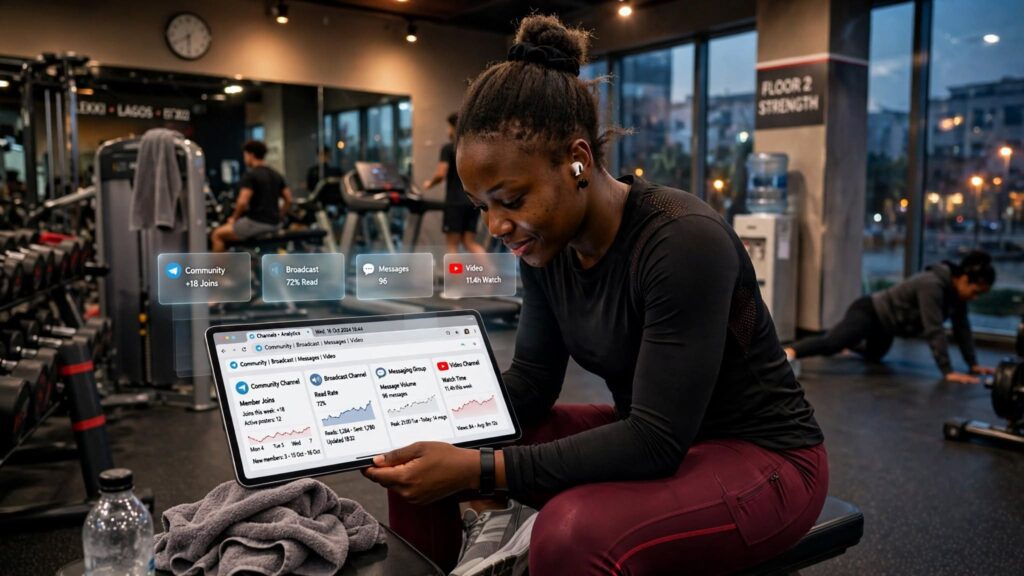
Choosing the right format on Telegram shapes how your audience interacts with your brand. Before applying tactics on how to boost Telegram Group members, you need to understand whether a group or a channel suits your specific goals. Telegram offers two distinct content distribution methods, each engineered for completely different marketing outcomes. Choosing blindly often leads to frustrated members or silent comment sections.
When digital creators launch a community, they frequently confuse open discussion forums with broadcast feeds. A broadcast feed allows centralized messaging, while a group thrives on peer-to-peer contribution. Deciding between a group and a channel requires evaluating your daily capacity to moderate user discussions, your long-term content delivery strategy, and your monetization plan.
Groups allow every member to share text messages, uploaded media files, external links, and short audio snippets. This open environment builds quick trust because members learn directly from each other rather than relying solely on admin updates. However, managing high-volume group interactions demands strict moderation rules, custom security bots, and consistent daily involvement.
Channels restrict posting permissions exclusively to designated administrators. Subscribers consume broadcast updates quietly without cluttering the main screen. This format works exceptionally well for sharing daily announcements, promotional deals, signal alerts, and downloadable digital products. If your business model relies on direct customer feedback, interactive learning cohorts, or dynamic group discussions, starting with a Telegram group offers the most effective foundation.
Understanding these core operational distinctions prevents administrative burnout. Many digital brands find that growing an active group requires significantly more hands-on moderation than maintaining a broad channel feed. By evaluating your target audience’s communication preferences beforehand, you can deploy targeted growth strategies that turn casual visitors into long-term brand advocates.
| Feature / Metric | Telegram Groups | Telegram Channels |
| Primary Purpose | Two-way peer community and direct discussion | One-way broadcast and media updates |
| Max Capacity | Up to 200,000 members | Unlimited subscribers |
| Default Posting | Open to all group members | Restricted to designated admins |
| Engagement Model | Live conversations, replies, voice chats | Emoji reactions, direct views, post comments |
| Best Use Case | Customer support, trading chat, live learning | News updates, signal alerts, content drops |
Telegram Groups vs Channels: Members, Subscribers, and Communication

Understanding the architectural differences between groups and channels forms the baseline of any digital marketing strategy. Telegram groups host up to 200,000 individual members who participate actively in real-time group messaging. Everyone inside a group can post messages, comment on topics, upload files, and reply directly to fellow participants. This open structural design turns a basic message chat into an active digital room.
According to global social media statistics compiled by DataReportal, Telegram has surpassed 900 million active monthly users worldwide, making direct community interaction one of the most effective ways to retain digital audiences.
Subscribers in channels consume content passively. They view updates, register emoji reactions, click outbound links, and forward posts to external contacts. Channel feeds remain completely clean because users cannot post top-level updates. When building brand trust through personal interactions, groups perform better than channels. Group members develop genuine relationships with admins and fellow members, which increases overall retention rates over time.
Managing an interactive group of up to 200,000 members requires clear operational structures. Admins can assign specific member permissions, restrict link sharing, limit GIF postings, and set message cooldown timers. Group communications can also be segmented into organized topic threads, allowing larger communities to run separate discussions under one roof. Channel communications remain strictly linear, displaying sequential broadcast posts stamped with view counters.
For brands evaluating platform options, groups provide an ideal environment for crowd-sourced support, real-time feedback, and interactive discussions. The continuous flow of user-generated content keeps the chat active, giving new visitors immediate reasons to join and participate in ongoing conversations.
When to Choose a Telegram Group for Community Building
Selecting a Telegram group makes sense when your primary business objective centers on open dialogue, crowd-sourced insights, customer support, or user networking. Groups turn passive content consumers into active participants.
Key environments where Telegram groups deliver optimal performance include:
- Interactive online learning cohorts where students discuss lessons, submit assignments, and ask tutors direct questions.
- Customer feedback communities where physical product sellers gather direct feature requests, troubleshoot user issues, and share product updates.
- Crypto, forex, and financial trading discussion hubs where traders share real-time chart analysis, technical setups, and market opinions.
- Local networking clubs, professional associations, and interest-based masterminds requiring direct peer-to-peer networking.
- Software user communities where developers, beta testers, and end users discuss product updates and bug reports.
Building a vibrant group environment requires creating spaces where members feel valued. When members receive fast answers to their questions from both admins and fellow participants, community loyalty grows rapidly. This collaborative structure reduces customer support overhead because experienced members often assist new joiners naturally.
Telegram groups serve as powerful incubators for market research. Business owners can monitor daily group messages to identify common pain points, emerging customer desires, and product preferences. This real-time feedback loop allows brands to refine their offerings based on authentic user conversations. Choosing a group format establishes a solid foundation for long-term customer retention and brand loyalty.
Deploying a group architecture proves advantageous for businesses relying on peer recommendations or community co-creation. When users ask questions and receive rapid solutions from fellow members, community trust deepens. This user-led dynamic lightens internal support workloads while generating a continuous archive of user-generated answers that guide new joiners.
When a Telegram Channel Is Better for Broadcasting Updates
Opting for a Telegram channel becomes the superior choice when your main objective involves controlled broadcast messaging, high-volume news distribution, or exclusive content drops. Channels act as personal publishing feeds where your posts remain uncluttered by continuous user messages.
Key operational scenarios where Telegram channels excel include:
- Daily news outlets, digital magazines, and market analysis blogs broadcasting curated articles and quick headline updates.
- Financial signal providers and betting tips services delivering time-sensitive alerts without chat interruptions.
- E-commerce stores and coupon creators sharing product drop notifications, flash sales, and exclusive discount codes.
- Content creators publishing exclusive audio downloads, PDF guides, video previews, and downloadable resources.
- Corporate brands issuing official press releases, service alerts, and executive announcements to global stakeholders.
Channels offer complete control over your brand’s voice and messaging schedule. Posts are displayed cleanly with cumulative view counters, providing clear data on how many subscribers view each update. Subscribers receive push notifications whenever you publish, making channels highly effective for urgent announcements.
Because channels lack general discussion feeds, administrators save significant time on moderation. There is no need to filter user spam, delete self-promotional links, or manage inter-member conflicts. Subscribers focus entirely on your broadcasted media, resulting in high click-through rates for outbound links. If your primary goal focuses on push-notification marketing rather than community management, a channel format delivers optimal results.
Can You Use a Telegram Group and Channel Together?
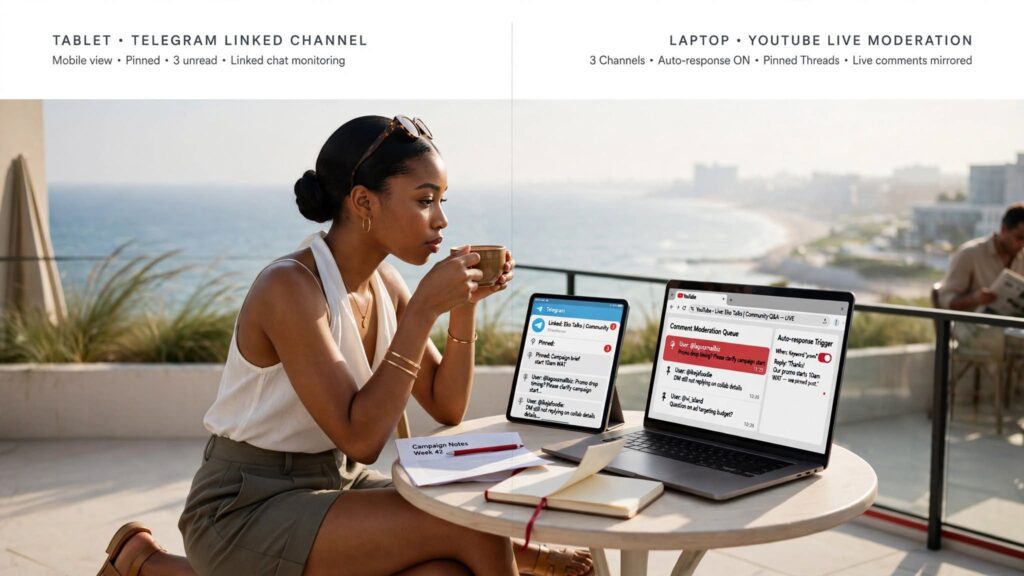
Combining a Telegram channel with a linked group thread delivers a flexible community layout. Telegram allows group administrators to connect a designated group directly to a main channel as a discussion forum.
Whenever an administrator posts an update inside the broadcast channel, Telegram automatically generates a dedicated comment section under that post. Subscribers click the comment button to enter the attached group thread, where they discuss that specific post. This hybrid setup keeps your primary broadcast channel clean while giving subscribers a dedicated space for detailed group discussion.
Implementing a hybrid community structure offers strategic advantages:
- Maintains a clean channel feed for important announcements while providing an interactive outlet for community chat.
- Automatically creates organized discussion threads for every broadcasted post, making conversation easy to follow.
- Allows channel subscribers to opt into group discussions without cluttering their main chat list.
- Gives administrators full control over group permissions while preserving one-way broadcasting authority.
- Increases overall community retention by catering to passive readers and active discussants simultaneously.
Using both features together creates an efficient balance between broadcasting authority and community engagement. Subscribers read official updates inside the channel, then jump into the linked discussion group to ask questions or share opinions. This dual approach maximizes audience reach while maintaining clean operational structure.
Integrating channels with linked groups establishes a structured audience funnel. Passive readers absorb official announcements within the main channel feed, while highly engaged members jump into linked discussion threads to collaborate, debate, and ask detailed questions. This keeps broadcast messages clean while catering to active participants.
This structural separation protects your central broadcast hub from chat clutter. Critical updates remain accessible at the channel level, while comment threads house detailed user responses. Admins can moderate comment sections independently, applying tailored security settings to discussion boards without altering main channel visibility.
How to Grow a Telegram Group Organically
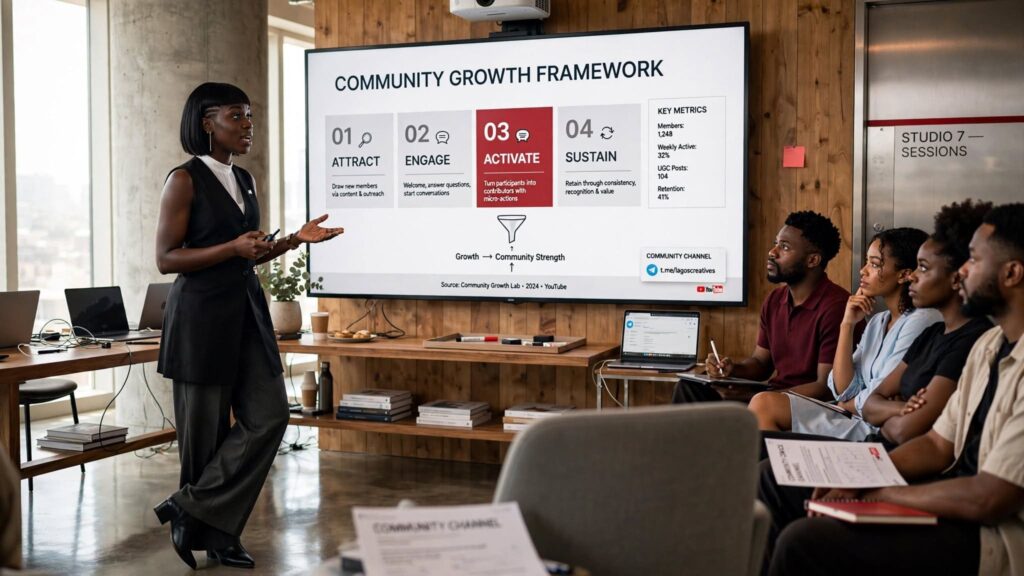
Organic growth forms the permanent backbone of an active community. Implementing fundamental optimization strategies ensures high member retention rates over time. Organic tactics attract users who hold genuine interest in your specific niche, resulting in higher daily message activity, better link clicks, and stronger word-of-mouth promotion.
Growing your group naturally requires evaluating every detail of your presentation. From your profile branding to your cross-platform promotion tactics, every touchpoint should communicate clear value to potential members. People rarely join quiet, poorly branded groups with vague titles. They seek active, organized environments that offer immediate insights or solutions to their specific problems.
Sustainable organic growth relies on consistent execution. You must establish reliable promotion routines across your website, social channels, and email touchpoints while maintaining high content quality inside the group. Organic member expansion takes consistent effort, but the resulting high-engagement community makes the investment worthwhile.
Building an organic expansion flywheel requires framing your group as an essential resource hub within your niche. Organic visitors join when they see immediate practical utility, whether through proprietary insights, direct networking opportunities, or exclusive tools. Maintaining clear quality standards across your public touchpoints builds trust, encouraging incoming traffic to convert into active, long-term contributors.
Create a Clear Purpose and an Attractive Group Description
Your group title, display image, and public description create the crucial first impression for prospective members. A vague or incomplete group profile causes visitors to leave immediately without tapping the join button.
To turn casual visitors into active group members, implement these profile optimization steps:
- Craft a bold, searchable group title: Include your primary focus keyphrases naturally alongside your brand name so users discover your group through native Telegram searches.
- Write a value-driven description: Detail who the group serves, what daily benefits members receive, and what specific topics are covered.
- Define community guidelines: Mention key rules briefly inside the description to set immediate standards for constructive behavior.
- Add a clear call to action (CTA): Prompt visitors to click join, introduce themselves, and check the pinned messages immediately upon entering.
- Use professional visual branding: Upload a high-resolution logo or branded avatar that looks recognizable in small chat previews.
Optimizing your profile branding makes your community easily discoverable through both search engines and Telegram search. When users search for niche topics, a clear title combined with a rich description boosts your overall search visibility.
Clear descriptions also filter out non-target users before they join, keeping your community focused on relevant topics. Setting clear expectations in your bio builds a strong foundation for high group engagement and long-term member retention.
Refining your group description requires viewing your profile through the lens of a new visitor. Clearly state the exact value proposition in the first two lines; for instance, explain whether your group offers daily financial analysis, technical software support, or local networking events. Explicit statements help potential members confirm they have found the right destination before clicking join.
Share Telegram Invite Links Across Relevant Platforms

Telegram invite links serve as direct access pathways to your group. Customizing your invite link settings inside Telegram creates clean, branded URLs that build user trust across digital touchpoints.
Strategic places to position your group invite link include:
- Official website headers, resource pages, contact sections, and footers.
- Automated welcome emails, newsletter footers, and customer receipt confirmations.
- Author bios, forum signatures, and active online thread discussions.
- Digital lead magnets, free eBook downloads, and webinar thank-you pages.
- Professional business cards, presentation slides, and printed marketing materials using custom QR codes.
Using specialized invite links allows admins to track exactly where new members originate. Telegram enables you to generate unique invite links with custom member limits or approval requirements, giving you full control over incoming group traffic.
Placing invite links across high-traffic digital assets establishes a continuous funnel of new group members. Anyone interacting with your brand online encounters a direct path into your Telegram community, creating steady, natural audience growth.
Maximizing link placement strategies involves using Telegram’s link management features effectively. Admins can generate unique invite links dedicated to specific acquisition channels, such as website banners, email newsletters, or partner campaigns. Assigning distinct links to each channel lets you track conversion rates accurately and double down on top-performing acquisition pathways.
Promote Your Telegram Group on WhatsApp and Other Social Networks

Cross-promoting your Telegram group across established social media channels unlocks massive traffic funnels. Converting social followers into Telegram members transfers audience ownership onto a platform with higher push-notification open rates.
Effective cross-promotion strategies include:
- WhatsApp Groups and Status: Share short teaser posts or exclusive tips on your status updates alongside a direct invite link.
- X (Twitter) Threads: Write detailed analytical threads on trending topics, directing readers to your group for deeper discussions.
- Instagram and TikTok Bios: Add your link to your bio landing pages and feature call-to-action cards in your story highlights.
- YouTube Video Descriptions: Mention your Telegram group during video tutorials and place direct links at the top of video descriptions.
- LinkedIn Articles: Publish professional industry posts and invite business contacts to join your exclusive group discussion.
Cross-promotion works best when offering exclusive incentives for joining. Rather than simply asking followers to join, offer access to exclusive Q&A sessions, early product announcements, or free downloadable resources.
Consistently directing social traffic to Telegram creates a reliable funnel for target audiences. This strategy builds community depth by connecting followers from multiple external platforms inside one central interactive hub.
To convert social audiences into group members efficiently, tailor your promotion to match the specific format of each platform. On X (formerly Twitter), break down complex concepts into engaging educational threads, pointing readers to your Telegram group for the complete resource file or active peer discussion. On Instagram or TikTok, post short video previews showcasing live discussions or exclusive media available inside your group.
Consistently emphasize the practical benefits of joining your Telegram community, such as instant notifications, direct creator access, or member-only downloads. Positioning your group as an exclusive upgrade to your public social channels creates steady conversion traffic across external platforms.
Publish Useful Content That Gives People a Reason to Join
Members stay inside communities that consistently deliver clear, actionable value. Publishing high-quality educational content, market insights, audio notes, and free resource templates gives members compelling reasons to remain active and invite their peers.
According to digital marketing benchmarks published by HubSpot, digital communities prioritizing consistent, high-value content experience significantly higher long-term retention and organic referral rates.
To establish strong content authority inside your group, focus on these content strategies:
- Share daily market updates, industry breakdowns, and practical tips that members can apply immediately.
- Upload exclusive PDF cheat sheets, reference templates, and educational infographics directly to the group file section.
- Record casual voice notes sharing quick industry insights to build personal connection with members.
- Host regular live Q&A sessions where members receive direct answers to their specific questions.
- Highlight valuable member contributions to encourage ongoing group participation.
When group members derive continuous value from your daily posts, they naturally share group messages with external contacts. This organic forwarding mechanism brings targeted users into your community without extra ad spend.
Maintaining high content standards establishes your group as an essential resource within your industry. Quality content drives long-term member retention and strengthens your brand’s overall authority.
Sustaining high engagement requires building a structured content schedule containing diverse media formats. Alternating text insights with quick voice notes, infographic summaries, and video walkthroughs keeps group feeds dynamic. Rich visual media stands out in chat histories, increasing message forward rates across external chats.
Admins should also encourage member contributions by hosting structured weekly discussion threads, user showcases, or community Q&As. Recognizing valuable member contributions publicly turns casual readers into invested advocates who help manage and protect your group space naturally.
How to Boost Telegram Group Members Using Sizzle Social

Combining organic promotional tactics with dedicated social media growth platforms accelerates your audience expansion curve. Utilizing a proven growth tool allows group administrators to scale their member count rapidly, establishing immediate social proof for prospective joiners.
New visitors evaluate existing member totals before deciding to join a community. A group with a low member count often struggles to gain momentum because prospective joiners doubt its activity level. Using specialized tools to scale your initial member numbers builds immediate credibility, making organic visitors far more likely to join and participate.
However, to build audience numbers efficiently while protecting community integrity, admins must follow streamlined ordering steps. Using dependable growth tools ensures fast order processing, allowing your group to reach vital growth targets smoothly.
Scaling your member base using growth tools establishes the baseline visibility needed to make organic campaigns effective. High member numbers signal authority and activity, reducing joining friction for organic search traffic. When visitors land in an established group, they convert faster than in empty chat rooms.
Using specialized expansion services alongside consistent content creation creates a powerful growth loop. Fast initial volume provides essential social proof, while your daily value delivery converts new visitors into active long-term community members.
Step 1: Visit Sizzle Social and Find the Telegram Service
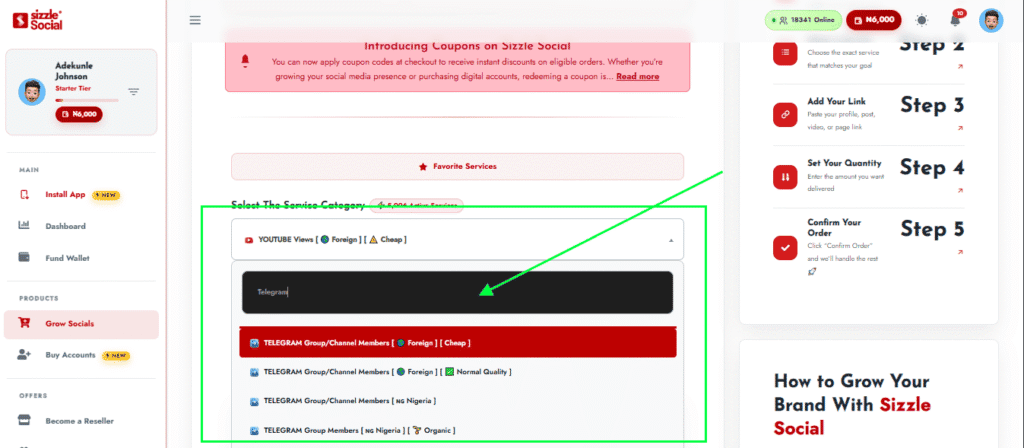
Start by visiting the official platform portal at Sizzle Social to set up your growth campaign. Log into your dashboard using your registered account credentials, or create a new account in just a few clicks if you are a first-time user.
Once logged into the main dashboard:
- Navigate to the primary category selection menu located on the dashboard sidebar.
- Select the dedicated platform options to explore available growth packages.
- Review specific service descriptions, speed estimates, and delivery parameters to match your goals.
- Learn how targeted solutions accelerate member count growth by reading the detailed Telegram members growth guide.
- Select your chosen package to open the streamlined order form.
Starting your campaign on a trusted platform ensures your group growth progresses smoothly. Navigating clear service menus allows admins to select growth options tailored precisely to their specific budget and timeline.
Accessing expert growth services provides the foundational social proof required to scale online communities. Once set up, your group gains the initial visibility needed to attract consistent organic traffic.
Navigating the service interface lets community managers select options matched to their specific campaign goals. Review service parameters carefully, evaluating delivery timelines and processing speeds to ensure your order fits your ongoing marketing initiatives.
Step 2: Enter Your Telegram Group Link and Choose a Package
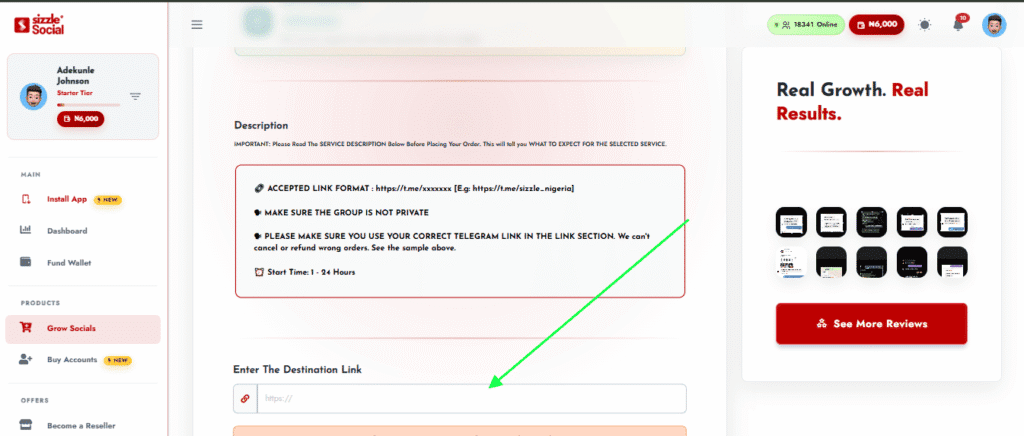
Setting up your campaign correctly requires submitting accurate group destination details. Copy your public group invite link directly from your Telegram group settings.
Follow these verification steps when submitting your link:
- Confirm your group privacy status is set to public so new members can join without technical blocks.
- Paste your copied invite link into the destination URL field inside the order window.
- Verify the URL contains no extra spaces or formatting errors before proceeding.
- Compare available package options based on delivery speed and target retention rates.
- Choose a package level aligned with your immediate growth targets.
Entering precise link information ensures seamless service fulfillment. Verifying link accessibility before placing an order prevents fulfillment delays and ensures immediate processing.
Selecting a suitable package gives admins full control over their group’s growth trajectory. Clear selection options make scaling community numbers straightforward and effective.
Double-checking destination link configurations prevents service fulfillment delays. Ensure your target Telegram group remains set to public during the order processing window, allowing automated systems to process additions cleanly.
Step 3: Enter the Number of Members and Review Your Order
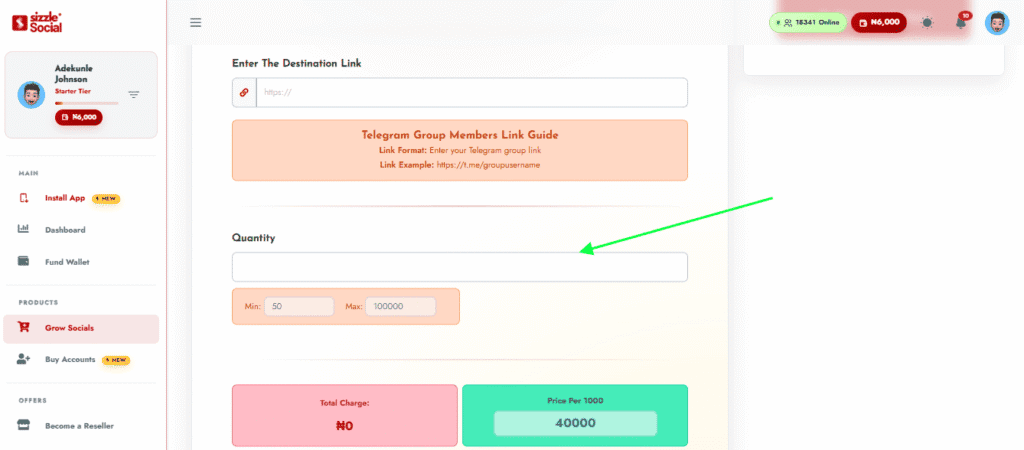
Defining exact member target numbers allows administrators to manage campaign budgets effectively. Input the exact number of members you wish to add to your group.
Review your order details carefully before final submission:
- Enter your desired member volume into the quantity input field.
- Verify that the total order cost updates correctly based on your chosen quantity.
- Review your group link format once more to ensure complete accuracy.
- Check delivery timeline details to understand estimated fulfillment times.
- Confirm that your group settings permit incoming members without link restrictions.
Careful review prevents simple input errors and ensures smooth campaign execution. Setting realistic member targets allows for steady, natural-looking audience expansion.
Reviewing your order parameters builds confidence in your growth strategy. Clear quantity controls make it easy to scale group capacity according to your exact operational requirements.
Inputting precise quantities allows community managers to plan incremental growth milestones. Aligning order volumes with upcoming content launches, promotional events, or product releases helps maximize social proof during high-traffic campaigns.
Thoroughly checking order summary details ensures accurate service execution. Verifying link formats and destination settings before confirming submission guarantees rapid processing without manual interventions.
Step 4: Fund Your Wallet and Place Your Order
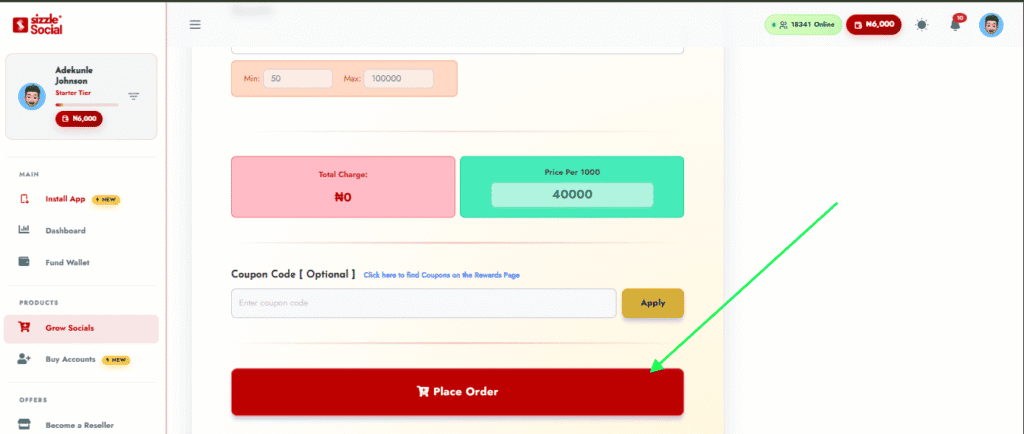
Completing your growth order requires ensuring your account wallet holds sufficient funds. The platform supports multiple convenient local payment methods for quick wallet funding.
To complete your payment and initiate processing:
- Select your preferred payment option, including local bank transfer, card payment, or USSD code.
- Follow the on-screen prompts to transfer funds directly into your secure wallet.
- Confirm that your updated wallet balance covers the total order summary amount.
- Click the final submit button to send your campaign directly into the processing queue.
- Save your unique order ID number to track real-time delivery progress.
Secure wallet funding processes instantly, allowing your growth order to enter the processing queue without delay. Reliable payment options make account management easy for group admins.
Once submitted, automated delivery systems begin populating your group with new members. Fast execution allows you to establish immediate social proof and focus on creating engaging group content.
Utilizing integrated checkout processes allows group managers to execute marketing campaigns quickly. Instant wallet funding options provide seamless processing, letting you scale member numbers without administrative delays.
Monitor Member Growth and Check Your Group’s Engagement
After your order is processed, track incoming members directly through your Telegram group settings. Watching member count metrics allows admins to measure overall growth momentum in real time.
Monitoring member growth provides clear insights into campaign performance. Observing real-time additions confirms service delivery while helping admins adjust content schedules to engage incoming audiences.
Leveraging growth tools establishes the baseline audience needed to trigger organic word-of-mouth growth. A high member count creates strong social proof, making future organic promotion efforts significantly more effective.
Active monitoring after campaign submission ensures your group environment remains welcoming as member volume grows. Pin key informational resources, welcome incoming visitors, and prompt ongoing discussions to convert social proof into sustained chat participation.
Analyzing conversion trends helps community admins measure the impact of improved social proof. As member counts rise, track how incoming organic traffic responds to your pinned resources, call-to-action buttons, and promotional links.
How to Keep Telegram Group Members Active

Attracting new group members represents only the first phase of community building; maintaining an active, spam-free space ensures long-term audience retention. Without continuous engagement and clear moderation, growing groups quickly turn silent or get overwhelmed by spam accounts.
Keeping a group dynamic requires deliberate administrative planning. Successful admins establish clear posting rules, launch daily conversation topics, use native interactive tools like polls, and deploy protective moderation bots to keep discussions safe and friendly.
Group engagement relies heavily on atmosphere. When members enter a clean, well-moderated space with active discussions and clear guidelines, they feel comfortable contributing. Active moderation transforms passive lurkers into valuable, long-term group participants.
Sustaining long-term community participation requires active community facilitation. Admins must act as hosts, initiating conversations, asking follow-up questions, and connecting members with shared interests. This consistent personal involvement sets an approachable tone, encouraging shy members to join discussions.
Establishing reliable posting rhythms keeps your group chat active daily. Scheduling structured features, such as Monday Q&As, midweek polls, or Friday project reviews, builds community habits and gives members consistent reasons to return.
1. Set Clear Group Rules and Welcome New Members
Establishing clear community guidelines early sets a constructive tone for incoming members. Clear rules prevent spam, control self-promotional links, and protect overall chat quality.
According to community management benchmarks published by CMX Hub, digital communities that implement automated onboarding workflows and visible rules achieve up to 40% higher 30-day retention rates than unmoderated groups.
Also, to build a professional onboarding flow for new members, implement these steps:
- Set up automated welcome bots (such as Rose Bot or Group Help Bot) to greet new members instantly upon entry.
- Pin a comprehensive welcome message detailing community rules, key resource links, and admin contacts at the top of the chat screen.
- Clearly define policies regarding external promotional links, affiliate posts, inappropriate language, and silent hours.
- Direct new joiners to complete specific introductory tasks, such as introducing themselves or answering a quick icebreaker question.
- Restrict media-sharing permissions for brand-new accounts for their first 24 hours to prevent instant link spam.
Automated welcome messages make incoming members feel recognized immediately while establishing clear behavioral standards. Clear rules reduce moderation work by preventing disruptive posts before they occur.
A well-structured onboarding flow transforms casual joiners into active participants. When members understand community expectations from day one, group quality remains high even as member volume scales.
Constructing an effective onboarding workflow involves greeting new joiners and guiding them toward immediate participation. Automated welcome bots can trigger personalized greeting messages containing quick links to community guidelines, ongoing discussion topics, and pinned FAQs. Prompting new members to share a brief introduction helps them make their first post quickly, breaking the ice early.
2. Use Discussions, Polls, and Questions to Encourage Participation

Keeping group conversations active requires consistent effort from community administrators. Initiating regular interactive activities encourages silent members to contribute to daily chats.
Effective tactics for driving daily group participation include:
- Ask open-ended daily questions: Prompt members to share opinions on trending industry news, market movements, or personal experiences.
- Run native Telegram polls: Create simple multiple-choice polls to gather community opinions, test knowledge, or decide upcoming content topics.
- Host live Telegram Voice Chats: Schedule regular audio Q&A sessions or informal voice chats to build direct personal connections with members.
- Launch member spotlight features: Highlight active participants weekly to recognize valuable contributions and encourage others to post.
- Host short trivia quizzes: Use quiz mode in Telegram polls to run engaging educational contests with small rewards for top participants.
Interactive content breaks the ice for quiet members, turning passive readers into active discussants. Polls offer a low-friction entry point for engagement, allowing users to participate with a single tap.
Consistently starting discussions keeps your group active and interesting. A lively chat feed attracts new members while giving existing participants compelling reasons to return daily.
Driving consistent interaction requires lowering the barrier to entry for hesitant members. Native Telegram polls provide an easy way for silent users to participate without writing long responses. Asking timely questions about current industry trends, tool preferences, or market predictions lets members share their perspectives with a single tap.
3. Moderate Spam and Remove Suspicious Accounts
Unchecked spam ruins group quality faster than any other issue. Protecting your group from promotional bots and scam accounts requires proactive, automated moderation systems.
Essential security steps to protect your group quality include:
- Enable Telegram’s native Aggressive Anti-Spam protection setting inside your group administration permissions panel.
- Install verification CAPTCHA bots (such as Shieldy or Telegram Sentinel) that require new members to solve a simple puzzle before posting.
- Restrict specific member permissions, disabling link previews, GIF sharing, and sticker posts for new joiners.
- Set up keyword blacklists that automatically delete messages containing common scam phrases, crypto wallet traps, or explicit language.
- Appoint active admin moderators across different time zones to monitor reported messages and ban disruptive users immediately.
Automated moderation bots work continuously to intercept automated spam before it reaches your main group chat feed. Keeping your chat clean protects members from scams and maintains professional community standards.
Proactive moderation preserves group value and builds long-term user trust. Members stay active in communities where discussions remain clean, helpful, and free from constant spam.
Maintaining robust security protocols becomes vital as your group scales. Enabling Telegram’s native Aggressive Anti-Spam protection automatically filters out common bot profiles and malicious messages. Adding verification CAPTCHA bots forces new arrivals to pass a quick test before sending messages, stopping automated spam scripts at the door.
4. Track Member Retention and Identify Why People Leave
Tracking join and leave metrics through Telegram Group Statistics provides clear insights into community health. Analyzing drop-off trends allows admins to identify operational issues and refine their content strategies.
Key steps for analyzing and improving member retention include:
- Review weekly growth charts inside Telegram’s native statistics to identify sudden spikes in member departures.
- Cross-reference departure spikes with recent chat activity to pinpoint potential triggers, such as excessive promotional posts or spam waves.
- Gather direct feedback by polling remaining members about content quality, posting frequency, and moderation standards.
- Adjust daily posting schedules if metrics show members are muted or overwhelmed by high message volume.
- Optimize administrative workflows to ensure user questions receive fast, helpful answers.
Regularly auditing community metrics allows administrators to catch potential issues early. Understanding why members leave helps you make informed adjustments to content delivery and moderation rules.
Focusing on member retention ensures long-term community success. Keeping existing members engaged reduces the need for constant acquisition, creating a stable, high-value digital asset.
Monitoring community metrics allows admins to track user behavior and retention patterns accurately. Native Telegram analytics show daily join rates, departure numbers, message volume trends, and active discussion times. Comparing departure spikes against your chat history helps identify friction points, such as spam outbreaks, off-topic debates, or over-promotional broadcasts.
Here’s How to Build a Telegram Community That Delivers Long-Term Value
Growing a thriving Telegram group requires balancing clear community positioning, consistent organic promotion, active daily engagement, and efficient growth tools. By maintaining clean moderation, posting high-value content, and scaling your reach with Sizzle Social, your Telegram group turns into a powerful, high-converting asset for your brand.
Long-term success relies on maintaining high content quality while expanding your audience. Scaling member numbers provides necessary social proof, but continuous daily value keeps members active and loyal over time.
Begin optimizing your group profile, setting up moderation bots, and cross-promoting your invite link today. Combining organic growth fundamentals with dependable social media growth tools builds an active Telegram community that drives real business results.
Building a lasting digital community is an ongoing journey that requires continuous optimization. As your member base expands, your administration workflows, moderation rules, and content schedules must evolve alongside it. Combining steady organic promotion with strategic growth services like Sizzle Social establishes the social proof and member momentum needed to dominate your industry niche.
Frequently Asked Questions
Telegram offers two distinct content distribution methods, each engineered for different marketing outcomes. A group allows every member to share text messages, uploaded media files, external links, and short audio snippets, and this open environment builds quick trust because members learn directly from each other rather than relying solely on admin updates. Groups host up to 200,000 individual members who participate actively in real-time messaging, and everyone inside can post messages, comment on topics, upload files, and reply directly to fellow participants. A channel restricts posting permissions exclusively to designated administrators, so subscribers consume broadcasted updates quietly without cluttering the main screen. This format works exceptionally well for sharing daily announcements, promotional deals, signal alerts, and downloadable digital products. Groups enable direct social commerce where community members convert through peer recommendations and live discussions, while channels monetized through sponsorship or exclusive content rely on high view-to-subscriber ratios. Choosing blindly often leads to frustrated members or silent comment sections, so evaluating your daily capacity to moderate user discussions is essential.
Selecting a Telegram group makes sense when your primary business objective centers on open dialogue, crowd-sourced insights, customer support, or user networking. Groups turn passive content consumers into active participants. Key environments where Telegram groups deliver optimal performance include interactive online learning cohorts where students discuss lessons and ask tutors direct questions, customer feedback communities where sellers gather feature requests and troubleshoot user issues, crypto and financial trading discussion hubs where traders share real-time chart analysis, local networking clubs and professional associations requiring direct peer-to-peer networking, and software user communities where developers and end users discuss product updates. Building a vibrant group environment requires creating spaces where members feel valued: when members receive fast answers to their questions from both admins and fellow participants, community loyalty grows rapidly. This collaborative structure reduces customer support overhead because experienced members often assist new joiners naturally. Telegram groups also serve as powerful incubators for market research, because business owners can monitor daily messages to identify common pain points and emerging customer desires.
Opting for a Telegram channel becomes the superior choice when your main objective involves controlled broadcast messaging, high-volume news distribution, or exclusive content drops. Channels act as personal publishing feeds where posts remain uncluttered by continuous user messages. Key operational scenarios where channels excel include daily news outlets and market analysis blogs broadcasting curated articles, financial signal providers delivering time-sensitive alerts without chat interruptions, e-commerce stores sharing product drop notifications and flash sales, content creators publishing exclusive audio downloads and PDF guides, and corporate brands issuing official press releases and service alerts. Channels offer complete control over your brand’s voice and messaging schedule, and posts display cleanly with cumulative view counters providing clear data on how many subscribers view each update. Because channels lack general discussion feeds, administrators save significant time on moderation: there is no need to filter user spam, delete self-promotional links, or manage inter-member conflicts. From an operational management standpoint, channels require significantly fewer administrative resources, and without live user chats to monitor, single creators or lean teams can run large broadcast networks efficiently.
Combining a Telegram channel with a linked group thread delivers a flexible community layout. Telegram allows group administrators to connect a designated group directly to a main channel as a discussion forum. Whenever an administrator posts an update inside the broadcast channel, Telegram automatically generates a dedicated comment section under that post, and subscribers click the comment button to enter the attached group thread where they discuss that specific post. This hybrid setup keeps your primary broadcast channel clean while giving subscribers a dedicated space for detailed group discussion. The strategic advantages include maintaining a clean channel feed for important announcements while providing an interactive outlet for community chat, automatically creating organized discussion threads for every broadcasted post, allowing channel subscribers to opt into group discussions without cluttering their main chat list, giving administrators full control over group permissions while preserving one-way broadcasting authority, and increasing overall community retention by catering to passive readers and active discussants simultaneously. This structural separation protects your central broadcast hub from chat clutter, and admins can moderate comment sections independently.
Your group title, display image, and public description create the crucial first impression for prospective members, and a vague or incomplete group profile causes visitors to leave immediately without tapping join. Craft a bold, searchable group title by including your primary focus keyphrases naturally alongside your brand name so users discover your group through native Telegram searches. Write a value-driven description detailing who the group serves, what daily benefits members receive, and what specific topics are covered. Define community guidelines briefly inside the description to set immediate standards for constructive behavior, and add a clear call to action prompting visitors to click join, introduce themselves, and check pinned messages. Use professional visual branding by uploading a high-resolution logo or branded avatar that looks recognizable in small chat previews. Clear descriptions also filter out non-target users before they join, keeping your community focused on relevant topics, and setting clear expectations in your bio builds a strong foundation for high group engagement. Explicit statements help potential members confirm they have found the right destination before clicking join.
Telegram invite links serve as direct access pathways to your group, and customizing invite link settings inside Telegram creates clean, branded URLs that build user trust. Strategic places to position your group invite link include official website headers, resource pages, contact sections, and footers; automated welcome emails, newsletter footers, and customer receipt confirmations; author bios, forum signatures, and active online thread discussions; digital lead magnets, free eBook downloads, and webinar thank-you pages; and professional business cards, presentation slides, and printed marketing materials using custom QR codes. Placing invite links across high-traffic digital assets establishes a continuous funnel of new group members, because anyone interacting with your brand online encounters a direct path into your Telegram community. Maximizing link placement involves using Telegram’s link management features effectively: admins can generate unique invite links dedicated to specific acquisition channels, such as website banners, email newsletters, or partner campaigns, and assigning distinct links to each channel lets you track conversion rates accurately and double down on top-performing pathways. Setting member limits or expiration times creates helpful urgency for promotional campaigns.
Cross-promoting your Telegram group across established social media channels unlocks massive traffic funnels, and converting social followers into Telegram members transfers audience ownership onto a platform with higher push-notification open rates. Effective strategies include sharing short teaser posts or exclusive tips on WhatsApp Status alongside a direct invite link, writing detailed analytical threads on X directing readers to your group for deeper discussions, adding your link to Instagram and TikTok bio landing pages and featuring call-to-action cards in story highlights, mentioning your Telegram group during YouTube video tutorials and placing direct links at the top of descriptions, and publishing professional industry posts on LinkedIn to invite business contacts. Cross-promotion works best when offering exclusive incentives for joining: rather than simply asking followers to join, offer access to exclusive Q&A sessions, early product announcements, or free downloadable resources. To convert social audiences efficiently, tailor promotion to match each platform’s specific format: on X, break down complex concepts into engaging educational threads, and on Instagram or TikTok, post short video previews showcasing live discussions available inside your group.
Members stay inside communities that consistently deliver clear, actionable value. Publishing high-quality educational content, market insights, audio notes, and free resource templates gives members compelling reasons to remain active and invite their peers. Digital communities prioritizing consistent high-value content experience significantly higher long-term retention and organic referral rates. To establish strong content authority inside your group, focus on sharing daily market updates, industry breakdowns, and practical tips that members can apply immediately; uploading exclusive PDF cheat sheets, reference templates, and educational infographics directly to the group file section; recording casual voice notes sharing quick industry insights to build personal connection; hosting regular live Q&A sessions where members receive direct answers to their specific questions; and highlighting valuable member contributions to encourage ongoing participation. When group members derive continuous value from your daily posts, they naturally share group messages with external contacts, and this organic forwarding mechanism brings targeted users into your community without extra ad spend. Sustaining high engagement requires building a structured content schedule containing diverse media formats, alternating text insights with quick voice notes and infographic summaries.
Combining organic promotional tactics with dedicated social media growth platforms accelerates your audience expansion curve. New visitors evaluate existing member totals before deciding to join a community, and a group with a low member count often struggles to gain momentum because prospective joiners doubt its activity level. Using specialized tools to scale your initial member numbers builds immediate credibility, making organic visitors far more likely to join and participate. Scaling your member base using growth tools establishes the baseline visibility needed to make organic campaigns effective: high member numbers signal authority and activity, reducing joining friction for organic search traffic, and when visitors land in an established group, they convert faster than in empty chat rooms. Using specialized expansion services alongside consistent content creation creates a powerful growth loop, because fast initial volume provides essential social proof while your daily value delivery converts new visitors into active long-term community members. Selecting specialized growth packages creates an established foundation for long-term community expansion, and establishing baseline member volume early accelerates the return on investment of your external cross-promotions.
Setting up a campaign correctly requires submitting accurate group destination details. Start by navigating to the platform dashboard and selecting the dedicated Telegram service options to explore available growth packages. Review specific service descriptions, speed estimates, and delivery parameters to match your goals, then select your chosen package to open the streamlined order form. Copy your public group invite link directly from your Telegram group settings, confirm your group privacy status is set to public so new members can join without technical blocks, paste the copied invite link into the destination URL field, verify the URL contains no extra spaces or formatting errors, and compare available package options based on delivery speed and target retention rates. Enter your desired member volume into the quantity input field, verify that the total order cost updates correctly, review your group link format once more, check delivery timeline details, and confirm that your group settings permit incoming members without link restrictions. To complete payment, select your preferred payment option, including local bank transfer, card payment, or USSD code, follow the on-screen prompts, and save your unique order ID number to track delivery progress.
Establishing clear community guidelines early sets a constructive tone for incoming members, and clear rules prevent spam, control self-promotional links, and protect overall chat quality. Communities that implement automated onboarding workflows and visible rules achieve significantly higher 30-day retention rates than unmoderated groups. To build a professional onboarding flow, set up automated welcome bots to greet new members instantly upon entry, pin a comprehensive welcome message detailing community rules, key resource links, and admin contacts at the top of the chat screen, clearly define policies regarding external promotional links, affiliate posts, inappropriate language, and silent hours, direct new joiners to complete specific introductory tasks such as introducing themselves or answering a quick icebreaker question, and restrict media sharing permissions for brand-new accounts for their first 24 hours to prevent instant link spam. Automated welcome messages make incoming members feel recognized immediately while establishing clear behavioral standards, and clear rules reduce moderation work by preventing disruptive posts before they occur. A well-structured onboarding flow transforms casual joiners into active participants.
Keeping group conversations active requires consistent effort from community administrators, and initiating regular interactive activities encourages silent members to contribute to daily chats. Effective tactics for driving daily participation include asking open-ended daily questions that prompt members to share opinions on trending industry news, market movements, or personal experiences; running native Telegram polls to gather community opinions, test knowledge, or decide upcoming content topics; hosting live Telegram Voice Chats to schedule regular audio Q&A sessions or informal voice chats that build direct personal connections; launching member spotlight features to highlight active participants weekly; and hosting short trivia quizzes using quiz mode in Telegram polls to run engaging educational contests with small rewards. Interactive content breaks the ice for quiet members, turning passive readers into active discussants, and polls offer a low-friction entry point for engagement because users can participate with a single tap. Driving consistent interaction requires lowering the barrier to entry for hesitant members, and asking timely questions about current industry trends lets members share their perspectives with a single tap.
Unchecked spam ruins group quality faster than any other issue, and protecting your group from promotional bots and scam accounts requires proactive, automated moderation systems. Essential security steps include enabling Telegram’s native Aggressive Anti-Spam protection setting inside your group administration permissions panel, installing verification CAPTCHA bots that require new members to solve a simple puzzle before posting, restricting specific member permissions by disabling link previews and GIF sharing for new joiners, setting up keyword blacklists that automatically delete messages containing common scam phrases or explicit language, and appointing active admin moderators across different time zones to monitor reported messages and ban disruptive users immediately. Automated moderation bots work continuously to intercept automated spam before it reaches your main group chat feed, and keeping your chat clean protects members from scams and maintains professional community standards. Maintaining robust security protocols becomes vital as your group scales: enabling native Aggressive Anti-Spam protection automatically filters out common bot profiles, while adding verification CAPTCHA bots forces new arrivals to pass a quick test before sending messages, stopping automated spam scripts at the door.
Tracking join and leave metrics through Telegram Group Statistics provides clear insights into community health, and analyzing drop-off trends allows admins to identify operational issues and refine content strategies. Key steps for analyzing and improving retention include reviewing weekly growth charts inside Telegram’s native statistics to identify sudden spikes in member departures, cross-referencing departure spikes with recent chat activity to pinpoint potential triggers such as excessive promotional posts or spam waves, gathering direct feedback by polling remaining members about content quality and moderation standards, adjusting daily posting schedules if metrics show members are muted or overwhelmed by high message volume, and optimizing administrative workflows to ensure user questions receive fast helpful answers. Native Telegram analytics show daily join rates, departure numbers, message volume trends, and active discussion times, and comparing departure spikes against your chat history helps identify friction points such as spam outbreaks, off-topic debates, or over-promotional broadcasts. Gathering direct feedback through anonymous community polls provides valuable clarity on member preferences. Focusing on member retention ensures long-term community success, because keeping existing members engaged reduces the need for constant acquisition.
Growing a thriving Telegram group requires balancing clear community positioning, consistent organic promotion, active daily engagement, and efficient growth tools. By maintaining clean moderation, posting high-value content, and scaling your reach strategically, your Telegram group turns into a powerful, high-converting asset for your brand. Long-term success relies on maintaining high content quality while expanding your audience: scaling member numbers provides necessary social proof, but continuous daily value keeps members active and loyal over time. Building a lasting digital community is an ongoing journey that requires continuous optimization, because as your member base expands, your administration workflows, moderation rules, and content schedules must evolve alongside it. Combining steady organic promotion with strategic growth services establishes the social proof and member momentum needed to dominate your industry niche. Prioritize high content standards, protect your community atmosphere with robust moderation tools, and actively engage your audience daily. By serving your members consistently and maintaining a clean, dynamic environment, your Telegram group will serve as a reliable engine for audience growth, brand authority, and customer retention for years to come.