

Table of Contents
A customer places an online order for native fabrics in Aba, pays through a local bank transfer, and receives a tracking code. Every update brings relief, while any unexpected pause creates instant worry. The same feeling applies when boosting page engagement or campaign reach on a digital marketing dashboard.
Every dashboard update provides insight into how campaign requests move behind the scenes. When a user submits a link for profile followers, video likes, or page views, the account dashboard assigns a tracking label. Understanding what is Social Media Growth Order Statuses helps creators, vendors, and marketers track campaign progress, spot issues early, and know when to reach out for support.
What Are Social Media Growth Order Statuses?

Social media growth order statuses serve as automated tracking markers used by digital promotion platforms to display the live state of a submitted service request. These markers clarify whether a request sits in a queue, actively delivers, reaches final count, or adjusts due to server constraints. Tracking these updates keeps digital marketing investments transparent and easy to manage.
Understanding these operational states ensures account owners make informed decisions regarding campaign scheduling and budget management. Digital marketing engines execute millions of requests daily across diverse networks, making standardized status markers essential for tracking request flows without relying on manual intervention.
When users gain full visibility into account backend routines, they eliminate guesswork. Instead of wondering if a server registered a transaction or if payment gateway webhooks succeeded, status codes communicate live operations directly to user interfaces. This clarity allows marketers to coordinate product launches, influencer announcements, and sponsored content drops with absolute precision.
Beyond basic order monitoring, status tracking frameworks act as an essential communication bridge between modern social network APIs and user management panels. Each status code reflects complex database operations occurring in real time across distributed server clusters. When a promotional network receives a query, database instances analyze account balances, evaluate server load allocations, confirm endpoint accessibility, and assign specialized job parameters. Without standardized tracking markers, managing high-volume promotional schedules would require manual database inquiries, slowing down delivery timelines and creating operational friction for digital agencies.
What Do Order Statuses Mean On An SMM Panel?
On an SMM panel, order statuses function as real-time progress indicators for active digital marketing campaigns. The moment a user pastes a target page link and enters a preferred quantity, the central database generates a unique tracking identification code alongside a dedicated status label.
These labels communicate internal server actions without requiring manual messaging back and forth. Instead of waiting for email updates or chasing account managers, account owners look at the dashboard status to determine if a request passes link checks, moves through active dispatch networks, or settles into total account balances. Automated monitoring ensures that every user maintains clear visibility over marketing budgets and execution speed.
System databases track each transaction ID to preserve server logs and historical data. This tracking allows campaign managers to evaluate historical fulfillment speeds, server load balances, and overall provider reliability over extended operational cycles. Clear status reporting also protects campaign investments by creating an immutable ledger of initial parameters. When target metrics match recorded parameters, accounts maintain structural stability, ensuring future promotional campaigns launch from accurate baseline metrics.
System panels interpret status codes through sophisticated monitoring microservices. These automated background routines query target profile states, inspect network header responses, and measure dispatch rates. For example, when an order status reflects an operational transition from queue holding to active dispatch, the backend engine has completed structural syntax checks, reserved account credits, verified platform rate limits, and established secure API worker connections.
However, to explore how structured delivery management pairs with overall account expansion, examine our complete guide to real social media growth in Nigeria.
How Does A Social Media Growth Order Move Through Each Stage?

Every digital promotion request follows a sequential lifecycle from initial submission to final balance settlement. Understanding this progression helps set realistic expectations for campaign timelines:
- Submission and System Queueing: Users select a service, paste target content or profile links, enter quantities, and submit. The platform assigns a Pending status while validating link structures, verifying format parameters, and reserving necessary wallet funds.
- Server Routing: Once verification checks pass, system nodes route jobs to active delivery servers. At this point, status labels change to Processing or In Progress.
- Active Metric Delivery: Engagement counters start updating on targeted posts, videos, profiles, or channels.
- Final Resolution: As soon as delivery engines fulfill target quantities, the platform tags tasks as Completed. If profile privacy limits, platform updates, or account restrictions block portions of requests, systems flag tasks as Partial or Canceled, triggering automatic balance adjustments where necessary.
- Post-Delivery Audit: Database systems perform background checks to confirm that delivered metrics match recorded baseline metrics before closing operational loops.
Beyond basic execution steps, backend architecture constantly monitors server throughput speeds to prevent platform rate-limiting algorithms from flagging target pages. This gradual dispatching safeguards target profiles while guaranteeing consistent progress. System verification nodes also monitor API endpoint connections between promotional servers and social media target networks. If a destination platform initiates unexpected system updates mid-delivery, routing nodes gracefully pause jobs, update order tags, and await server stabilization before resuming execution.
Automated workflow systems continuously validate each stage transition against system database logs. When jobs transition from queue holding into active processing, dispatch workers divide large delivery volumes into manageable micro-batches. Splitting high-volume orders prevents sudden, unnatural metric spikes on target profiles, preserving organic account trust metrics across major social platforms.
If target social networks encounter temporary network congestion during delivery runs, panel routing systems automatically adjust worker speeds. Jobs remain safely in progress while dispatch algorithms re-route metrics across secondary node networks. This structural resilience guarantees that technical network delays resolve automatically without compromising account integrity or manual management intervention.
Understanding every phase transition within order execution pipelines prevents operational mistakes during intensive marketing drives. When digital agencies launch multi-n
etwork promotions, tracking lifecycle transitions ensures that content releases align precisely with active metric delivery phases. For example, scheduling press releases or sponsored product announcements right as promotional orders transition into active delivery maximizes initial visibility signals across platform recommendation engines.
Where Can You Check Your Social Media Order Status?
Users monitor every social media order status directly within personal user portals through clear steps:
Step 1: Access account control centers using valid login credentials via the Sizzle Social dashboard.
Step 2: Open the Order History tab located on primary side menus.
Step 3: Locate specific transactions using unique Order IDs, submitted links, or submission dates.
Step 4: Check status columns alongside recorded start counts, remaining quantities, and initial charge amounts.
Step 5: Refresh system views periodically during active campaigns to observe live count updates.
Modern user portals feature search filters, date parameters, and status tags to simplify transaction auditing across high-volume accounts. Agencies managing multiple client accounts rely heavily on these centralized management tools to maintain detailed delivery receipts across campaigns.
Additionally, API integration options allow professional resellers to sync panel status codes directly with custom billing portals or client-facing web applications. Automated webhook listeners receive instant status change notifications, allowing real-time client updates without manual portal checks.
Navigating dashboard order monitoring tools provides valuable operational insights beyond basic status tracking. High-performance user portals display granular transaction data, including timestamp logs for every stage transition, precise initial baseline counts, calculated remaining balances, and dynamic delivery speed estimates. Monitoring these metrics allows marketing operations teams to evaluate campaign execution velocity accurately across diverse target networks.
Managing multi-client promotional portfolios requires systematic status auditing protocols. Experienced agency teams utilize custom CSV export features inside order panels to generate weekly delivery reports for brand clients. Exported records document precise start counts, verified final numbers, total investment expenditures, and exact execution timelines, establishing transparent operational proof for client marketing campaigns.
What Is The Difference Between Order Status And Delivery Progress?

Order status and delivery progress describe two distinct elements of promotional requests:
| Tracking Feature | Order Status | Delivery Progress |
| Definition | Broad system state of submissions. | Numeric changes occurring on target pages. |
| Primary Examples | Pending, Processing, Completed, Partial, Canceled. | Start count: 1,200 / Current count: 1,800 / Target: 2,200. |
| Core Function | Shows operational state and backend health. | Tracks numerical count movement over time. |
| Update Mechanism | System event triggers and server logs. | Periodic metric counts scraped from public page counters. |
| User Action | Signals when to wait, inspect links, or contact support. | Confirms delivery speed and retention stability. |
Monitoring both metrics provides complete oversight. While order status confirms that backend software runs smoothly, delivery progress confirms that actual audience numbers grow as intended.
System order status updates operate on internal server triggers, whereas delivery progress relies on public platform API scrapers. Occasionally, social media platforms cache public counters, causing small discrepancies between internal panel delivery numbers and visible page counters.
Understanding this technical operational gap prevents unnecessary worry when public counters lag behind backend dispatch rates. Waiting for network cache clearing typically reconciles visible engagement numbers with system dashboard metrics within short timeframes.
Differentiating systemic status markers from live numerical metric progress prevents misinterpreting platform performance data. An order status code reflects internal server state conditions, system database allocation, and API endpoint readiness. In contrast, delivery progress reflects actual numerical metric movements verified on destination social media pages.
While an order status code updates instantly when system servers approve job parameters, visible metric counters on public platform pages depend on external caching schedules, regional CDN server syncing, and public platform database updates.
Social media platforms deploy distributed Content Delivery Networks (CDNs) to manage global user traffic efficiently. When promotional engines dispatch engagement units to a specific post or profile, global servers record the metric additions immediately inside central databases. However, public user interfaces reading from localized edge caches might display outdated numerical counts for several minutes or hours.
Understanding this technical distinction ensures campaign operators evaluate real performance accurately, distinguishing between systemic server pauses and routine public counter caching delays.
However, to understand how tracking metrics fit into broader profile expansion strategies, read our guide on how Nigerian brands increase Instagram followers fast.
Understand Pending And Processing Order Statuses

The initial phase of any digital promotion determines how quickly active metrics begin reflecting on user pages. Knowing how early operational states function prevents unnecessary worry while server networks initialize.
Initial stages act as security gates, protecting campaign budgets from avoidable submission errors. Proper link formatting and target visibility checks ensure that resources allocate only to active, reachable digital destinations.
When marketing teams understand early stage parameters, campaign setup routines become significantly more efficient. Verifying target links before submission ensures rapid queue progression and prevents routing holds.
Understanding the mechanics of early order lifecycle stages helps digital marketers design optimized campaign schedules. Initial verification routines execute background security checks, account balance confirmations, and target link structural validation. By screening incoming data parameters before triggering automated dispatch nodes, system panels eliminate technical conflicts, protect database stability, and guarantee clean metric routing across targeted social platforms.
Proper queue management ensures that marketing investments receive immediate execution priority. When user portals route verified requests into operational nodes, dispatch routines establish connection pipelines with active delivery servers. Recognizing how pending state verifications transition seamlessly into active processing states empowers growth strategists to execute time-sensitive promotions with complete operational confidence.
Early order lifecycle management requires strict adherence to technical submission guidelines. When automated systems accept incoming requests, verification daemons evaluate submitted URLs against platform-specific syntax templates. Link validation routines verify protocol headers, domain structures, parameter query strings, and media asset identifiers. Passing string validation checks signals database controllers to reserve wallet funds and move tasks into active dispatch pipelines.
What Does Pending Mean On A Social Media Growth Order?

A Pending status indicates that an order sits in the system queue awaiting backend verification. The platform records request details and logs payment deductions from account balances, but active delivery has not yet started.
During this stage, automated checks run to verify link syntax, service availability, system capacity, and database sync status before routing orders to operational nodes. System security protocol requires this verification pause to block invalid URLs, broken formats, or inaccessible private profiles from overloading delivery servers.
Pending validation protects user account balances by verifying order feasibility before dispatching resources. If link checks uncover formatting errors, system filters reject jobs early, preventing locked funds or unfulfillable tasks.
Queue holding times vary depending on overall system workload and target platform status. High-demand promotional hours slightly extend pending duration, though automated load balancers work continuously to move requests swiftly into execution phases.
System verification pipelines execute automated string parsing routines during pending states. These routines analyze submitted link formats, cross-referencing domain structures, protocol headers, and resource parameters against expected platform syntax rules. If an order contains malformed parameters, system logic flags the submission early, preventing broken job routines from entering core server dispatch pools.
Furthermore, pending verification nodes perform database account state checks to confirm target profile accessibility. If an order target resolves to an inactive account handle, a private page, or an age-restricted video URL, automated validation holds the job in queue. This automated safety layer protects client promotional budgets, ensuring server resources engage only when destination links satisfy all technical operational criteria.
Pending status routines execute essential financial verification checks alongside technical link audits. Database ledgers confirm that user account balances contain adequate funds to cover total order costs based on selected service unit rates. Once financial authorization finishes, the system places a temporary ledger hold on required funds, reserving exact capital amounts without executing permanent balance deductions until job completion or partial settlement occurs.
Why Is Your Social Media Order Stuck On Pending?
Promotional orders remain queued longer than expected due to specific technical factors:
- Incorrect Link Format: Submitting account handles instead of full post URLs, or pasting profile links when reel links are required.
- Account Privacy Settings: Submitting private accounts, restricted pages, or age-gated videos that block external system access.
- High Server Queue Volume: Peak promotional periods across major marketing seasons temporarily extend server processing times.
- Target Platform Updates: According to digital industry data published by Statista, major social networks roll out frequent backend API adjustments, requiring promotional service nodes to enter brief maintenance pause cycles to ensure account safety.
- Duplicate Active Orders: Submitting new orders for exact target links while previous orders still run causes system conflicts and queue holds.
System queues systematically prioritize requests based on target platform availability and link validity. Submitting clean, accurate links ensures minimal queue resistance and faster processing starts.
When target platforms experience major infrastructure updates, promotional networks temporarily freeze pending queues to safeguard user accounts. Resuming dispatch operations only after target networks stabilize protects profiles from unexpected algorithmic flags.
Extended queue delays often trace back to temporary platform rate-limiting adjustments or API structural changes executed by target social networks. When major social platforms deploy security updates or change backend schema structures, automated promotional nodes pause job dispatches instantly. Pausing incoming queues prevents dispatch nodes from triggering system flags or generating failed delivery attempts on client targets.
Additionally, queue collisions occur when users submit multiple simultaneous requests for identical target links using conflicting service types. For example, placing a high-speed follower order alongside a slow drip-feed order for the same account handle creates database tracking locking conditions. System queues hold second submissions in pending states until primary tasks complete, maintaining clean tracking metrics and preventing server dispatch errors.
What Does Processing Mean On An SMM Panel?

A Processing (or In Progress) status signals that backend validation checks passed and servers actively dispatch engagement counters to destination links.
At this stage, public numbers on profiles, videos, or posts start to increase. Delivery speed depends on service descriptions, ranging from rapid batch delivery to gradual drip-feed distribution designed for continuous, natural account growth. System nodes constantly monitor public target metrics to ensure smooth, uninterrupted delivery flows.
During processing stages, system engines monitor rate limits to maintain natural, balanced delivery curves. Gradual delivery protects account trust scores on major social platforms, ensuring sustainable, long-term metric retention.
System algorithms dynamically adjust distribution speeds according to platform traffic patterns. Distributing growth naturally over hours or days prevents artificial spikes while maintaining steady account growth.
Active processing states represent the core execution engine of digital marketing panels. During this phase, automated worker processes establish active API sessions, streaming metrics to target destinations according to pre-configured speed algorithms. Advanced distribution microservices vary delivery intervals dynamically, creating natural engagement curves that mirror organic viral expansion patterns on social networks.
System monitoring daemons track dispatch metrics continuously throughout active processing cycles. If public target pages experience temporary network timeouts or elevated latency, processing engines throttle dispatch rates automatically. Dynamic rate control ensures continuous, reliable delivery flow while protecting destination pages from sudden metric drops or rate-limit violations.
When Should You Contact Support About A Delayed Order?
Patience remains important during campaign rollouts, but clear timelines help protect promotional schedules. Reach out to customer service when:
- Orders remain on Pending past estimated start windows listed in service details (typically 6 to 24 hours).
- Status displays Processing, but no metric changes appear on posts after 24 hours.
- Progress counters freeze without movement for more than two consecutive days.
- Link errors on pending requests need immediate manual correction.
- Orders display active statuses, but target social platforms experience extended network outages.
Timely support requests allow technical teams to inspect server logs, reset stuck API routing nodes, or re-route jobs to higher-speed alternative servers. Providing precise transaction context during initial outreach ensures rapid ticket handling. Support agents quickly inspect backend log files and restore normal delivery speeds when presented with clean order data.
Determining appropriate times to initiate technical support tickets depends on evaluating service level agreements against documented platform status indicators. Service descriptions specify expected start times, average delivery speeds, and operational limits. Initiating support inquiries within normal operational windows creates unnecessary support ticket volume, slowing down response times for urgent technical issues.
When submitting technical support inquiries, providing comprehensive context speeds up database investigation routines. Support engineering teams require specific operational parameters, including unique Order IDs, exact target destination URLs, verified initial start counts, live page readings, and current dashboard status labels. Equipping support teams with accurate transaction records enables rapid database log analysis, allowing technicians to resolve queue stalls, adjust server routes, or execute manual balance adjustments efficiently.
Evaluating campaign progress against documented provider service-level guidelines prevents unnecessary ticketing friction. Most service catalog items include explicit start time specifications, detailing whether initial dispatches begin within minutes or require extended warm-up windows. When an order remains within stated operational start windows, backend servers are usually executing scheduled batch queuing protocols.
When orders require manual review, visit the official Sizzle Social Support Ticket Portal to submit request details directly to support teams for rapid resolution.
What to Know About Completed And Partial Order Statuses

The final stage of an order details how fully system servers fulfilled requested service units.
Understanding final resolution statuses ensures complete transparency around campaign spending and metric delivery. Fully processed jobs close open tasks, freeing system capacity for subsequent promotional orders.
Evaluating post-delivery metric retention helps marketers identify the most effective service options for long-term growth. Clean completed statuses provide solid baseline metrics for future promotional campaigns.
Final order resolution markers represent the administrative conclusion of promotional campaigns. System databases verify final metric counters, record transaction completion timestamps, and reconcile wallet ledger balances. Recognizing how completed and partial operational states function ensures digital marketers audit campaign budgets accurately while maintaining full transparency over marketing investments.
Comprehensive post-delivery auditing protocols protect digital account ecosystems over extended operational timelines. By verifying that final metric counts align with initial order specifications, campaign operators confirm service quality, measure retention rates, and optimize future allocation strategies across targeted social media networks.
What Does Completed Mean On A Social Media Growth Order?
A Completed status confirms that service systems delivered 100% of requested quantities to target links. Systems log final metric counts, mark jobs finished, and retain initial transaction costs from wallet balances.
Achieving a completed status means that backend servers successfully transmitted all requested data packets and public platform counters matched target limits.
Final completion flags signify that system scrapers verified target numbers on destination pages. Central databases archive full transaction receipts, documenting successful service execution. Completed statuses mark successful campaign completions, allowing growth strategists to calculate overall marketing return on investment and plan follow-up promotional strategies confidently.
Generating a completed status trigger requires automated verification daemons to execute final target link validation checks. System scrapers inspect public destination pages, reading current numerical counters to confirm that total metric additions equal or exceed original requested quantities. Once validation scripts verify target achievement, backend routines close active job threads and update database transaction records.
Final completion logging creates an immutable audit trail inside user management dashboards. Marketing analysts review these archived execution logs to track long-term account growth trajectories, verify delivery speed consistency, and compare promotional performance across diverse service categories. Clear completion documentation ensures total accounting clarity for digital agencies managing corporate marketing expenditures.
Why Is Your Order Completed Without Full Delivery?

When dashboards display completed statuses but public metrics fall short of target counts, consider potential causes:
- Natural Metric Drop-off: Social network account cleanups or natural unfollows occurred during delivery, reducing net visible growth.
- Overlap From Simultaneous Campaigns: Running parallel campaigns from multiple providers causes metric counters to reach target end counts prematurely.
- Mid-Delivery Profile Edits: Changing account usernames, making posts private, or deleting media mid-delivery interrupts tracking counters, causing premature completion flags.
- Incorrect Recorded Start Count: Public counters cached incorrect initial numbers prior to order execution.
System tracking nodes rely heavily on initial start counts logged at order submission. If parallel campaigns boost metrics simultaneously, backend scrapers detect target end counts early and mark tasks completed prematurely.
Maintaining stable profile settings and avoiding overlapping campaigns guarantees accurate metric counting. Clean delivery tracking simplifies growth verification and prevents accounting confusion.
Apparent discrepancies between system completion flags and visible public page numbers often result from backend metric math calculations tied to initial start count parameters. System algorithms calculate target completion endpoints by adding ordered quantities directly to initial recorded start counts. If public account counters undergo rapid fluctuations during active delivery runs due to organic unfollows or external promotional campaigns, calculation endpoints resolve prematurely.
Metric discrepancy analysis requires careful evaluation of initial start count logs against platform counter dynamics. When an order initializes, panel scrapers read public target metrics and write that numerical value as the baseline reference point. If a profile owner launches secondary promotional efforts simultaneously through external channels, external metric additions inflate total counts, leading panel scrapers to detect calculated target endpoints earlier than expected.
Platform edge server caching creates another common scenario for apparent metric shortfalls. Social media networks distribute public page content across global CDN nodes, updating public numeric displays on staggered time schedules. While panel scrapers connecting directly to platform API endpoints read updated metric additions immediately, public mobile apps and web browsers reading cached CDN data may display outdated numbers for several hours, creating visual gaps that resolve naturally as edge caches refresh.
On the othe hand, to learn how to manage post-delivery engagement stability on key platforms, read our analysis on why your Instagram followers are not growing in Nigeria.
What Does Partial Mean On An SMM Panel?
A Partial status means servers delivered portions of requested quantities before stopping.
Instead of marking entire jobs as failed, systems close orders at delivered counts and automatically return unfulfilled portions back to wallet balances. This partial mechanism protects campaign budgets by ensuring users only pay for successfully delivered metrics.
Partial statuses act as financial protections against target profile restrictions or sudden service interruptions. Users maintain total control over unspent funds, allowing instant re-allocation to alternative active services.
Automated refunding removes friction when managing large marketing budgets. Unfulfilled units convert back to wallet credits instantly, keeping promotional workflows moving without delay.
System panels trigger partial order resolutions whenever operational constraints prevent completing full requested quantities. Operational constraints include target post deletions, profile privacy settings changes, platform rate-limit caps, or server capacity adjustments. Tagging constrained jobs as partial rather than forcing incomplete runs preserves destination account trust ratings.
The automated partial resolution framework safeguards account funds by matching expenditure strictly to verified metric delivery. Returned wallet credits become available immediately inside user portals, allowing marketers to launch alternative campaign requests without administrative delays or payment gateway re-processing.
Partial state triggers activate safety routines designed to protect target profile integrity and user capital. When delivery nodes encounter target link errors, such as a post being archived or a profile switching to private mode, dispatch workers halt metric transmission instantly. Halting active workers prevents automated systems from generating continuous server connection errors against inaccessible platform endpoints.
How Are Undelivered Quantities And Partial Refunds Calculated?

System partial refunds use a linear calculation based on undelivered service units:
RefundAmount=OrderedQuantity-DeliveredQuantityOrderedQuantityTotalCost
Consider how this applies in a standard campaign scenario:
- Initial Request: Placed orders for 1,000 TikTok views costing ₦2,000.
- Partial Delivery: Systems deliver 600 views before encountering system limits.
- Undelivered Units: 400 views remain unfulfilled (40% of total requests).
- Balance Settlement: Systems retain 60% (₦1,200) for delivered work and automatically credit 40% (₦800) back to platform wallet balances.
Mathematical refund algorithms ensure precise micro-credit calculations down to exact units. Transparent accounting systems protect marketing budgets across all campaign sizes.
Automated financial calculations protect user funds instantly, making partial statuses a safe system safeguard rather than a loss.
Precise mathematical formulas govern partial refund calculations across system databases, eliminating calculation errors and ensuring financial transparency. Database transaction routines calculate unit prices by dividing total order charges by original requested quantities. When partial statuses trigger, system scripts multiply calculated unit rates directly by undelivered unit counts, generating exact micro-credit values returned to user wallets.
Understanding these mathematical principles enables campaign managers to reconcile account ledgers accurately. Automated balance adjustments register as distinct credit transactions inside user billing logs, cross-referencing original Order IDs. Precise credit tracking ensures digital marketing agencies maintain total financial oversight when running large-scale promotional campaigns across multiple client channels.
System financial ledgers process partial credit returns using atomic database transactions. Atomic execution ensures that wallet balance updates and transaction log writes complete simultaneously, preventing ledger desynchronization errors during high-volume server updates. If any step within a financial adjustment routine fails, system controllers roll back the entire transaction state, ensuring user funds remain accurate and fully accounted for.
What Should You Do When A Partial Order Has No Refund?
When order statuses update to partial but balances do not reflect automatic credit adjustments within a few hours, follow corrective steps:
- Inspect transaction ledgers inside dashboards to confirm automated micro-credit entries.
- Verify whether undelivered unit counts fell below minimum platform rounding thresholds.
- Confirm that target links remained public and accessible throughout active delivery windows.
- Open support tickets providing Order IDs, target URLs, and current public metric counts so agents can manually verify calculations.
- Review service terms to verify whether specific promotional items use non-refundable fixed rates.
System ledgers log micro-refunds as distinct transaction entries linked directly to original Order IDs. Checking full wallet histories often reveals previously overlooked balance returns.
If manual review reveals missing credits, customer service teams calculate missing fractions and update account balances promptly. Clear transaction records ensure quick, straightforward ticket processing.
Experiencing a partial order resolution without observing an immediate wallet balance credit typically points to micro-transaction caching or database synchronization lags. System billing microservices process ledger updates through batch queued routines. During peak traffic cycles, transaction logs update prior to visual balance updates on user dashboard headers.
If manual wallet audits confirm missing partial credits past standard database sync windows, opening a structured ticket ensures prompt administrative review. Technical support teams inspect backend execution logs, recalculate undelivered unit balances manually, and adjust user wallet ledgers directly, restoring complete accounting alignment.
Discrepancies in partial balance credits sometimes relate to fixed baseline charges or minimum transaction thresholds configured within billing software. When fractional undelivered amounts result in refund calculations below minimum ledger precision values, automated scripts flag entries for secondary batch processing rather than executing instant micro-credits. Secondary batch routines compile small fractional credits, posting consolidated adjustments during off-peak database sync maintenance.
How to Track Orders And Resolve SMM Panel Delivery Issues

Organized record-keeping speeds up issue resolution whenever delivery delays or technical edge cases occur.
Systematic tracking strategies enable digital marketers to maintain complete control over multiple promotion campaigns. Maintaining organized records ensures smooth account management and rapid problem resolution.
Documenting baseline metrics and target link details empowers marketers to audit panel performance accurately, maximizing campaign value across all active channels.
Implementing structured campaign record protocols establishes robust operational controls for digital marketing managers. Systematic tracking involves logging initial profile baselines, capturing submission timestamps, archiving destination link syntax, and monitoring status stage transitions. Keeping precise transaction records minimizes operational confusion and accelerates technical troubleshooting when resolving delivery edge cases.
Auditing panel execution performance over time helps agencies select optimal service catalog packages for specific promotional objectives. Evaluating service retention metrics, delivery speed consistency, and support responsiveness guarantees marketing funds concentrate on high-performing promotion channels.
Campaign performance tracking relies on systematic data collection practices executed across every active promotion cycle. Digital agencies managing client growth document baseline profile metrics prior to placing order requests, creating verifiable snapshot records of account states. Capturing pre-promotion baselines enables account managers to isolate panel metric contributions from organic platform traffic, ensuring accurate performance reporting for client accounts.
What Order Details Should You Record Before Contacting Support?
Helping support agents resolve account inquiries quickly requires gathering specific information before opening tickets:
- Unique Order ID: Numerical identification codes generated at submission.
- Destination Link: Exact URLs pasted into request forms.
- Service Code and Title: Specific service items selected from catalogs.
- Initial Start Count: Public metric counters recorded before campaign starts.
- Live Counter Reading: Active metric counts visible on destination pages today.
Comprehensive submission logs help technical teams analyze server activity without endless back-and-forth communication. Immediate log access enables rapid troubleshooting and faster queue fixes.
Maintaining internal campaign logs helps agencies track metric performance across client accounts efficiently. Organized transaction records make service auditing simple and accurate.
Compiling exhaustive transaction parameters prior to submitting technical support tickets speeds up operational resolution routines significantly. Support specialists rely on accurate data inputs to search database server logs, identify routing bottlenecks, and inspect API worker activity. Providing complete details during initial ticket creation eliminates diagnostic delays, allowing technical teams to address underlying causes immediately.
Establishing internal campaign logging templates helps marketing agencies maintain operational consistency across multi-client account management setups. Standardized logs track submission dates, client names, targeted social platforms, ordered quantities, platform transaction costs, and assigned Order IDs. Structured record-keeping ensures agencies maintain total account audit readiness while verifying provider performance standards.
Thorough technical preparation transforms support interactions into rapid operational resolutions. Gathering precise diagnostic data points allows customer service teams to bypass preliminary informational requests, moving directly into backend server analysis. When tickets include verified start counts, Order IDs, and live metric readings, support technicians can immediately query database logs to locate server thread stalls or proxy connection failures.
How Can You Compare Ordered And Delivered Quantities?

Tracking net metric growth requires simple arithmetic against recorded account baselines:
NetDeliveredQuantity=CurrentMetricCount-RecordedStartCount
If a profile started at 500 followers, an order requested 1,000, and the live count reads 1,300, net delivery sits at 800 followers. Comparing this value against order status entries clarifies whether accounts require refills or balance adjustments. Regular auditing keeps marketing spend aligned with real metrics.
Consistent metric auditing helps identify natural account drop-off patterns early. Understanding normal retention curves allows creators to select services with long-term stability and refill guarantees.
Comparing delivered numbers against target numbers guarantees full service value. Systematic audits protect marketing budgets and ensure clear ROI reporting across campaigns.
Accurate delivery auditing relies on isolating promotional metric dispatches from background organic growth or simultaneous engagement activity. Calculating net metric gains using verified initial start count baselines establishes clear fulfillment benchmarks. Subtracting recorded start counts directly from live metric readings reveals exact unit deliveries achieved during active campaign cycles.
When campaign audits reveal net delivery shortfalls relative to ordered quantities, account managers identify whether shortfalls stem from incomplete dispatch or post-delivery drop-off. Discerning between undelivered service units and natural post-delivery metric attrition determines whether accounts qualify for automated partial refunds or require warranty refill dispatches under service coverage policies.
For practical steps on evaluating platform capabilities and operational performance, check out our breakdown of the best SMM panels in Nigeria.
When Should You Request A Refill, Refund Or Order Review?
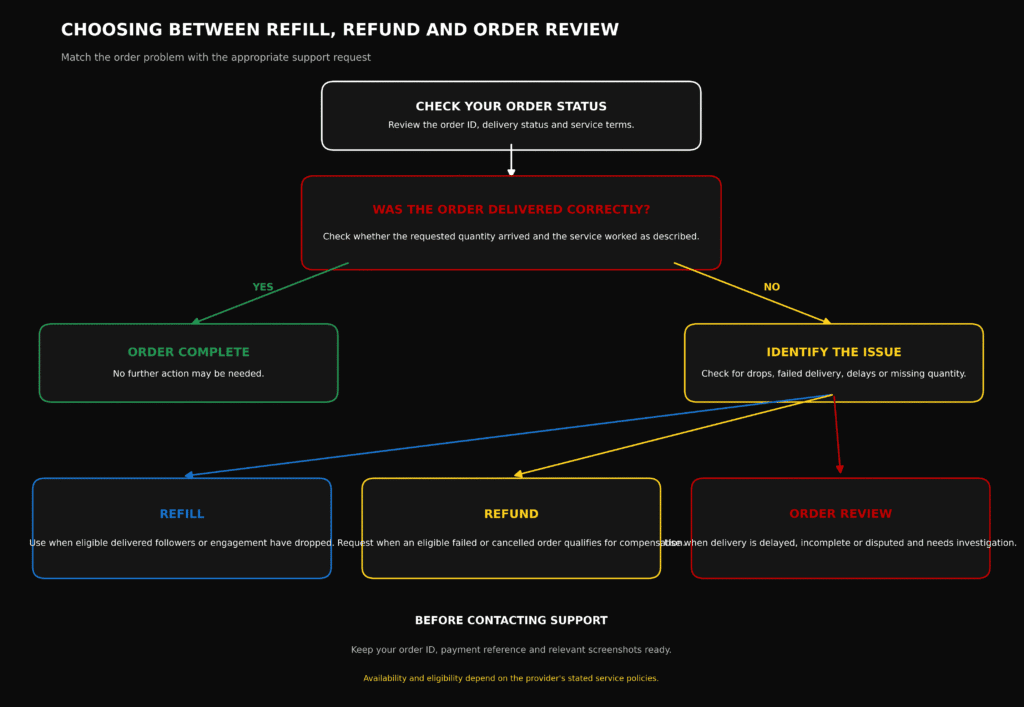
Selecting correct resolution paths depends on specific campaign situations:
- Submit Refill Requests: Delivered numbers drop below completed targets within active refill warranty windows (e.g., 30-day refill guarantee).
- Submit Order Review Requests: Submitted orders remain stuck on Pending or Processing past expected start windows.
- Submit Wallet Credit Requests: Orders cancel outright, or partial completions leave uncredited balance gaps.
- Submit Link Correction Requests: Pending orders contain broken URL structures that require updates before dispatch.
- Submit Service Inquiries: Delivery speeds differ significantly from metrics outlined in service catalog descriptions.
Submitting inquiries under accurate ticket categories ensures routing directly to qualified technical support teams. Proper categorizations reduce queue delays and speed up resolutions.
Understanding service warranty windows ensures timely refill submissions. Prompt requests maintain consistent engagement metrics without unnecessary delays.
Selecting accurate support resolution channels requires matching specific delivery symptoms with platform administrative procedures. Refill request protocols address natural metric attrition occurring after successful job completions. When promotional packages include retention guarantees, automated or manual refill routines dispatch supplementary units to restore profile metrics to target levels without additional charges.
Conversely, order review requests address active queue stalls, link formatting syntax errors, or unexpected delivery pauses occurring mid-campaign. Submitting clear, correctly categorized inquiries directs tickets to specialized technical units, facilitating faster queue clearing, server re-routing, or manual wallet credit adjustments.
How Can Nigerian Users Resolve Wallet And Payment Disputes?
Local payment processors such as Paystack, Flutterwave, or bank transfer channels occasionally experience network delays. When funds leave bank accounts but fail to credit dashboard balances, follow clear resolution steps:
- Allow 15 to 30 minutes for automated bank payment webhooks to process.
- Locate Transaction Reference Numbers or Session IDs from bank transfer receipts or debit alerts.
- Navigate to payment support menus inside account dashboards.
- Submit tickets under Billing / Payment categories including transfer dates, payment channels, amounts in Naira, and session IDs. Support agents query payment gateways directly to update wallet balances.
Payment processor webhooks resolve most payment delays automatically once interbank clearing finishes. Brief waiting periods resolve standard network sync delays naturally.
When manual payment confirmation is necessary, providing transaction session IDs allows support staff to query gateway backends and credit platform wallets immediately.
Resolving funding issues efficiently requires understanding local interbank transaction flows and gateway communication protocols. When funding platform wallets through Naira debit cards, USSD codes, or direct bank transfers, payment processing networks transmit instant webhook confirmation payloads to panel billing endpoints. If interbank network congestion delays webhook transmissions, platform databases delay wallet credit updates until financial clearing confirms.
Providing unique payment gateway session reference strings empowers support teams to query processing API backends directly. Technicians locate held settlement records, verify fund transfers, and execute manual wallet balance additions promptly, ensuring campaign setup routines continue without extended funding delays.
Review our full breakdown on best SMM panels with Naira payments to explore reliable local funding options for your account.
When Should You Wait, Contact Support Or Request A Refund?
Managing digital growth campaigns requires clear understanding of order processing stages. Recognizing distinctions between Pending, Processing, Completed, and Partial statuses prevents confusion and ensures campaigns remain on schedule.
Knowing precisely when to wait for normal queue progression, when to raise support tickets, and when to accept automatic partial refunds protects digital investments while optimizing results. Smart campaign management relies on clear technical understanding, patience, and organized record-keeping.
Ready to launch your next campaign or need help tracking an active request? Log into your dashboard to monitor live progress, or register via the Sizzle Social Sign Up Page to start growing your presence today!
Frequently Asked Questions
Social media growth order statuses are automated tracking markers used by digital promotion platforms to display the live state of a submitted service request. These markers clarify whether a request sits in a queue, actively delivers, reaches its final count, or adjusts due to server constraints. Tracking these updates keeps digital marketing investments transparent and easy to manage. Understanding these operational states ensures account owners make informed decisions regarding campaign scheduling and budget management. Digital marketing engines execute millions of requests daily across diverse networks, making standardized status markers essential for tracking request flows without relying on manual intervention. When users gain full visibility into account backend routines, they eliminate guesswork. Instead of wondering if a server registered a transaction or if payment gateway webhooks succeeded, status codes communicate live operations directly to user interfaces. This clarity allows marketers to coordinate product launches, influencer announcements, and sponsored content drops with absolute precision. Beyond basic order monitoring, status tracking frameworks act as an essential communication bridge between modern social network APIs and user management panels.
On an SMM panel, order statuses function as real-time progress indicators for active digital marketing campaigns. The moment a user pastes a target page link and enters a preferred quantity, the central database generates a unique tracking identification code alongside a dedicated status label. These labels communicate internal server actions without requiring manual messaging back and forth. Instead of waiting for email updates or chasing account managers, account owners look at the dashboard status to determine if a request passes link checks, moves through active dispatch networks, or settles into total account balances. Automated monitoring ensures that every user maintains clear visibility over marketing budgets and execution speed. System databases track each transaction ID to preserve server logs and historical data. This tracking allows campaign managers to evaluate historical fulfillment speeds, server load balances, and overall provider reliability over extended operational cycles. Clear status reporting also protects campaign investments by creating an immutable ledger of initial parameters, ensuring future promotional campaigns launch from accurate baseline metrics.
Every digital promotion request follows a sequential lifecycle from initial submission to final balance settlement. The process begins with submission and system queueing, where users select a service, paste target links, enter quantities, and submit. The platform assigns a Pending status while validating link structures, verifying format parameters, and reserving necessary wallet funds. Once verification checks pass, system nodes route jobs to active delivery servers, and status labels change to Processing or In Progress. During active metric delivery, engagement counters start updating on targeted posts, videos, profiles, or channels. As soon as delivery engines fulfill target quantities, the platform tags tasks as Completed. If profile privacy limits, platform updates, or account restrictions block portions of requests, systems flag tasks as Partial or Canceled, triggering automatic balance adjustments where necessary. Finally, a post-delivery audit runs background checks to confirm that delivered metrics match recorded baseline metrics before closing operational loops. Beyond basic execution steps, backend architecture constantly monitors server throughput speeds to prevent platform rate-limiting algorithms from flagging target pages, and automated workflow systems continuously validate each stage transition against system database logs.
Users monitor every social media order status directly within personal user portals through clear steps. First, access account control centers using valid login credentials via the platform dashboard. Second, open the Orders or Order History tab located on primary side menus. Third, locate specific transactions using unique Order IDs, submitted links, or submission dates. Fourth, check status columns alongside recorded start counts, remaining quantities, and initial charge amounts. Fifth, refresh system views periodically during active campaigns to observe live count updates. Modern user portals feature search filters, date parameters, and status tags to simplify transaction auditing across high-volume accounts. Agencies managing multiple client accounts rely heavily on these centralized management tools to maintain detailed delivery receipts across campaigns. Additionally, API integration options allow professional resellers to sync panel status codes directly with custom billing portals or client-facing web applications. Automated webhook listeners receive instant status change notifications, allowing real-time client updates without manual portal checks. Navigating dashboard order monitoring tools provides valuable operational insights beyond basic status tracking, including timestamp logs, precise baseline counts, and dynamic delivery speed estimates.
Order status and delivery progress describe two distinct elements of promotional requests. Order status is the broad system state of submissions, with primary examples including Pending, Processing, Completed, Partial, and Canceled. Its core function is to show operational state and backend health, and it updates through system event triggers and server logs. Delivery progress, by contrast, tracks the numeric changes occurring on target pages, such as a start count of 1,200, a current count of 1,800, and a target of 2,200. Its core function is to track numerical count movement over time, and it updates through periodic metric counts scraped from public page counters. Monitoring both metrics provides complete oversight, because while order status confirms that backend software runs smoothly, delivery progress confirms that actual audience numbers grow as intended. System order status updates operate on internal server triggers, whereas delivery progress relies on public platform API scrapers. Occasionally, social media platforms cache public counters, causing small discrepancies between internal panel delivery numbers and visible page counters. Understanding this technical operational gap prevents unnecessary worry when public counters lag behind backend dispatch rates.
A Pending status indicates that an order sits in the system queue awaiting backend verification. The platform records request details and logs payment deductions from account balances, but active delivery has not yet started. During this stage, automated checks run to verify link syntax, service availability, system capacity, and database sync status before routing orders to operational nodes. System security protocol requires this verification pause to block invalid URLs, broken formats, or inaccessible private profiles from overloading delivery servers. Pending validation protects user account balances by verifying order feasibility before dispatching resources. If link checks uncover formatting errors, system filters reject jobs early, preventing locked funds or unfulfillable tasks. Queue holding times vary depending on overall system workload and target platform status. High-demand promotional hours slightly extend pending duration, though automated load balancers work continuously to move requests swiftly into execution phases. System verification pipelines execute automated string parsing routines during pending states, analyzing submitted link formats and cross-referencing domain structures, protocol headers, and resource parameters against expected platform syntax rules. If an order contains malformed parameters, system logic flags the submission early, preventing broken job routines from entering core server dispatch pools.
Promotional orders remain queued longer than expected due to specific technical factors. Incorrect link format is a common cause, such as submitting account handles instead of full post URLs, or pasting profile links when reel links are required. Account privacy settings also matter, since submitting private accounts, restricted pages, or age-gated videos blocks external system access. High server queue volume during peak promotional periods across major marketing seasons temporarily extends server processing times. Target platform updates also play a role, because major social networks roll out frequent backend API adjustments, requiring promotional service nodes to enter brief maintenance pause cycles to ensure account safety. Duplicate active orders are another factor, since submitting new orders for exact target links while previous orders still run causes system conflicts and queue holds. System queues systematically prioritize requests based on target platform availability and link validity. Submitting clean, accurate links ensures minimal queue resistance and faster processing starts. When target platforms experience major infrastructure updates, promotional networks temporarily freeze pending queues to safeguard user accounts, resuming dispatch operations only after target networks stabilize to protect profiles from unexpected algorithmic flags.
A Processing or In Progress status signals that backend validation checks passed and servers actively dispatch engagement counters to destination links. At this stage, public numbers on profiles, videos, or posts start to increase. Delivery speed depends on service descriptions, ranging from rapid batch delivery to gradual drip-feed distribution designed for continuous, natural account growth. System nodes constantly monitor public target metrics to ensure smooth, uninterrupted delivery flows. During processing stages, system engines monitor rate limits to maintain natural, balanced delivery curves. Gradual delivery protects account trust scores on major social platforms, ensuring sustainable, long-term metric retention. System algorithms dynamically adjust distribution speeds according to platform traffic patterns, and distributing growth naturally over hours or days prevents artificial spikes while maintaining steady account growth. Active processing states represent the core execution engine of digital marketing panels. During this phase, automated worker processes establish active API sessions, streaming metrics to target destinations according to pre-configured speed algorithms. Advanced distribution microservices vary delivery intervals dynamically, creating natural engagement curves that mirror organic viral expansion patterns on social networks.
Patience remains important during campaign rollouts, but clear timelines help protect promotional schedules. Reach out to customer service when orders remain on Pending past estimated start windows listed in service details, typically 6 to 24 hours. Also contact support when status displays Processing but no metric changes appear on posts after 24 hours, when progress counters freeze without movement for more than two consecutive days, when link errors on pending requests need immediate manual correction, or when orders display active statuses but target social platforms experience extended network outages. Timely support requests allow technical teams to inspect server logs, reset stuck API routing nodes, or re-route jobs to higher-speed alternative servers. Providing precise transaction context during initial outreach ensures rapid ticket handling, and support agents quickly inspect backend log files and restore normal delivery speeds when presented with clean order data. Determining appropriate times to initiate technical support tickets depends on evaluating service level agreements against documented platform status indicators. Service descriptions specify expected start times, average delivery speeds, and operational limits, so initiating support inquiries within normal operational windows creates unnecessary ticket volume.
A Completed status confirms that service systems delivered 100 percent of requested quantities to target links. Systems log final metric counts, mark jobs finished, and retain initial transaction costs from wallet balances. Achieving a completed status means that backend servers successfully transmitted all requested data packets and public platform counters matched target limits. Final completion flags signify that system scrapers verified target numbers on destination pages. Central databases archive full transaction receipts, documenting successful service execution. Completed statuses mark successful campaign completions, allowing growth strategists to calculate overall marketing return on investment and plan follow-up promotional strategies confidently. Generating a completed status trigger requires automated verification daemons to execute final target link validation checks. System scrapers inspect public destination pages, reading current numerical counters to confirm that total metric additions equal or exceed original requested quantities. Once validation scripts verify target achievement, backend routines close active job threads and update database transaction records. Final completion logging creates an immutable audit trail inside user management dashboards, and marketing analysts review these archived execution logs to track long-term account growth trajectories.
When dashboards display completed statuses but public metrics fall short of target counts, several causes may apply. Natural metric drop-off can occur when social network account cleanups or natural unfollows happen during delivery, reducing net visible growth. Overlap from simultaneous campaigns is another cause, since running parallel campaigns from multiple providers causes metric counters to reach target end counts prematurely. Mid-delivery profile edits also matter, such as changing account usernames, making posts private, or deleting media mid-delivery, which interrupts tracking counters and causes premature completion flags. Incorrect recorded start counts occur when public counters cache incorrect initial numbers prior to order execution. System tracking nodes rely heavily on initial start counts logged at order submission. If parallel campaigns boost metrics simultaneously, backend scrapers detect target end counts early and mark tasks completed prematurely. Maintaining stable profile settings and avoiding overlapping campaigns guarantees accurate metric counting. Apparent discrepancies between system completion flags and visible public page numbers often result from backend metric math calculations tied to initial start count parameters, and public social media platforms routinely execute background maintenance routines that archive inactive profiles or purge spam metric accounts.
A Partial status means servers delivered portions of requested quantities before stopping. Instead of marking entire jobs as failed, systems close orders at delivered counts and automatically return unfulfilled portions back to wallet balances. This partial mechanism protects campaign budgets by ensuring users only pay for successfully delivered metrics. Partial statuses act as financial protections against target profile restrictions or sudden service interruptions. Users maintain total control over unspent funds, allowing instant re-allocation to alternative active services. Automated refunding removes friction when managing large marketing budgets, and unfulfilled units convert back to wallet credits instantly, keeping promotional workflows moving without delay. System panels trigger partial order resolutions whenever operational constraints prevent completing full requested quantities. Operational constraints include target post deletions, profile privacy settings changes, platform rate-limit caps, or server capacity adjustments. Tagging constrained jobs as partial rather than forcing incomplete runs preserves destination account trust ratings. The automated partial resolution framework safeguards account funds by matching expenditure strictly to verified metric delivery, and returned wallet credits become available immediately inside user portals, allowing marketers to launch alternative campaign requests without administrative delays.
System partial refunds use a linear calculation based on undelivered service units. The refund amount equals the ordered quantity minus the delivered quantity, divided by the ordered quantity, and then multiplied by the total cost. Consider a standard campaign scenario: a user places an order for 1,000 TikTok views costing 2,000 Naira. Systems deliver 600 views before encountering system limits, leaving 400 views unfulfilled, which represents 40 percent of total requests. Systems then retain 60 percent, or 1,200 Naira, for delivered work and automatically credit 40 percent, or 800 Naira, back to platform wallet balances. Mathematical refund algorithms ensure precise micro-credit calculations down to exact units, and transparent accounting systems protect marketing budgets across all campaign sizes. Automated financial calculations protect user funds instantly, making partial statuses a safe system safeguard rather than a loss. Precise mathematical formulas govern partial refund calculations across system databases, eliminating calculation errors and ensuring financial transparency. Database transaction routines calculate unit prices by dividing total order charges by original requested quantities, and when partial statuses trigger, system scripts multiply calculated unit rates directly by undelivered unit counts.
When order statuses update to partial but balances do not reflect automatic credit adjustments within a few hours, follow corrective steps. First, inspect transaction ledgers inside dashboards to confirm automated micro-credit entries. Second, verify whether undelivered unit counts fell below minimum platform rounding thresholds. Third, confirm that target links remained public and accessible throughout active delivery windows. Fourth, open support tickets providing Order IDs, target URLs, and current public metric counts so agents can manually verify calculations. Fifth, review service terms to verify whether specific promotional items use non-refundable fixed rates. System ledgers log micro-refunds as distinct transaction entries linked directly to original Order IDs, so checking full wallet histories often reveals previously overlooked balance returns. If manual review reveals missing credits, customer service teams calculate missing fractions and update account balances promptly. Clear transaction records ensure quick, straightforward ticket processing. Experiencing a partial order resolution without observing an immediate wallet balance credit typically points to micro-transaction caching or database synchronization lags, since system billing microservices process ledger updates through batch queued routines.
Local payment processors such as Paystack, Flutterwave, or bank transfer channels occasionally experience network delays. When funds leave bank accounts but fail to credit dashboard balances, follow clear resolution steps. First, allow 15 to 30 minutes for automated bank payment webhooks to process. Second, locate transaction reference numbers or session IDs from bank transfer receipts or debit alerts. Third, navigate to payment support menus inside account dashboards. Fourth, submit tickets under billing or payment categories including transfer dates, payment channels, amounts in Naira, and session IDs, so support agents can query payment gateways directly to update wallet balances. Payment processor webhooks resolve most payment delays automatically once interbank clearing finishes, and brief waiting periods resolve standard network sync delays naturally. When manual payment confirmation is necessary, providing transaction session IDs allows support staff to query gateway backends and credit platform wallets immediately. Resolving funding issues efficiently requires understanding local interbank transaction flows and gateway communication protocols. When funding platform wallets through Naira debit cards, USSD codes, or direct bank transfers, payment processing networks transmit instant webhook confirmation payloads to panel billing endpoints, and if interbank network congestion delays transmissions, platform databases delay wallet credit updates until financial clearing confirms.