Table of Contents
- What Is Facebook Follower Refill And How Does It Work?
- Follow These Steps To Request A Facebook Follower Refill
- Check Facebook Follower Refill Policies Before Ordering
- How to Resolve Common Facebook Follower Refill Problems
- What Should You Expect From A Facebook Follower Refill Policy?
- Frequently Asked Questions
A Lagos fashion vendor pays for five thousand new page followers on Monday. By Friday morning, four hundred of those numbers vanish from the screen. A Port Harcourt gospel artist watches a fresh fanbase shrink right before a major album release. Panic sets in fast when numbers dip without warning. People spend hard-earned cash on online reach, only to watch the meter slide backward. That sudden drop feels like money down the drain.
Understanding what is Facebook follower refill saves business owners, creators, and marketers from unnecessary stress and wasted budgets. Platforms update systems constantly, and inactive profiles disappear overnight. When you order through a reliable Facebook growth service, a refill guarantee acts like a safety net for your wallet. Instead of paying twice for the same audience size, the provider restores lost numbers back on your page at zero extra cost. Knowing how this protection operates helps you spot fair terms, claim replacements on time, and keep your page credible before buyers or sponsors visit.
What Is Facebook Follower Refill And How Does It Work?
Buying followers represents only the first half of an audience-building campaign; keeping those numbers intact long enough for real customers and brand partners to notice represents the second half. Across Nigeria, digital entrepreneurs rely on visible social proof because shoppers rarely trust an online storefront that displays only twelve followers.
When a sudden dip happens days after a purchase, buyers often assume they were cheated or that the service failed. In reality, follower fluctuations are an inherent part of how large social networks police accounts, and a refill mechanism exists specifically to absorb that shock on your behalf.
Here is a detailed breakdown of what a Facebook follower refill involves and how the underlying process operates:
- Automated drop detection that continuously monitors your page statistics to identify when platform algorithms remove inactive or duplicate accounts.
- Guaranteed restoration terms provided by reliable Facebook growth service vendors who promise to replace dropped metrics without hidden fees.
- Gradual replenishment schedules that add followers back in small, natural batches to prevent suspicious spikes from triggering network security flags.
- Order tracking protocols allowing you to submit your original transaction receipt or profile link when requesting your entitled updates.
- Vendor accountability standards that protect your marketing investment by ensuring you get the exact audience count you originally paid for.
- System stability maintenance helping your storefront keep up a consistent, reliable appearance for every new visitor who drops by.
Understanding this protective safety net changes how you view audience acquisition services. Instead of worrying that your investment will vanish overnight, you gain peace of mind knowing that drops are covered under clear vendor policies. When you select a provider, always check their guarantee terms before placing an order so you know exactly how replenishment requests are handled.
What Does Facebook Follower Refill Mean?
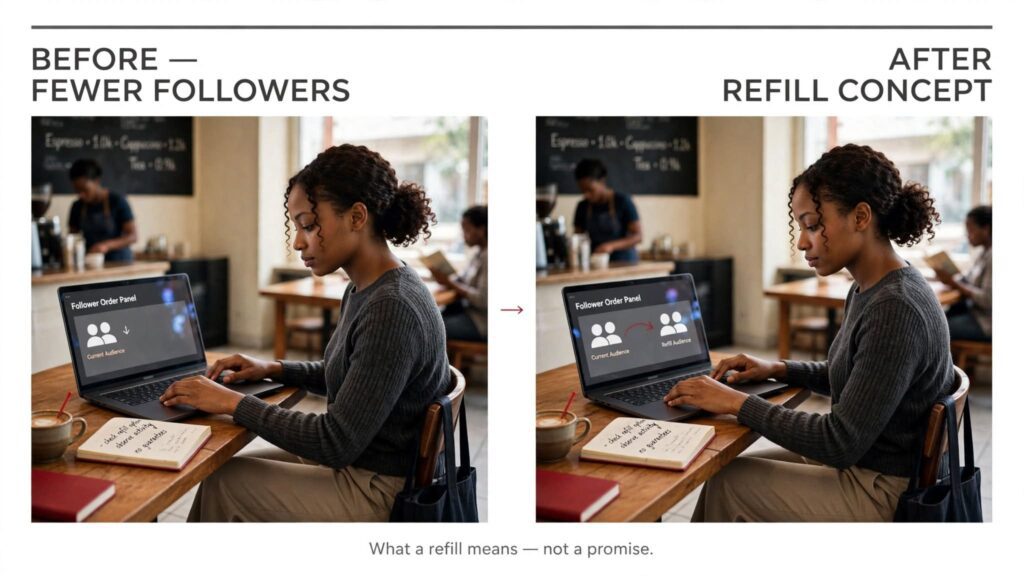
A Facebook follower refill is a contractual service guarantee where a social media growth provider replaces followers that disappear from your page or profile after an order finishes. Think of it like a warranty on a phone charger you purchase at Computer Village in Ikeja. If the charger stops functioning within the agreed period, the vendor hands you a fresh one without asking for additional payment.
In digital marketing, Facebook follower refill meaning comes down to safeguarding your initial budget. When you place an order for 2,000 followers, your starting count plus the 2,000 new followers equals your target benchmark. If that total drops below the benchmark during the protection window, the refill system tops your count back up. It does not award extra followers beyond what you originally paid for; instead, it restores the missing portion so you receive the full value of your purchase.
Examining how a solid Facebook retention policy shapes your buying experience reveals several practical layers of protection:
- Benchmark Locking: Your provider records the exact follower count on your page before delivery starts, creating a permanent mathematical baseline for future checks.
- Zero Additional Billing: Eligible replacements cost nothing extra because the replacement margin is already built into the original package price.
- Automated Gap Calculation: Modern tracking tools subtract your current live follower count from your completion benchmark so only the exact missing difference enters the queue.
- Time-Bound Protection: Coverage stays active for a fixed number of days after order completion, giving your page stability during early algorithm checks.
- Quality Tier Alignment: Higher-retention packages pair stable accounts with longer refill windows, ensuring your public social proof holds steady during product launches or brand pitches.
Beyond simple numbers, a clear refill policy signals accountability from the platform you choose. When a provider attaches an explicit refill duration alongside a service package, that provider accepts financial responsibility for server stability over that timeframe.
Buyers in Abuja, Lagos, or Port Harcourt can plan product launches, influencer pitches, and seasonal sales knowing their public follower count will not collapse right when prospective clients inspect their profile. Rather than treating every minor fluctuation as an emergency, you gain a predictable system that keeps your page metrics aligned with your business goals.
Why Do Facebook Followers Drop After Buying?
Seeing your follower count decrease can feel frustrating, especially when you are working hard on building social proof for a brand or community. However, drops rarely happen because a provider intentionally took your followers back. According to Meta’s Transparency Center reports, Facebook removes hundreds of millions of fake or policy-violating accounts every single quarter through automated detection systems. When Meta deletes or suspends these profiles, they automatically vanish from every page they previously followed.
Understanding what happens when Facebook followers drop becomes much easier when you examine the specific triggers behind routine fluctuations:
- Routine Meta Platform Cleanups: Meta regularly sweeps through its network to remove inactive accounts, spam profiles, and accounts that violate community standards. Any page followed by those removed profiles sees an immediate drop in its public follower counter.
- Natural User Unfollows: When campaigns involve real or active profiles, individual users still control their own accounts. Someone might follow your page during a promotion and later decide to unfollow if your daily posts do not match their personal interests.
- Server and Algorithm Updates: Major updates across Facebook’s core ranking system often trigger temporary counter fluctuations or stricter account verification checks, causing unverified profiles to lose access until they complete security prompts.
- Account Deactivations by Owners: Everyday users frequently deactivate their personal profiles temporarily during exams, travel, or digital breaks, which removes their count from your page until they reactivate.
- Regional Security Sweeps: Facebook periodically tightens verification rules in specific regions, requiring older accounts to confirm phone numbers or email addresses before remaining visible on public follower lists.
Content relevance also plays an understated role in post-order retention. Suppose an electronics dealer in Onitsha boosts a brand-new Facebook page with 3,000 followers, yet the page has zero product photos, no contact phone number, and no posts published over the past six months. Whenever real or semi-active accounts land on an empty page, they have no reason to stay connected.
Pairing paid growth with active content updates, clear branding, and regular community replies gives incoming followers a reason to remain subscribed long after delivery concludes. Even when platform-wide purges happen, pages with active engagement recover faster because organic visitors continuously replace minor technical losses.
How Does A Facebook Follower Refill Guarantee Work?
A Facebook follower refill guarantee relies on automated tracking of your page’s starting count and ending count. Before your order begins, the system records the exact number of followers already on your Facebook page. Suppose you start with 1,200 followers and order 3,000; your expected completion count is 4,200.
Once the order reaches 4,200, the refill timer starts ticking. If Facebook runs a cleanup two weeks later and your count falls to 3,850, you have experienced a drop of 350 followers. Provided you are still within the stated guarantee window, you can trigger a refill request.
The system checks your current count against your completion benchmark, verifies the 350-follower gap, and dispatches new followers until your total returns back up toward 4,200. For a deeper look at how local providers structure these dashboards, read our breakdown of how Facebook booster sites work in Nigeria.
| Order Stage | Page Follower Count | System Status | What Happens Behind the Scenes |
| Order Placed | 1,200 | Pending | System records 1,200 as the permanent start count baseline. |
| Delivery Completed | 4,200 | Completed | System locks 4,200 as the completion target and starts the refill timer. |
| Post-Cleanup Drop | 3,850 | Drop Detected | Count sits 350 followers below the 4,200 target within the active window. |
| Refill Triggered | 3,850 | Refilling | System verifies eligibility and dispatches 350 replacement followers. |
| Refill Finished | 4,200 | Protected | Page count returns back up toward the original benchmark at zero extra cost. |
Behind the scenes, API synchronization makes this entire audit possible without requiring your Facebook password. When you submit your public page link at checkout, the platform queries Facebook’s public metadata endpoint, reads your live follower integer, and writes that number into an immutable database field.
After delivery completes, the system logs the final count and attaches a timestamp. Whenever you click the refill button, the API performs a fresh public query, compares the live figure against your stored completion figure, and calculates whether a deficit exists. Because everything relies on public counter math rather than private account access, your page security remains completely untouched throughout every refill cycle.
What Is The Difference Between Refill And Replacement?
Many buyers use “refill” and “replacement” as if they mean the exact same thing, yet there is a subtle practical difference in how social growth platforms handle them. Knowing how both terms operate keeps your expectations realistic when speaking with customer support.
A refill focuses strictly on topping up the missing gap in an existing, completed order. If 200 out of 1,000 followers drop, a refill sends 200 followers so your balance matches the original target. It uses the exact same upstream server infrastructure that fulfilled your initial purchase, provided that server remains healthy and operational. Refills usually run through an automated dashboard button after a quick count check, meaning you do not need human intervention for routine 10% or 15% dips.
Replacement, by contrast, applies when an entire batch of delivered followers fails to stick or when a specific delivery server experiences a total wipeout following a major Meta algorithm patch. In such cases, simply pushing more followers from the damaged server would result in another immediate drop. Instead, the provider switches your order over onto a more stable server pool and re-delivers the affected quantity from scratch.
While a refill stays attached inside your original Order ID history, a full replacement sometimes generates a fresh tracking reference on the backend after technical review from an account manager. Both options fall under broader Facebook follower drop protection, ensuring buyers never pay twice for undelivered retention during the active warranty period.
Follow These Steps To Request A Facebook Follower Refill
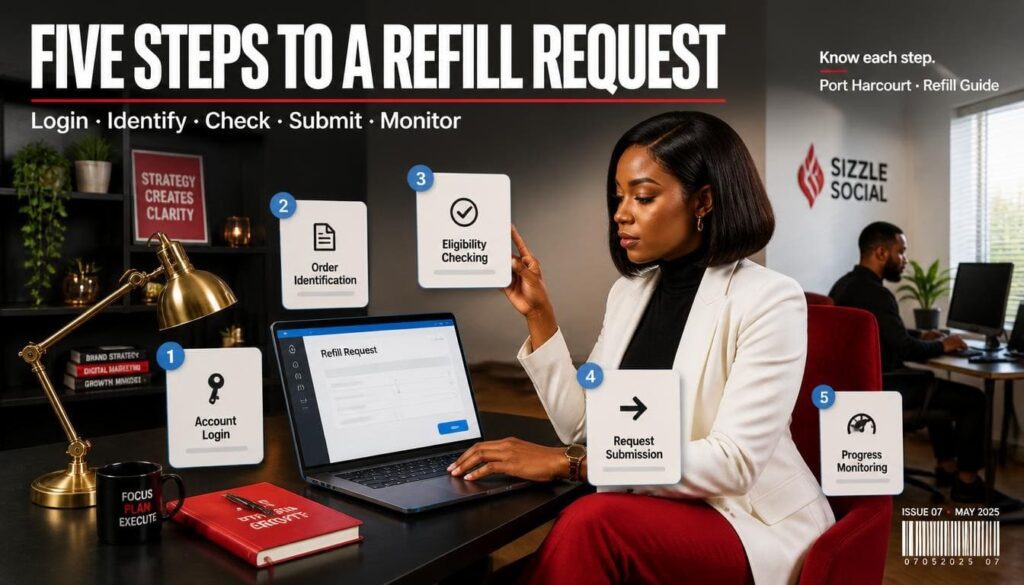
Claiming a warranty update should never feel like solving a complex puzzle, yet many buyers accidentally delay their own requests by skipping basic verification steps. Whether you manage a single boutique page in Lekki or handle twenty client accounts for a digital agency in Ikeja, following a clear sequence ensures your Facebook follower refill request passes automated checks on the first attempt. Each stage below walks through the exact workflow on Sizzle Social from login through final confirmation.
Opening your browser and signing in to your Sizzle Social dashboard requires using your registered email and password. Make sure you are logging into the exact account used when placing the original Facebook order, as refill tools are tied directly inside your personal order history. Many business owners maintain separate email addresses for personal tasks, finance, and marketing operations; signing in with an alternate email displays an empty order table and causes unnecessary confusion.
Before opening your order list, check your browser environment carefully. If you previously left your dashboard tab open on your phone or laptop for several days, refresh the page completely so live session tokens and server status synchronize cleanly.
Ensure your mobile data or office Wi-Fi connection remains stable during the submission process to avoid interrupted form transmissions.
Once your dashboard loads fully, navigate directly to your completed orders history tab where every past transaction sits neatly organized by date and service type. Locate the specific Facebook page follower transaction that experienced a drop and click on its reference number to open the detailed item breakdown.
Step 1: Log In To Your Sizzle Social Account
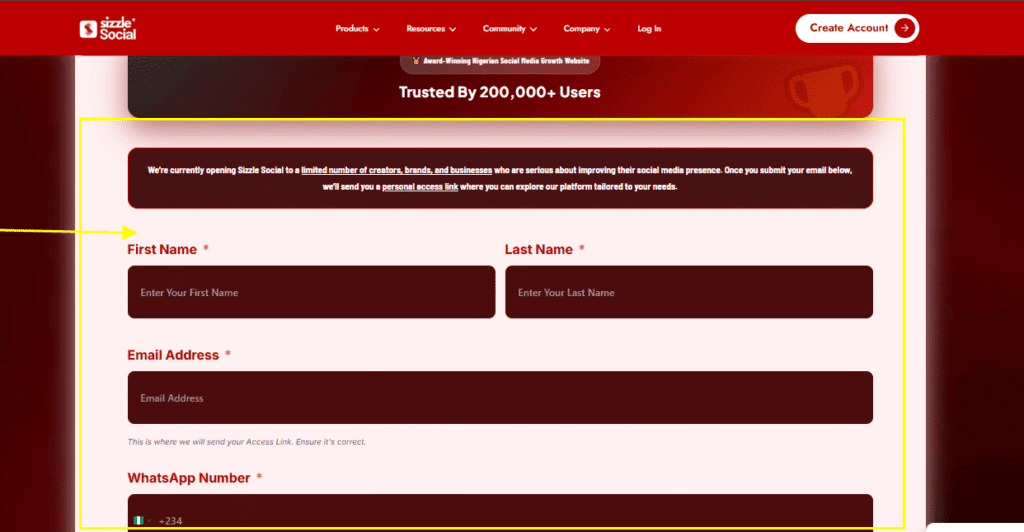
Open your browser and sign in to your Sizzle Social dashboard using your registered email and password. Make sure you are logging into the exact account used when placing the original Facebook order, as refill tools are tied directly inside your personal order history. Many business owners maintain separate email addresses for personal tasks, finance, and marketing operations; signing in with an alternate email displays an empty order table and causes unnecessary confusion.
Before opening your order list, check your browser environment carefully. If you previously left your dashboard tab open on your phone or laptop for several days, refresh the page completely so live session tokens and server status scripts load cleanly. Ensure your mobile data or office Wi-Fi connection is stable before clicking any dashboard action buttons, because an interrupted network request during a status query can produce a timeout message. Keeping only a single dashboard tab active also prevents duplicate form submissions when triggering automated tools.
Step 2: Find The Facebook Order With Follower Drops
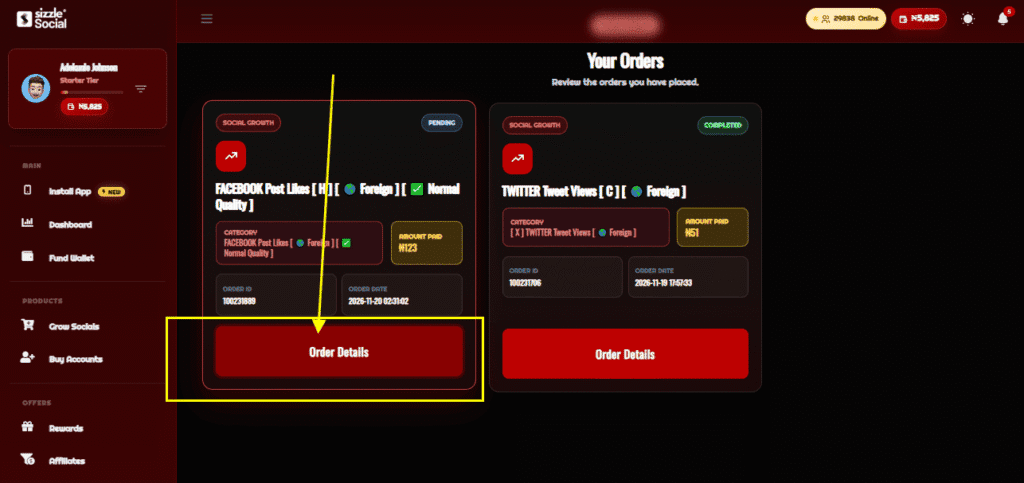
Navigate inside the Orders section in your dashboard menu. If you run campaigns across Instagram, TikTok, YouTube, and Facebook simultaneously, use the search bar or platform filter tab to isolate your Facebook orders. Locate the specific Order ID linked with the page or profile experiencing the drop.
Agencies and serial entrepreneurs often place multiple orders for the same Facebook page over several months. Identifying the exact entry among dozens of historical rows requires checking four key data points side by side:
- Unique Order ID Number: Every purchase receives a distinct numeric code that separates it from earlier or later campaigns on the same link.
- Target Page URL: Double-check the exact Facebook link printed beside the order so you do not confuse a main brand page with a regional branch page.
- Service Package Title: Review the package name to confirm whether you selected a 30-day refill option, a 60-day refill option, or a basic non-refill package.
- Start Count and Ordered Quantity: Look at the initial number logged beside the order alongside the quantity purchased so you can calculate your expected completion benchmark accurately.
Writing down or copying that numeric Order ID before checking eligibility saves precious minutes if you later need to share the reference with live support.
Step 3: Check The Order Status And Refill Eligibility
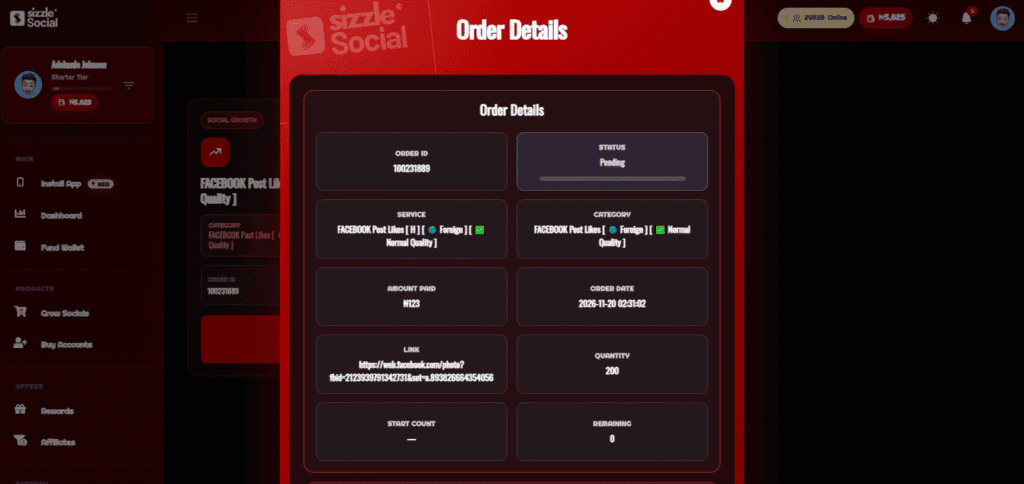
Before clicking anything, review the order details carefully. To qualify for a refill, your order status must read Completed. Orders marked as Pending, In Progress, or Partial cannot be refilled because delivery is either still active or already refunded for the undelivered portion. Also check the service description to confirm the refill duration (such as 30 days or 60 days) has not passed since the completion date.
If you are unsure how different service tiers compare before placing future orders, our step-by-step Facebook followers order tutorial walks through reading service descriptions line by line. Comparing your order against the table below confirms immediately whether your claim qualifies:
| Order Status | Refill Eligible? | Why This Status Matters | Recommended Action |
| Completed (Within Window) | Yes | Order finished full delivery and sits inside active warranty days. | Click the Refill button or submit your Order ID via ticket. |
| Completed (Window Expired) | No | The stated 30-day or 60-day guarantee period has officially ended. | Place a fresh order using a longer-retention service tier. |
| In Progress | No | Initial followers are still arriving gradually on your page. | Wait until status changes to Completed before checking counts. |
| Partial | No | System stopped early and refunded undelivered balance to wallet. | Use the refunded wallet credit on a more stable Facebook server. |
| Canceled | No | Order never ran and full funds returned back inside your wallet. | Verify your Facebook page privacy settings and reorder. |
Paying attention to the exact completion timestamp prevents false alarms. Suppose an order for 5,000 followers took three days to finish delivering; your 30-day warranty begins on the day the status switched from In Progress to Completed, giving you three extra days of coverage compared with the checkout date.
Step 4: Submit A Refill Request With The Required Details
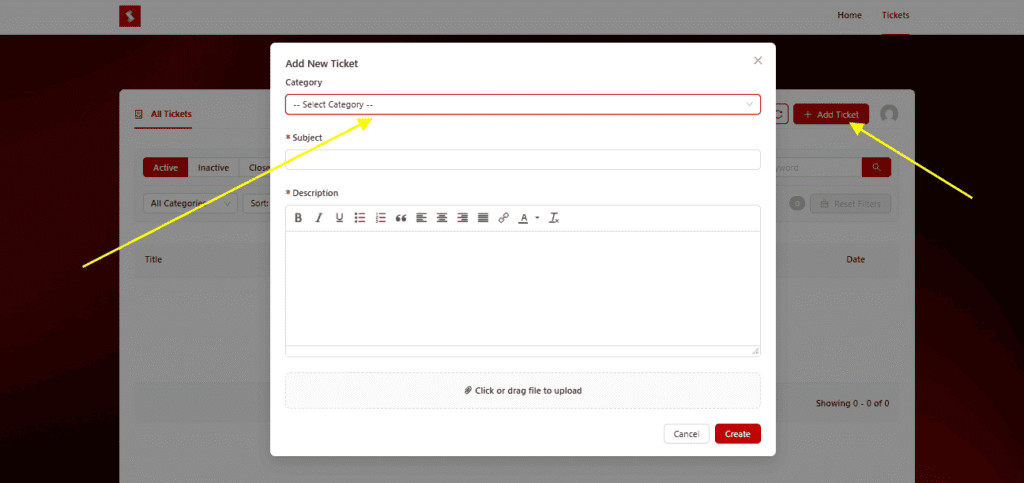
If the service supports one-click refills and the refill window is open, you will see an active Refill button next to the order. Click that button once to queue your request automatically. The interface will confirm that your refill task has been logged, and the button will temporarily disable itself for 24 hours so duplicate requests do not clog the server queue.
Occasionally, a service relies on manual server verification or displays a greyed-out button despite an active guarantee. When that happens, open a support ticket through the dashboard or reach out via live chat. Providing complete evidence in your opening message allows support engineers to verify and dispatch your replacement batch immediately without slow back-and-forth questions:
- Exact Order ID: Paste the numeric ID from your Orders tab so the agent can pull up your server logs in seconds.
- Direct Facebook Page Link: Include the full URL of your page or Professional Mode profile exactly as submitted during checkout.
- Current Live Follower Count: Type out the exact number currently visible on your public page header.
- Clear Screenshot Proof: Attach a full-screen screenshot showing your page name, handle, and current follower count clearly.
- Brief Drop Summary: Note roughly when you noticed the decrease and confirm that no changes were made on your page URL or privacy settings.
Step 5: Monitor The Request And Contact Support If Needed
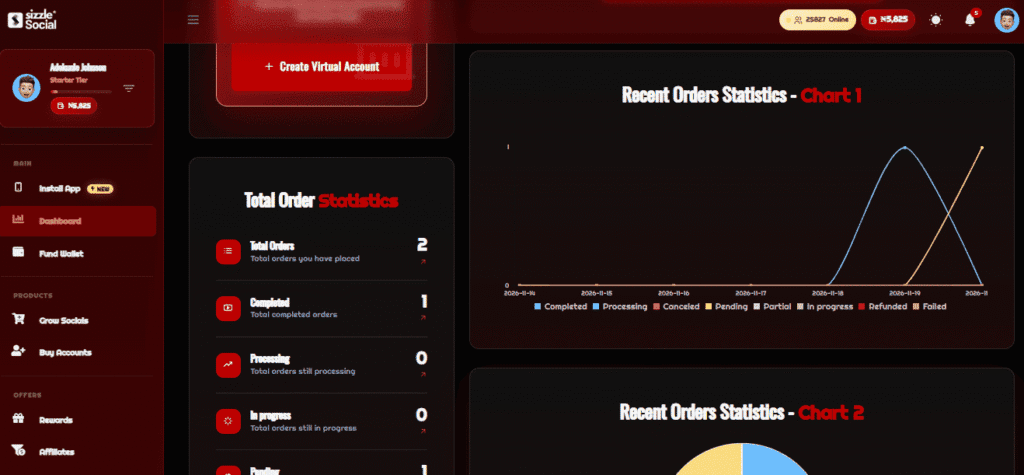
Once submitted, refill orders typically enter a processing queue and start delivering within a few hours up to 24 hours. Keep an eye on your Facebook page count without ordering new followers from another source at the same time. Patience during this verification window protects your tracking accuracy and keeps your page looking natural.
Refreshing your Facebook app every two minutes rarely speeds up server queues and often creates unnecessary anxiety. Instead, check your page counter once in the morning and once in the evening while continuing your normal content schedule. Publish fresh product photos, answer customer inquiries in your comments, and share short Reels so real visitors landing on your profile see an active business.
If 24 full hours pass with zero upward movement on your follower count, reply directly inside your existing support ticket with an updated screenshot rather than opening a brand-new ticket thread. Keeping all communication inside one thread preserves your place in line and gives agents your complete audit history at a glance.
Check Facebook Follower Refill Policies Before Ordering
Reading the fine print before funding your wallet separates smart digital marketers from frustrated buyers. Every social growth package carries specific rules printed inside its description box, and assuming all packages share identical terms often leads to avoidable disappointment.
According to DataReportal, Nigeria recorded over thirty-six million active social media user identities, making Facebook one of the busiest digital marketplaces for local vendors, entertainers, and service providers. Protecting your brand credibility in such an active market starts with auditing your Facebook follower refill policy before placing an order.
Understanding these service rules prevents unpleasant surprises when follower counts fluctuate naturally over time. Platforms frequently purge inactive or spam profiles, causing minor dips in your page metrics days after a purchase completes. A transparent service provider will always outline clear guarantees, specifying whether drops are covered for thirty days, sixty days, or indefinitely. Knowing these operational boundaries helps you select reliable vendor packages that offer genuine financial protection for your marketing investment.
Failing to read promotional terms often leaves business owners stranded without recourse when unexpected drops occur. Some cheap service providers offer massive follower numbers upfront while hiding strict non-refill clauses deep inside their fine print. Checking service conditions beforehand ensures your business funds are spent on sustainable growth rather than temporary vanity metrics that vanish overnight. Taking five minutes to review cancellation rules, drop limits, and support windows safeguards your digital reputation and keeps your social media strategy firmly on track.
How Long Does A Facebook Follower Refill Window Last?
A Facebook follower refill window is the exact number of days your order remains covered after delivery finishes. Different campaigns call for different coverage lengths depending on your budget, launch schedule, and long-term brand objectives.
| Refill Window Tier | Typical Price Level | Best Campaign Use Case | Practical Buyer Expectation |
| No Refill (0 Days) | Lowest Cost | Short-term event hype, temporary testing, or tight budgets. | Zero warranty once status reads Completed; any drop stays permanent. |
| 15-Day Refill | Budget-Friendly | Weekend flash sales, giveaway announcements, or short promos. | Protects numbers across two weeks of active campaign traffic. |
| 30-Day Refill | Mid-Range Standard | Monthly brand growth, steady social proof, and creator milestones. | Unlimited refill claims within 30 days of order completion. |
| 60-Day to 90-Day Refill | Premium Tier | Product launches, music album rollouts, and quarterly ad runs. | Covers an entire business quarter against routine Meta sweeps. |
| 365-Day Refill | Enterprise / Flagship | Established companies, public figures, and agency client pages. | Full-year protection for long-term credibility and sponsor audits. |
Always verify when the warranty clock begins: the countdown starts the moment your order status changes to Completed, not the day you first notice a drop. Choosing a 30-day or 60-day package costs slightly more upfront than a zero-refill option, yet it often proves far cheaper over time because you never have to repurchase lost numbers after a platform update.
What Conditions Must You Meet To Qualify For A Refill?
Even when an order carries a 30-day or 60-day guarantee, certain actions on your end can void the protection. Most providers enforce strict conditions so automated tracking servers can verify your numbers fairly without manual guesswork.
First, your Facebook page or Professional Mode profile must remain completely public throughout the entire warranty duration. If you switch your profile to private, restrict visibility, or hide your follower counter from public view, automated verification scripts read a zero or null value and immediately cancel refill eligibility. Second, never edit your custom @username or page URL slug after placing an order. Refill servers tie your warranty permanently to the exact link submitted at checkout; changing your handle breaks that link and causes automated checks to fail.
Third, avoid placing overlapping follower orders for the same link across multiple websites or even across two separate packages simultaneously. When two batches enter a page at once, tracking systems cannot determine which batch experienced a drop, voiding the warranty on both orders.
Fourth, ensure your page stays free of strict country blocks or high age gates (such as 21+ restrictions) that prevent global replacement accounts from following your profile. Finally, your current count must reflect losses from the purchased batch rather than pre-existing organic churn below your original start count. If you want to understand how organic retention and paid boosts complement each other without triggering policy conflicts, explore our guide on how to increase Facebook followers organically with a paid boost strategy.
Does A Refill Guarantee Cover Every Lost Follower?

A refill guarantee covers drops tied directly to the delivered batch, provided your total count falls below the completion target. However, minor natural fluctuations of 1% to 3% are normal across social platforms. When evaluating whether a drop qualifies for replacement, platforms measure your aggregate page count rather than tracking individual user profiles.
Understanding this aggregate math prevents confusion when organic growth and paid drops happen during the same week:
| Scenario | Start Count | Ordered | Target Benchmark | Current Live Count | Eligible for Refill? | Reason |
| Standard Paid Drop | 2,000 | 1,000 | 3,000 | 2,750 | Yes (250 refill) | Total count sits 250 below the 3,000 completion benchmark. |
| Organic Gain Offsets Drop | 2,000 | 1,000 | 3,000 | 3,150 | No | New organic followers pushed total count above the 3,000 target. |
| Pre-Existing Organic Churn | 2,000 | 1,000 | 3,000 | 1,850 | Partial (1,000 max) | Provider replaces up to the 1,000 purchased followers, not old organic losses. |
| Tiny 1% Fluctuation | 10,000 | 1,000 | 11,000 | 10,990 | Usually No | Most servers require a minimum drop threshold (e.g., 2% to 5%) before triggering. |
Look closely at the third row in that table. Suppose you started with 2,000 old followers and bought 1,000 new ones, reaching 3,000. If an older community group you ran two years ago suddenly disbands and 1,150 of your original organic followers unfollow your page, your live count falls to 1,850.
Because your warranty covers the 1,000 followers purchased in that order rather than your pre-existing organic audience, the provider can restore up to 1,000 followers (bringing you back up toward 2,850), not the 150 pre-existing organic followers lost below your 2,000 start baseline.
Can You Request A Refill After The Guarantee Expires?
No. Once the stated refill window closes, the order moves outside its warranty period. If a 30-day refill order experiences a drop on day 35, the system automatically locks the refill button and support agents cannot override expired provider warranties. Upstream social servers close order tracking logs once the warranty clock hits zero, meaning replacement credits no longer exist on the backend.
Rather than spending energy trying to reopen an expired order, pivot toward practical actions that restore momentum on your page:
- Audit Your Recent Content Performance: Review your Insights tab to see which posts generated real shares and saves over the past month, then publish more content in that exact format.
- Upgrade Your Warranty Tier on Future Orders: Switch from a 30-day package to a 60-day or 365-day retention service for flagship business pages that require year-round stability.
- Place a Targeted Micro Top-Up: Order a small, budget-friendly batch matching the exact number of followers lost rather than paying for a massive package all over again.
- Optimize Your Page Header and Pinned Post: Ensure visitors landing on your profile immediately see clear contact details, customer reviews, and active offers so casual viewers convert into permanent organic followers.
- Balance Followers With Post Engagement: Pairing a small follower top-up with post likes or video views signals active social proof and encourages organic discovery across Facebook feeds.
How to Resolve Common Facebook Follower Refill Problems
Encountering a snag when trying to restore your page metrics can feel frustrating, but most issues stem from a few minor oversights during the submission process. When your refill request fails or stalls, checking your submission details usually reveals an incorrect link, an unverified order number, or restricted account privacy settings. Fixing these errors quickly ensures your restoration ticket moves forward without unnecessary delays.
Here is a practical walkthrough of the steps required to troubleshoot and resolve common follower replenishment hurdles:
- Verify your exact order identification number by cross-referencing your receipt history to ensure you did not copy a digit incorrectly.
- Confirm your Facebook page visibility settings remain set to public so that automated verification systems can accurately read your follower count.
- Check your user account dashboard status to ensure your support ticket submission went through successfully without timing out due to a weak internet connection.
- Review the specific vendor refill guarantee terms to verify whether your drop falls within the eligible warranty window and meets minimum threshold rules.
- Submit a direct support inquiry with your transaction details if automated tools fail, providing clear screenshots of your order confirmation and current page metrics.
- Clear your browser cache and cookies before attempting to submit another ticket if the platform page freezes or rejects your input data.
Tackling these potential roadblocks systematically saves you valuable time and eliminates the stress of waiting on stuck support tickets. Most platforms process corrected submissions within twenty-four hours once valid transaction credentials are provided.
Keeping your business pages fully optimized and open to public viewing prevents future verification errors. Taking a calm, methodical approach to troubleshooting guarantees your social proof stays intact and your brand remains professional to every incoming customer.
What Should You Do If Your Refill Request Is Taking Too Long?
Unlike initial orders that often start within minutes, refills go through a multi-step verification check first. The system has to confirm your start count, current count, link validity, and active warranty days before dispatching new followers. Give your request up to 24 hours to begin moving. During major Meta platform updates, refill queues across the entire industry slow down while upstream servers recalibrate delivery speeds.
While waiting for a slow refill queue to clear, check your own setup to ensure nothing on your page is blocking incoming accounts. Open an incognito browser tab or log out of Facebook and paste your page link into the address bar. Confirm that your page loads publicly without login prompts, country restrictions, or age gates. Double-check that you did not open three duplicate support tickets for the same Order ID, because multiple tickets force agents to merge threads and can reset your position in the review queue.
Check Sizzle Social’s Telegram or WhatsApp community channels for live service announcements; whenever Meta rolls out a global update, real-time server advisories appear there first. Only reach out with a polite follow-up message after 24 full hours pass with zero upward movement.
Why Is Your Facebook Follower Refill Not Working?
When a Facebook follower refill is not working or gets rejected automatically, one of several specific technical triggers is usually behind it. Identifying the exact symptom lets you resolve the root cause in minutes rather than guessing what went wrong.
| Common Error Symptom | Root Cause Behind the Issue | How You Can Fix It Immediately |
| Refill Button Is Greyed Out | Less than 24 hours passed since your previous refill click. | Wait for the mandatory 24-hour cooldown timer to reset. |
| Request Rejected Automatically | Current live follower count is still higher than your target benchmark. | No action needed; organic gains have kept your total count protected. |
| “Invalid Link” or “Page Not Found” | You edited your Facebook page @username or custom slug after ordering. | Revert your page handle back to the original URL or contact support. |
| Refill Starts Then Stops Early | Country or age restrictions block incoming replacement accounts. | Set page visibility to “Public” and “Everyone” inside Facebook Page Settings. |
| No Refill Button Appears at All | You purchased a “No Refill” package or the warranty days expired. | Review your service title and place a new order with refill protection. |
Understanding these five error states saves hours of back-and-forth troubleshooting. In particular, many Nigerian business owners rebrand their page handle mid-campaign (for instance, changing @lagosstyleshop to @lagosstyleshopng) without realizing that automated APIs track URLs rather than internal numeric Page IDs. Keeping your page link static throughout the warranty window prevents the vast majority of automated rejections.
What Can You Do If Followers Drop Again After A Refill?

Repeated drops usually signal that Facebook is actively purging a specific network of accounts in waves rather than all on a single day. According to HubSpot’s State of Marketing report, consistent engagement and community interaction remain top drivers of sustainable social media growth and audience retention. If your count dips a second time within your warranty window, wait 24 hours after the first refill completes and submit another refill request.
As long as your guarantee period remains active, you can claim multiple refills on the same order. Combining those replacements with simple organic retention habits also strengthens your page against future sweeps:
- Claim Subsequent Refills Promptly: Click the refill button again once the 24-hour cooldown clears so your count never stays below benchmark for long.
- Publish Native Facebook Reels: Short vertical videos reach non-followers across Nigeria and bring steady organic followers that offset minor paid fluctuations.
- Invite Post Likers to Follow Your Page: Open the reaction list on your popular posts and tap “Invite” next to people who liked your content but have not followed yet.
- Reply Quickly to Comments and DMs: Active conversations signal positive page health to Meta’s algorithm and build genuine loyalty among real visitors.
- Review Our Algorithm Retention Tips: Read our guide on Facebook algorithm tips to grow followers without losing reach to keep your page in strong standing.
When your page publishes consistent Reels and engages active commenters, fresh organic followers flow in every week. Those real community members never vanish during automated bot purges, gradually replacing volatile numbers with permanent local customers.
When Should You Request A Refund Instead Of A Refill?
Refills are the standard remedy for post-completion drops, whereas refunds apply when an order fails to deliver properly in the first place. Understanding when to ask for a wallet refund saves you from waiting on a server that cannot fulfill your request.
If your initial order remains stuck on Pending for more than 24 to 48 hours without delivering a single follower, support can cancel the stalled order and return your full balance. Similarly, when a server stops partway through a campaign and marks your order as Partial, the billing system automatically calculates the exact cost of the undelivered followers and credits that amount back to your wallet.
Refunds also apply if you catch a typo in your submitted Facebook URL while the order is still Pending with zero progress, or if a major Meta platform patch permanently disables the specific server you purchased from during your warranty period.
In rare cases where an eligible refill request fails repeatedly across multiple verified attempts due to a confirmed backend server fault, support issues a fair pro-rated wallet credit for the remaining unrefilled gap. On Sizzle Social, eligible refunds return directly inside your platform wallet balance so you can select a more stable service right away without waiting days for bank reversals.
What Should You Expect From A Facebook Follower Refill Policy?
A transparent Facebook follower refill policy should never feel like fine print designed to trap buyers. Before you fund your wallet or place an order on any platform, look for clear answers on four core details: the exact duration of the refill window, the minimum drop threshold required before triggering a replacement, whether refills run automatically via a dashboard button or through support tickets, and what page settings void coverage. When a provider states those rules upfront in plain English, you can compare packages accurately and choose the exact level of protection your campaign requires.
Ready to grow your page with clear terms and dependable support? Explore Sizzle Social’s Facebook growth services today, review the refill guarantee listed on each package, or compare top local options in our best site to boost Facebook followers in Nigeria review so you can build your audience with confidence.
Frequently Asked Questions
A Facebook follower refill is a contractual service guarantee where a social media growth provider replaces followers that disappear from your page or profile after an order finishes. Think of it like a warranty on a phone charger you purchase at Computer Village in Ikeja. If the charger stops functioning within the agreed period, the vendor hands you a fresh one without asking for additional payment.
In digital marketing, the meaning comes down to safeguarding your initial budget. When you place an order for 2,000 followers, your starting count plus the 2,000 new followers equals your target benchmark. If that total drops below the benchmark during the protection window, the refill system tops your count back up. It does not award extra followers beyond what you originally paid for. Instead, it restores the missing portion so you receive the full value of your purchase.
A solid retention policy has several practical layers. Benchmark locking means your provider records the exact follower count before delivery starts, creating a permanent mathematical baseline. Zero additional billing means eligible replacements cost nothing extra because the margin is built into the original price. Automated gap calculation means modern tracking tools subtract your current live count from your completion benchmark so only the exact missing difference enters the queue. Time-bound protection means coverage stays active for a fixed number of days after order completion. Quality tier alignment means higher-retention packages pair stable accounts with longer refill windows.
Beyond simple numbers, a clear refill policy signals accountability from the platform you choose. When a provider attaches an explicit refill duration alongside a service package, that provider accepts financial responsibility for server stability over that timeframe.
Seeing your follower count decrease can feel frustrating, especially when you are working hard on building social proof for a brand or community. However, drops rarely happen because a provider intentionally took your followers back. Facebook removes hundreds of millions of fake or policy-violating accounts every single quarter through automated detection systems. When Meta deletes or suspends these profiles, they automatically vanish from every page they previously followed.
Several specific triggers explain routine fluctuations. Routine Meta platform cleanups happen when Meta sweeps through its network to remove inactive accounts, spam profiles and accounts that violate community standards. Natural user unfollows happen when real or active profiles control their own accounts, and someone might follow your page during a promotion and later decide to unfollow if your daily posts do not match their interests. Server and algorithm updates often trigger temporary counter fluctuations or stricter account verification checks. Account deactivations by owners happen when everyday users temporarily deactivate their profiles during exams, travel or digital breaks. Regional security sweeps occur when Facebook periodically tightens verification rules in specific regions, requiring older accounts to confirm phone numbers or email addresses before remaining visible.
Content relevance also plays an understated role in post-order retention. Suppose an electronics dealer in Onitsha boosts a brand-new Facebook page with 3,000 followers, yet the page has zero product photos, no contact phone number, and no posts published over the past six months. Whenever real or semi-active accounts land on an empty page, they have no reason to stay connected. Pairing paid growth with active content updates, clear branding and regular community replies gives incoming followers a reason to remain subscribed long after delivery concludes. Even when platform-wide purges happen, pages with active engagement recover faster because organic visitors continuously replace minor technical losses.
A Facebook follower refill guarantee relies on automated tracking of your page’s starting count and ending count. Before your order begins, the system records the exact number of followers already on your Facebook page. Suppose you start with 1,200 followers and order 3,000, so your expected completion count is 4,200.
Once the order reaches 4,200, the refill timer starts ticking. If Facebook runs a cleanup two weeks later and your count falls to 3,850, you have experienced a drop of 350 followers. Provided you are still within the stated guarantee window, you can trigger a refill request. The system checks your current count against your completion benchmark, verifies the 350-follower gap, and dispatches new followers until your total returns back up toward 4,200.
Here is the order stage in simple terms. When the order is placed, the system records your start count as the permanent baseline. When delivery completes, the system locks the completion target and starts the refill timer. When a post-cleanup drop is detected, your count sits below the target within the active window. When the refill is triggered, the system verifies eligibility and dispatches replacement followers. When the refill finishes, your page count returns back up toward the original benchmark at zero extra cost.
Behind the scenes, API synchronization makes this entire audit possible without requiring your Facebook password. When you submit your public page link at checkout, the platform queries Facebook’s public metadata endpoint, reads your live follower integer, and writes that number into an immutable database field. After delivery completes, the system logs the final count and attaches a timestamp. Whenever you click the refill button, the API performs a fresh public query, compares the live figure against your stored completion figure, and calculates whether a deficit exists. Because everything relies on public counter math rather than private account access, your page security remains completely untouched throughout every refill cycle.
Many buyers use refill and replacement as if they mean the exact same thing, yet there is a subtle practical difference in how social growth platforms handle them. Knowing how both terms operate keeps your expectations realistic when speaking with customer support.
A refill focuses strictly on topping up the missing gap in an existing, completed order. If 200 out of 1,000 followers drop, a refill sends 200 followers so your balance matches the original target. It uses the exact same upstream server infrastructure that fulfilled your initial purchase, provided that server remains healthy and operational. Refills usually run through an automated dashboard button after a quick count check, meaning you do not need human intervention for routine 10 or 15 percent dips.
Replacement, by contrast, applies when an entire batch of delivered followers fails to stick or when a specific delivery server experiences a total wipeout following a major Meta algorithm patch. In such cases, simply pushing more followers from the damaged server would result in another immediate drop. Instead, the provider switches your order over onto a more stable server pool and re-delivers the affected quantity from scratch.
While a refill stays attached inside your original order ID history, a full replacement sometimes generates a fresh tracking reference on the backend after technical review from an account manager. Both options fall under broader Facebook follower drop protection, ensuring buyers never pay twice for undelivered retention during the active warranty period.
Claiming a warranty should never feel like solving a complex puzzle, yet many buyers accidentally delay their own requests by skipping basic verification steps. Following a clear sequence ensures your request passes automated checks on the first attempt.
Step 1: Log in to your account. Open your browser and sign in to your dashboard using your registered email and password. Make sure you are logging into the exact account used when placing the original Facebook order, as refill tools are tied directly inside your personal order history. Many business owners maintain separate email addresses for personal tasks, finance and marketing operations. Signing in with an alternate email displays an empty order table and causes unnecessary confusion. Before opening your order list, check your browser environment carefully. If you previously left your dashboard tab open on your phone or laptop for several days, refresh the page completely so live session tokens and server status scripts load cleanly. Ensure your mobile data or office Wi-Fi connection is stable before clicking any dashboard action buttons, because an interrupted network request during a status query can produce a timeout message. Keeping only a single dashboard tab active also prevents duplicate form submissions when triggering automated tools.
Step 2: Find the Facebook order with follower drops. Navigate inside the Orders section in your dashboard menu. If you run campaigns across Instagram, TikTok, YouTube and Facebook simultaneously, use the search bar or platform filter tab to isolate your Facebook orders. Locate the specific Order ID linked with the page or profile experiencing the drop.
Agencies and serial entrepreneurs often place multiple orders for the same Facebook page over several months. Identifying the exact entry among dozens of historical rows requires checking four key data points side by side. The unique Order ID number is a distinct numeric code that separates it from earlier or later campaigns on the same link. The target page URL should be double-checked so you do not confuse a main brand page with a regional branch page. The service package title should be reviewed to confirm whether you selected a 30-day refill option, a 60-day refill option or a basic non-refill package. The start count and ordered quantity should be noted so you can calculate your expected completion benchmark accurately.
Writing down or copying that numeric Order ID before checking eligibility saves precious minutes if you later need to share the reference with live support.
Step 3: Check the order status and refill eligibility. Before clicking anything, review the order details carefully. To qualify for a refill, your order status must read Completed. Orders marked as Pending, In Progress or Partial cannot be refilled because delivery is either still active or already refunded for the undelivered portion. Also check the service description to confirm the refill duration has not passed since the completion date.
Paying attention to the exact completion timestamp prevents false alarms. Suppose an order for 5,000 followers took three days to finish delivering. Your 30-day warranty begins on the day the status switched from In Progress to Completed, giving you three extra days of coverage compared with the checkout date.
Step 4: Submit a refill request with the required details. If the service supports one-click refills and the refill window is open, you will see an active Refill button next to the order. Click that button once to queue your request automatically. The interface will confirm that your refill task has been logged, and the button will temporarily disable itself for 24 hours so duplicate requests do not clog the server queue.
Occasionally, a service relies on manual server verification or displays a greyed-out button despite an active guarantee. When that happens, open a support ticket through the dashboard or reach out via live chat. Providing complete evidence in your opening message allows support engineers to verify and dispatch your replacement batch immediately without slow back-and-forth questions. Include the exact Order ID, the direct Facebook page link, the current live follower count, clear screenshot proof and a brief drop summary.
Step 5: Monitor the request and contact support if needed. Once submitted, refill orders typically enter a processing queue and start delivering within a few hours up to 24 hours. Keep an eye on your Facebook page count without ordering new followers from another source at the same time. Patience during this verification window protects your tracking accuracy and keeps your page looking natural.
Refreshing your Facebook app every two minutes rarely speeds up server queues and often creates unnecessary anxiety. Instead, check your page counter once in the morning and once in the evening while continuing your normal content schedule. Publish fresh product photos, answer customer inquiries in your comments, and share short Reels so real visitors landing on your profile see an active business. If 24 full hours pass with zero upward movement on your follower count, reply directly inside your existing support ticket with an updated screenshot rather than opening a brand-new ticket thread. Keeping all communication inside one thread preserves your place in line and gives agents your complete audit history at a glance.
A Facebook follower refill window is the exact number of days your order remains covered after delivery finishes. Different campaigns call for different coverage lengths depending on your budget, launch schedule and long-term brand objectives.
A no-refill package, at zero days, has the lowest cost and suits short-term event hype, temporary testing or tight budgets. It offers zero warranty once status reads Completed, so any drop stays permanent.
A 15-day refill is budget-friendly and suits weekend flash sales, giveaway announcements or short promos. It protects numbers across two weeks of active campaign traffic.
A 30-day refill is the mid-range standard and suits monthly brand growth, steady social proof and creator milestones. It offers unlimited refill claims within 30 days of order completion.
A 60-day to 90-day refill is the premium tier and suits product launches, music album rollouts and quarterly ad runs. It covers an entire business quarter against routine Meta sweeps.
A 365-day refill is the enterprise or flagship tier and suits established companies, public figures and agency client pages. It offers full-year protection for long-term credibility and sponsor audits.
Always verify when the warranty clock begins. The countdown starts the moment your order status changes to Completed, not the day you first notice a drop. Choosing a 30-day or 60-day package costs slightly more upfront than a zero-refill option, yet it often proves far cheaper over time because you never have to repurchase lost numbers after a platform update.
Even when an order carries a 30-day or 60-day guarantee, certain actions on your end can void the protection. Most providers enforce strict conditions so automated tracking servers can verify your numbers fairly without manual guesswork.
First, your Facebook page or Professional Mode profile must remain completely public throughout the entire warranty duration. If you switch your profile to private, restrict visibility or hide your follower counter from public view, automated verification scripts read a zero or null value and immediately cancel refill eligibility.
Second, never edit your custom username or page URL slug after placing an order. Refill servers tie your warranty permanently to the exact link submitted at checkout. Changing your handle breaks that link and causes automated checks to fail.
Third, avoid placing overlapping follower orders for the same link across multiple websites or even across two separate packages simultaneously. When two batches enter a page at once, tracking systems cannot determine which batch experienced a drop, voiding the warranty on both orders.
Fourth, ensure your page stays free of strict country blocks or high age gates, such as 21-plus restrictions, that prevent global replacement accounts from following your profile.
Finally, your current count must reflect losses from the purchased batch rather than pre-existing organic churn below your original start count. Understanding how organic retention and paid boosts complement each other without triggering policy conflicts helps you plan a safer campaign.
A refill guarantee covers drops tied directly inside the delivered batch, provided your total count falls below the completion target. However, minor natural fluctuations of 1 to 3 percent are normal across social platforms. When evaluating whether a drop qualifies for replacement, platforms measure your aggregate page counter rather than tracking individual user profiles.
Understanding this aggregate math prevents confusion when organic growth and paid drops happen during the same week. Here are four common scenarios.
In a standard paid drop, you start with 2,000, order 1,000, and reach a target of 3,000. If your live count falls to 2,750, you are eligible for a 250 refill because your total sits 250 below the completion benchmark.
In an organic gain offset, you start with 2,000, order 1,000, and reach a target of 3,000. If your live count rises to 3,150, you are not eligible, because new organic followers pushed your total above the target.
In pre-existing organic churn, you start with 2,000, order 1,000, and reach a target of 3,000. If your live count falls to 1,850 because older organic followers left, you are eligible for a partial refill of up to 1,000, because the provider replaces up to the purchased followers, not old organic losses.
In a tiny 1 percent fluctuation, most servers require a minimum drop threshold, such as 2 to 5 percent, before triggering a refill.
Look closely at the third scenario. If an older community group you ran two years ago suddenly disbands and 1,150 of your original organic followers unfollow your page, your live count falls to 1,850. Because your warranty covers the 1,000 followers purchased in that order rather than your pre-existing organic audience, the provider can restore up to 1,000 followers, bringing you back up toward 2,850, not the 150 pre-existing organic followers lost below your 2,000 start baseline.
No. Once the stated refill window closes, the order moves outside its warranty period. If a 30-day refill order experiences a drop on day 35, the system automatically locks the refill button and support agents cannot override expired provider warranties. Upstream social servers close order tracking logs once the warranty clock hits zero, meaning replacement credits no longer exist on the backend.
Rather than spending energy trying to reopen an expired order, pivot toward practical actions that restore momentum on your page. Audit your recent content performance by reviewing your Insights tab to see which posts generated real shares and saves over the past month, then publish more content in that exact format. Upgrade your warranty tier on future orders by switching from a 30-day package to a 60-day or 365-day retention service for flagship business pages that require year-round stability. Place a targeted micro top-up by ordering a small, budget-friendly batch matching the exact number of followers lost rather than paying for a massive package all over again. Optimize your page header and pinned post by ensuring visitors landing on your profile immediately see clear contact details, customer reviews and active offers so casual viewers convert into permanent organic followers. Balance followers with post engagement by pairing a small follower top-up with post likes or video views, which signals active social proof and encourages organic discovery across Facebook feeds.
Unlike initial orders that often start within minutes, refills go through a multi-step verification check first. The system has to confirm your start count, current count, link validity and active warranty days before dispatching new followers. Give your request up to 24 hours to begin moving. During major Meta platform updates, refill queues across the entire industry slow down while upstream servers recalibrate delivery speeds.
While waiting for a slow refill queue to clear, check your own setup to ensure nothing on your page is blocking incoming accounts. Open an incognito browser tab or log out of Facebook and paste your page link into the address bar. Confirm that your page loads publicly without login prompts, country restrictions or age gates. Double-check that you did not open three duplicate support tickets for the same Order ID, because multiple tickets force agents to merge threads and can reset your position in the review queue. Check the platform’s community channels for live service announcements, because whenever Meta rolls out a global update, real-time server advisories appear there first. Only reach out with a polite follow-up message after 24 full hours pass with zero upward movement.
Patience during this verification window protects your tracking accuracy and keeps your page looking natural. If the refill still has not moved after a full day of checking, a single follow-up inside your existing ticket is the best next step.
When a Facebook follower refill is not working or gets rejected automatically, one of several specific technical triggers is usually behind it. Identifying the exact symptom lets you resolve the root cause in minutes rather than guessing what went wrong.
If the refill button is greyed out, less than 24 hours have passed since your previous refill click, so wait for the mandatory 24-hour cooldown timer to reset. If the request is rejected automatically, your current live follower count is still higher than your target benchmark, so no action is needed because organic gains have kept your total count protected. If you see an invalid link or page not found message, you likely edited your Facebook page username or custom slug after ordering, so revert your page handle back to the original URL or contact support. If the refill starts then stops early, country or age restrictions are blocking incoming replacement accounts, so set page visibility to public and everyone inside Facebook page settings. If no refill button appears at all, you purchased a no-refill package or the warranty days expired, so review your service title and place a new order with refill protection.
Understanding these five error states saves hours of back-and-forth troubleshooting. In particular, many Nigerian business owners rebrand their page handle mid-campaign, for instance changing a shop handle without realizing that automated APIs track URLs rather than internal numeric page IDs. Keeping your page link static throughout the warranty window prevents the vast majority of automated rejections.
Repeated drops usually signal that Facebook is actively purging a specific network of accounts in waves rather than all on a single day. Consistent engagement and community interaction remain top drivers of sustainable social media growth and audience retention. If your count dips a second time within your warranty window, wait 24 hours after the first refill completes and submit another refill request.
As long as your guarantee period remains active, you can claim multiple refills on the same order. Combining those replacements with simple organic retention habits also strengthens your page against future sweeps. Claim subsequent refills promptly by clicking the refill button again once the 24-hour cooldown clears so your count never stays below benchmark for long. Publish native Facebook Reels, because short vertical videos reach non-followers and bring steady organic followers that offset minor paid fluctuations. Invite post likers to follow your page by opening the reaction list on your popular posts and tapping invite next to people who liked your content but have not followed yet. Reply quickly to comments and direct messages, because active conversations signal positive page health to Meta’s algorithm and build genuine loyalty among real visitors. Review algorithm retention tips to keep your page in strong standing.
When your page publishes consistent Reels and engages active commenters, fresh organic followers flow in every week. Those real community members never vanish during automated bot purges, gradually replacing volatile numbers with permanent local customers.
Refills are the standard remedy for post-completion drops, whereas refunds apply when an order fails to deliver properly in the first place. Understanding when to ask for a wallet refund saves you from waiting on a server that cannot fulfill your request.
If your initial order remains stuck on pending for more than 24 to 48 hours without delivering a single follower, support can cancel the stalled order and return your full balance. Similarly, when a server stops partway through a campaign and marks your order as partial, the billing system automatically calculates the exact cost of the undelivered followers and credits that amount back to your wallet. Refunds also apply if you catch a typo in your submitted Facebook URL while the order is still pending with zero progress, or if a major Meta platform patch permanently disables the specific server you purchased from during your warranty period. In rare cases where an eligible refill request fails repeatedly across multiple verified attempts due to a confirmed backend server fault, support issues a fair pro-rated wallet credit for the remaining unrefilled gap.
On many Nigerian platforms, eligible refunds return directly inside your platform wallet balance so you can select a more stable service right away without waiting days for bank reversals. Check the provider’s stated refund policy before you pay so you know exactly where your money goes if an order fails.
A transparent Facebook follower refill policy should never feel like fine print designed to trap buyers. Before you fund your wallet or place an order on any platform, look for clear answers on four core details. First, the exact duration of the refill window. Second, the minimum drop threshold required before triggering a replacement. Third, whether refills run automatically via a dashboard button or through support tickets. Fourth, what page settings void coverage. When a provider states those rules upfront in plain English, you can compare packages accurately and choose the exact level of protection your campaign requires.
Evaluating policies side by side also helps you avoid unrealistic marketing promises. Any website claiming one hundred percent lifetime zero-drop followers for a tiny fee ignores how Meta’s enforcement algorithms actually operate. Honest platforms acknowledge that periodic platform cleanups happen across the entire industry, and they back up their services with verifiable refill windows, clear API benchmark tracking and responsive human support when server queues slow down.
Understanding what a Facebook follower refill is puts you in complete control of your social growth budget. Instead of guessing why numbers fluctuate or paying twice for the same milestone, you can choose protected services, keep your page settings compliant and claim replacements whenever Facebook runs a routine cleanup. Comparing your Facebook follower replacement policy options carefully before checkout ensures every Naira you invest works harder for your brand.
Choosing the right refill package starts with your campaign timeline and your budget. The refill window is the exact number of days your order remains covered after delivery finishes, and different campaigns call for different coverage lengths.
A no-refill package has the lowest cost and suits short-term event hype, temporary testing or tight budgets. It offers zero warranty once status reads completed, so any drop stays permanent. A 15-day refill is budget-friendly and suits weekend flash sales, giveaway announcements or short promos. A 30-day refill is the mid-range standard and suits monthly brand growth, steady social proof and creator milestones. A 60-day to 90-day refill is the premium tier and suits product launches, music album rollouts and quarterly ad runs. A 365-day refill is the enterprise or flagship tier and suits established companies, public figures and agency client pages.
Always verify when the warranty clock begins. The countdown starts the moment your order status changes to completed, not the day you first notice a drop. Choosing a 30-day or 60-day package costs slightly more upfront than a zero-refill option, yet it often proves far cheaper over time because you never have to repurchase lost numbers after a platform update.