

Table of Contents
- Discord Online Members vs Total Members: What’s the Difference?
- How Discord Counts Online Members and Total Members
- How to Check and Analyze Discord Online vs Total Members
- Best Practices to Increase Discord Online Members Naturally
- Focus on Active Communities, Not Just Bigger Numbers
- Frequently Asked Questions
A busy Discord server is like a living city. Some people are online, chatting, gaming, or sharing memes, while others are part of the community but not active at that moment. This is the real meaning of Discord online members vs total members. One number shows who is present and active right now, while the other shows the full size of your server, including those who may be offline or inactive.
Numbers can be misleading if you don’t know what they represent. A server with 10,000 members might look impressive, but if only 50 are online, the vibe feels quiet. On the other hand, a smaller server with 500 members and 200 online can feel vibrant and full of life. The difference between Discord online members and total members isn’t just about counting: it’s about understanding the heartbeat of your community.
Think of it like a sports team: the roster lists everyone signed up, but only the players on the field decide the game. In Discord, online members are the active players, while total members are the roster. Knowing the difference helps you measure real engagement and build a community that thrives beyond just big numbers.
What Is the Difference Between Discord Online Members and Total Members?
Discord online members are users currently logged in and active on your server at any given moment, while total members include everyone who has ever joined, including offline, inactive users and bots. Online members reflect real-time engagement, while total members show the full size of your community’s reach.
Who This Guide Is For
This guide is for Discord server owners, community managers, content creators, gamers, and brand managers who want to understand what their member numbers actually mean and how to use that data to build a more active, engaged community. Whether you’re frustrated that your server has thousands of members but feels quiet, trying to figure out the healthiest online-to-total member ratio, or looking for practical ways to increase daily activity without chasing empty numbers, this guide gives you a clear breakdown of how Discord counts members and what you can do to grow a server that genuinely thrives.
Discord Online Members vs Total Members: What’s the Difference?

Understanding the difference between online members and total members is key to knowing how your Discord server really works. Online members are the people who are logged in and active at the moment. They might be chatting, playing games, or just browsing through channels. This number changes all the time as people come and go.
Total members, on the other hand, is the full list of everyone who has joined your server. This includes people who are offline, inactive, or even bots. It’s the total size of your community, but it doesn’t tell you who is actually there right now.
These two numbers will almost never be the same, because not everyone can be online at once. People live in different time zones, have different schedules, and some just don’t check Discord often. So the online count is always a smaller, more active group.
Knowing both numbers helps you see the real picture. Total members show how big your community is, but online members show how lively it is. If you have a large total but very few online, it might mean your server needs more engagement. If you have a smaller total but a high online count, your community is active and connected.
This difference is important for anyone who wants to grow their server. It helps you focus on keeping people involved, not just adding names to a list. When you understand these numbers, you can make better choices about how to run your server and keep it fun for everyone.
What Discord Online Members Actually Mean
Online members are those currently logged in and showing an active status. They might be chatting, gaming, or simply browsing channels. This number reflects real-time engagement. These members are the heartbeat of your server at any given moment. They are the ones who bring life to conversations and keep the community buzzing. When you see the online count rise, it means people are connecting, sharing, and having fun together. This number can change quickly as people log in and out throughout the day.
It’s important to know that online members include those who are active and those who might be idle but still logged in. Sometimes people stay online even if they are not typing or speaking. They might be reading messages, watching streams, or just hanging out quietly. This still counts as engagement because they are present and part of the moment.
Seeing a high number of online members is a good sign. It shows your server is active and people want to be there. But don’t worry if the number is low sometimes. Everyone has different schedules and lives outside Discord. What matters most is the quality of interactions when members are online.
Tracking online members helps you understand when your community is most active. This can guide you in planning events or posting important updates when more people are around. It also helps you spot trends, like which days or times get the most activity.
Online members are your server’s current crowd. They are the ones making things happen right now, and their presence is what keeps your community alive and growing.
What Total Discord Members Represent
Total members include everyone who has joined the server: active, inactive, bots, and even those who rarely log in. It’s the full roster of your community. This number shows the full reach of your server. It tells you how many people have found your community and decided to join. But it doesn’t tell you how many are actually involved or paying attention at any moment.
This count grows over time as more people join. Some members might be new and eager to participate, while others may have joined long ago and stopped coming around. Some accounts might even be bots that help with moderation or add features. All of these are counted in the total.
Having a large total member count can look impressive. It shows your server has attracted interest. But it’s just one piece of the puzzle. A big number doesn’t always mean a strong or active community. Some members might never log in again after joining. Others might only visit once in a while.
The total member count is useful for understanding the size of your audience. It helps you see how many people have connected with your server over time. But it’s not the best way to measure how alive your community feels on a daily basis.
When you look at total members, think of it as the potential of your server. It’s the pool of people who could be active, chatting, and sharing. Your job as a server owner or moderator is to turn that potential into real activity. That means encouraging members to come online, join conversations, and take part in events.
Total members show the full scope of your community. It’s the foundation you build on, but it doesn’t tell the whole story about how your server is doing right now.
Why Online Members and Total Members Are Never the Same
Not everyone is online at the same time. Time zones, personal schedules, and inactivity all affect the online count. That’s why the two numbers will always differ. People live different lives and have different rhythms. Some might be night owls, others early birds. Some check Discord every hour, while others pop in once a week or less. This natural ebb and flow means the online count is always a snapshot, never the full story.
Here’s why this matters and what those numbers really tell you:
- Time zones split your community across the globe. When it’s prime time for one group, others might be asleep or busy. This keeps the online number lower than total members.
- Personal schedules vary widely. Work, school, family, and hobbies pull people away. Even the most dedicated members can’t be online all the time.
- Inactivity is normal. Some join out of curiosity or for a specific event, then drift away. They stay counted in total members but don’t show up online.
- Bots add to total members but usually don’t appear online unless programmed. They boost numbers but don’t chat or react.
- Invisible mode lets users hide their online status. They’re there but don’t show up in the online count, making the active number seem smaller.
Understanding these points helps you see why the online number is just a moment’s glimpse. It’s not a flaw but a feature of how people use Discord. The total member count shows your community’s size, while the online count shows its current pulse. Both matter, but they tell different parts of your server’s story.
Why Understanding Both Metrics Matters for Community Growth
Online members show activity, while total members show reach. Together, they reveal whether your server is lively or just large. This simple truth is the key to growing a strong community. When you watch these numbers, you get a clear picture of how your server is doing. It’s not just about having a big crowd; it’s about having people who care and join in.
Here’s why these numbers matter so much:
- Online members reflect real-time energy. They are the ones chatting, sharing, and making your server feel alive. Without them, your server is just a list of names.
- Total members show your potential. This number tells you how many people have found your server and decided to join. It’s the pool of possible active members waiting to be engaged. A high total with low online means work ahead. If many people join but few show up, it’s a sign to spark more interest and activity.
- A high online ratio means a tight-knit community. When a good chunk of your members are online, it shows they care and want to be part of the action. Tracking both helps plan better. Knowing when your server is most active lets you schedule events and posts for maximum impact.
Focusing on these numbers helps you build a community that’s not just big but buzzing. It’s about turning potential into real connections and keeping your server a place people want to visit every day.
How Discord Counts Online Members and Total Members

Understanding how Discord counts these members helps you get a clearer picture of your server’s activity. Discord tracks user presence through different statuses like online, idle, do not disturb, and invisible. Only those marked as online or active are counted in the online members number. This means if someone sets their status to invisible or is offline, they won’t show up in the online count, even if they are actually there.
The total member count includes every account that has joined your server. This means active users, inactive users, and even bots are all part of this number. Bots usually don’t appear as online unless they are programmed to show activity, so they mainly boost your total member count without affecting the online number.
Invisible mode is a sneaky one. People can be online but choose to hide their status. They’re there, lurking or chatting quietly, but won’t show up in the online count. This can make your online number look smaller than it really is.
Idle status is another interesting case. Users who are idle might still appear as online, even if they haven’t interacted for a while. This can slightly inflate the online count, but it still means they are present in some way.
Discord’s system is designed to give you a snapshot of who is really active at any moment. It’s not perfect, but it’s the best way to track live engagement without counting everyone who ever joined.
Knowing this helps you understand why your online and total numbers can look very different. It’s all about who’s really there and who’s just part of the list.
How Discord Determines Online Status
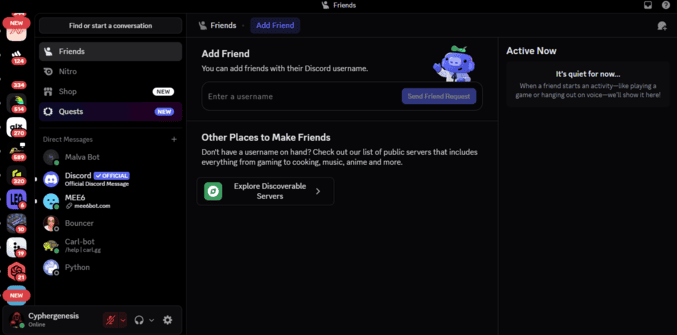
Discord tracks user presence through statuses: online, idle, do not disturb, and invisible. Only those marked online or active count toward the online number. This system helps show who is really active at any moment, but it’s not perfect. Some users might be lurking quietly in invisible mode, hiding from the spotlight but still part of the action. Others might be idle, appearing online even if they haven’t moved a muscle for a while.
Here’s a quick breakdown to clear things up:
- Online status means active presence. These members are fully visible and usually interacting, chatting, or gaming. They’re the life of the server. Idle status shows a user who’s away but still connected.
- They might be grabbing a snack or just stepping away from the keyboard, but Discord still counts them as online. Do Not Disturb blocks notifications but keeps you online. These users want to focus but don’t want to miss out completely.
- Invisible mode is the ultimate hideout. Users appear offline but can still read messages and chat. Offline means truly away. These members aren’t counted in the online number because they’re not connected at all.
Understanding these statuses helps explain why your online count might not match what you expect. It’s a mix of who’s really active, who’s hiding, and who’s just taking a break. This makes the online number a snapshot of your server’s current energy, not a permanent measure of it.
What Counts Toward Your Total Member Count
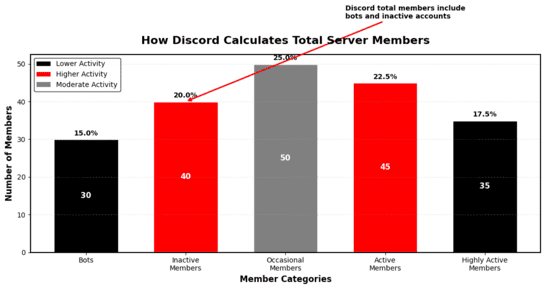
Every account that joins your server adds to the total count, regardless of whether they ever participate. This includes active users, inactive users, and even bots that serve different roles within your server. The total member count is a broad measure of your community’s size, capturing everyone who has ever connected with your server.
It’s important to understand that this number doesn’t reflect how many people are currently engaged or even regularly visit. Some members might have joined once and never returned, while others might drop in occasionally without much interaction. Bots, which help with moderation, games, or other functions, also add to this total but don’t contribute to conversations or activity.
The total member count is like a guest list for a party. It shows everyone who was invited, but not everyone shows up or stays for the whole event. This number grows over time as more people discover and join your server, but it doesn’t shrink unless you remove members manually.
Here’s why this matters, broken down into key points:
- It includes every kind of account. Whether someone is actively chatting, lurking quietly, a bot running tasks, or an inactive member who rarely visits, they all add to this total.
- It’s a broad measure of your server’s size. It doesn’t show who’s engaged. Just because the number is high doesn’t mean your server is buzzing with activity.
- Many members might have joined and then disappeared, leaving the count inflated but the chat quiet. It can give a false sense of health.
- Big numbers look impressive, but they don’t always mean your community is thriving. A large total member count can hide low participation and engagement. It’s the starting point, not the finish line.
This number is the foundation you build on. Real success comes when you turn those names on the list into people who show up, chat, and contribute. It helps you understand your audience’s size. Knowing your total members gives you a sense of how far your community’s reach extends, but it’s just one piece of the puzzle.
Understanding these points helps you see why the total member count is important but not the whole story. It’s a snapshot of your server’s potential, waiting for you to bring it to life.
How Invisible, Offline, and Idle Status Affect Online Numbers

Invisible and offline users don’t appear in the online count. Idle users may show as online but inactive, slightly inflating the number. This means the online count isn’t just a simple headcount; it’s a mix of who’s really active, who’s taking a break, and who’s hiding in plain sight.
Invisible mode is like a cloak of invisibility. People can be online, reading messages, or even chatting, but they choose not to show their status. This keeps them off the online radar, making your active number look smaller than it really is. It’s suited to those who want to lurk without being noticed.
Offline status means the user is truly away from Discord. They aren’t connected, so they don’t show up in the online count at all. This is the clearest way to know someone isn’t currently part of the conversation.
Idle status is a bit tricky. Users who are idle might have stepped away from their keyboard but still appear online. This can make the online number look a little higher than the actual active users. It’s like someone sitting quietly in the corner, not talking but still present.
All these statuses together create a live snapshot of your server’s activity. The online number is never a perfect count of who’s chatting or reacting, but it gives a good sense of the current energy. Understanding these details helps you see why your online count might shift throughout the day.
The Role of Bots in Discord Member Counts

Bots are included in your total member count, but they usually don’t show up in the online numbers unless they’re programmed to appear active. These helpers run tasks, moderate chats, or add fun features, but they don’t join conversations like humans do.
Think of bots as the behind-the-scenes crew. They keep things running smoothly but don’t steal the spotlight. Because they’re counted in total members, they can make your server look bigger than it actually is when it comes to real people.
Here’s why bots matter in your member counts:
- Bots boost total numbers without chatting. They add to your member list but don’t usually show up as online users, so they don’t affect your server’s active vibe.
- Some bots can appear online. If programmed to do so, bots might show as online, but this is rare and usually for specific functions.
- Bots help manage your server. They handle moderation, welcome messages, and games, making your community smoother and more fun. They don’t replace real members. No matter how many bots you have, they can’t create genuine conversations or community spirit.
- Counting bots helps track server size. Including bots in total members gives a full picture of your server’s makeup, but don’t mistake this for real human activity.
Understanding the role of bots helps you see why your total member count might be high, but your online number feels smaller. Bots are part of your server’s backbone, not its heartbeat.
How to Check and Analyze Discord Online vs Total Members

Checking these numbers is easier than you might think. Discord shows both online and total members right in the server sidebar. The online members are usually highlighted or shown near the top, giving you a quick snapshot of who’s active. The total member count is often displayed alongside or just above it, showing the full size of your community.
For a deeper dive, you can use Discord bots like MEE6, Statbot, or ServerStats. These bots track your server’s activity over time and give detailed reports on online versus total members. They help you spot trends, like when your server is busiest or which days see the most activity. This is far more useful than just looking at a single moment, which can be misleading.
Tracking these numbers over days or weeks gives you a clearer picture of your community’s health. You’ll see patterns and can plan events or announcements when more people are around. It also helps you spot if your server is growing or if activity is dropping off.
A good rule of thumb is to look at your online-to-total member ratio. Healthy servers often have about 20–40% of members online during peak times. If your ratio is much lower, it might mean you need to boost engagement or clean out inactive accounts.
Here are some tips to help you check and analyze your Discord members:
- View online and total members in the sidebar. This quick look shows your server’s current activity and overall size.
- Use bots for detailed stats. Bots track trends and give you reports that help understand your server’s pulse.
- Monitor activity over time. Don’t rely on one snapshot; watch how numbers change daily or weekly. Check your online-to-total ratio. This helps you know if your server is active or just big on paper.
- Plan events around peak times. Use your data to schedule when most members are online for better engagement.
Knowing how to check and analyze these numbers gives you the power to grow a lively, connected community. It’s not just about counting members: it’s about understanding your server’s heartbeat.
View Online and Total Members Inside Discord
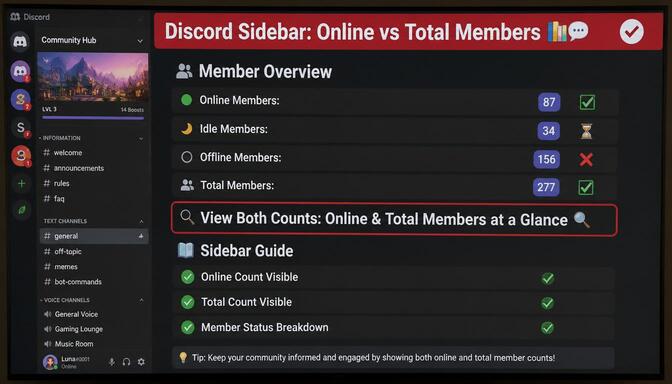
Checking your server’s online and total member counts is simple and right at your fingertips. When you open your Discord server, look at the sidebar on the left. There, you’ll spot the total number of members at the very top: this shows everyone who has joined your community, no matter if they’re active or not.
Just below or near that, you’ll see the online members count. This number is usually highlighted or marked in a way that makes it stand out. It tells you how many people are actually logged in and active at that moment. This quick glance gives you a real-time snapshot of your server’s energy.
It’s a handy way to check how lively your community is without digging through complicated menus or settings. You don’t need any special tools or bots just to see these basic stats. Just open your server and look at the sidebar.
If you want to get a feel for when your server is most active, try checking these numbers at different times of the day or week. You’ll start to notice patterns, like when more people are online or when things slow down. This simple habit can help you plan events or announcements when the most members are around.
So the next time you wonder how your server is doing, take a quick peek at the sidebar. It’s the easiest way to see who’s hanging out and how active your community really is.
Use Discord Bots for Accurate Member Statistics
Bots like MEE6, Statbot, and ServerStats are useful when it comes to digging deeper into your server’s numbers. These bots don’t just show you who’s online right now; they track activity over days, weeks, and even months. This helps you spot real trends instead of guessing from a single moment.
With these tools, you can see how your online and total member counts change over time. They give you detailed reports on peak activity hours, days when your server buzzes the most, and even which channels get the most action. This info is valuable for planning events or posting announcements when your community is most awake and ready to engage.
These bots also help you understand your server’s health by showing the ratio of online to total members regularly. If you notice the online count dropping while total members keep growing, it’s a sign to shake things up and bring people back.
Plus, some bots can even track inactive members, helping you clean up your server and keep your numbers honest. This way, you’re not just growing a big list; you’re building a real community.
Discord bots give you the power to see beyond the surface numbers. They turn raw data into clear insights, making it easier to keep your server lively and connected. If you want your community to thrive, these bots are the tools you need to watch closely.
Monitor Activity Trends Instead of Single Snapshots

Looking at one moment can be misleading. Activity on Discord ebbs and flows, so tracking your server’s numbers over days or weeks gives you a clearer picture of what’s really going on. A single snapshot might catch a quiet moment or a sudden spike, but long-term trends reveal the true heartbeat of your community.
Watching these trends helps you spot patterns, like which days or times get the most action. Maybe your server wakes up on weekends or buzzes during certain hours. Knowing this lets you plan events and announcements when your members are most likely to be around and ready to engage.
It also helps you catch warning signs early. If you see a steady drop in online members over several weeks, it’s a signal to shake things up and bring fresh energy to your server. On the flip side, steady growth in online activity means your community is healthy and thriving.
Tracking over time also shows how changes you make affect your server. Launch a new event or channel? Watch the numbers to see if it brings more people online or sparks more conversations. This feedback loop is valuable for building a lively, connected community.
Don’t trust a single moment. Keep an eye on the bigger picture and use trends to guide your server’s growth and engagement. It’s the best way to understand what’s really happening and make smart moves for your community.
Identify Healthy Online-to-Total Member Ratios
A healthy server often has 20–40% of members online during peak hours. Ratios lower than that may signal inactivity, meaning your community might be struggling to keep members engaged. This ratio is a quick way to gauge the real energy of your server, not just the size.
If your online-to-total member ratio dips below 20%, it could be a sign that many members have joined but aren’t sticking around or participating. This isn’t unusual, but it’s a clear signal that you might need to spark more interest or clean out inactive accounts.
On the flip side, if your ratio climbs above 40%, your server is buzzing with activity, and people are showing up regularly. This level of engagement means your community feels alive and connected.
Keep in mind, these numbers aren’t set in stone. Different types of servers have different rhythms. A gaming server might have higher online ratios during evenings and weekends, while a study group might peak during weekdays.
Tracking this ratio over time helps you spot trends and understand what’s working. If you launch a new event or change your server’s focus, watch how this number shifts. It’s a simple but powerful way to measure your community’s health and growth.
Here are some quick points to keep in mind about online-to-total member ratios:
- Low ratios often mean low engagement. If less than 20% of your members are online, it’s time to rethink how you keep people interested.
- High ratios show strong community energy. When 40% or more are online, your server is active and thriving. Different servers have different peaks. Know your community’s habits and plan around them.
Use the ratio to track changes. Watch how events or updates affect member activity. Don’t obsess over numbers alone. Combine this with other signs of engagement for a full picture.
Best Practices to Increase Discord Online Members Naturally

Growing your Discord server’s online presence isn’t about quick tricks or empty numbers. It’s about building real connections and keeping your community active and engaged. In the next section, we’ll dive into practical, easy-to-follow strategies that help you build a lively community. These aren’t just random tips: they’re proven ways to get people talking, coming back, and feeling part of something special.
You’ll learn how daily chats can spark real conversations, why regular events are your secret weapon, and how cleaning out inactive accounts keeps your server fresh. We’ll also cover why focusing on genuine members beats chasing big numbers, and how creating a welcoming space with clear rules makes everyone feel at home. These practices will help you grow a server that’s not just big, but truly alive and buzzing with energy.
Here are some solid ways to naturally boost your online members and keep the energy alive.
1. Encourage Daily Community Engagement
Chat with your members regularly. Ask questions that spark conversation and invite opinions. Polls are a great way to get people involved without pressure. When members feel heard and valued, they’ll keep coming back.
Keep the conversation flowing by sharing updates, news, or even simple greetings. A little attention goes a long way in making members feel connected. Don’t be afraid to jump into chats yourself: your presence shows you care and encourages others to join in.
Try to create a space where everyone feels safe to share their thoughts. When people know their voice matters, they’re more likely to stick around and participate. Even small interactions, like reacting to messages or giving shoutouts, build a sense of community.
Consistency is key. Daily engagement doesn’t mean nonstop chatting but regular check-ins that keep the server alive. It’s like watering a plant: a little care every day helps your community grow strong and vibrant.
Here are some quick tips to boost daily engagement:
- Ask open-ended questions that invite real answers and stories.
- Use polls to get quick feedback and spark fun debates.
- Share interesting content related to your server’s theme.
- Celebrate member milestones and achievements.
- Respond promptly to messages to keep conversations going.
These simple steps help turn your server from a quiet space into a lively hangout where members feel welcome and excited to return.
2. Create Events That Bring Members Back Regularly
Events are the heartbeat of any active server. Host game nights, Q&A sessions, or watch parties that give members a reason to log in and join the fun. Regular events build habits and make your server a go-to spot.
Planning events isn’t just about filling the calendar; it’s about creating moments your members look forward to. When people know there’s something fun or interesting happening regularly, they’ll make time for it. This builds a rhythm that keeps your server alive and buzzing.
Try mixing up the types of events to keep things fresh. One week could be a trivia night, the next a movie watch party, and then a casual chat session. Variety keeps members curious and eager to see what’s next.
Don’t stress about big, fancy events. Even small gatherings or quick challenges can spark excitement and bring people together. The key is consistency and making sure everyone feels welcome to join in.
Events also give quieter members a chance to step up and shine. When you create spaces where everyone can participate, you build a stronger, more connected community.
Here are some tips to make your events a hit:
- Schedule events at times when most members are online.
- Promote events ahead of time with clear details.
- Encourage members to invite friends and bring new faces.
- Use voice channels for more personal interaction.
- Follow up after events to gather feedback and ideas.
With regular, well-planned events, your server becomes more than just a chat room: it becomes a place where people want to show up, connect, and stay.
3. Remove Inactive Accounts and Improve Community Quality
Cleaning out inactive members keeps your server fresh and your numbers honest. It’s tempting to hold onto every member, but a smaller, engaged community beats a large, silent one any day. Inactive accounts drag down your server’s energy and can give a false sense of growth. When you clear out these silent profiles, you make room for real members who want to participate and contribute.
Regularly reviewing your member list helps you spot accounts that haven’t interacted in weeks or months. Removing these inactive users isn’t about being harsh; it’s about making your community stronger and more vibrant. A clean server means your online member count better reflects actual activity, which helps you plan events and discussions that truly engage your audience.
Keeping inactive accounts also affects your server’s reputation. New members might see a huge total member count but notice low activity, which can feel disappointing or uninviting. A focused, active community attracts people who want to be part of something alive and welcoming.
Here are some tips for managing inactive accounts:
- Set clear rules about activity expectations and membership. Clear guidelines help members understand what’s expected and encourage regular participation. When everyone knows the rules, it’s easier to spot who’s truly active and who isn’t.
- Use bots to identify and flag inactive members automatically. Bots can scan your server and highlight members who haven’t interacted in a while. This saves you time and ensures you don’t miss anyone who might be slipping away.
- Communicate with members before removing them, giving a chance to stay active. Sending a friendly reminder or check-in message shows you care and gives members a chance to re-engage before any action is taken.
- Schedule regular cleanups to keep your server healthy. Setting a routine for reviewing and removing inactive accounts keeps your community fresh and your numbers accurate. It also shows that you’re serious about maintaining an active space.
Focus on quality interactions rather than just numbers. It’s better to have a smaller group of engaged members than a large list of silent accounts. Quality connections build a stronger, more vibrant community that lasts. Cleaning inactive accounts isn’t just maintenance: it’s a way to protect your community’s heart and keep it beating strong.
4. Grow Your Discord Server With Real, Active Members
Focus on inviting people who genuinely care about your community’s purpose. Quality beats quantity every time. Real members bring life, conversations, and loyalty. Building a strong community means finding people who want to be part of something meaningful. When members care, they show up more often, chat more freely, and help others feel welcome.
It’s easy to get caught up in numbers, but a big member list doesn’t mean much if most people are silent. Real growth happens when your members feel connected and excited to participate. This kind of engagement creates a positive cycle where active members attract more active members.
Think about what makes your server special and invite people who share that passion. Whether it’s gaming, art, study groups, or just hanging out, genuine interest fuels ongoing activity. When members find value, they stick around and bring friends.
Focus on quality interactions over quantity. Encourage conversations that matter and create spaces where members can share their thoughts without fear. This builds trust and loyalty, which are the real keys to a thriving server.
Here are some ways to grow your server with real, active members:
- Invite people who fit your community’s vibe and values.
- Welcome new members warmly and help them get involved.
- Encourage members to invite friends who will add to the community. Highlight and celebrate active members regularly.
- Keep your server’s purpose clear and focused to attract the right crowd.
Growing your server naturally takes time, but the results are worth it. A community full of real, engaged members is what makes your server truly alive and fun.
Focus on Active Communities, Not Just Bigger Numbers
The difference between Discord online members vs total members is more than a statistic: it’s a measure of community health. A server with thousands of silent members is less valuable than one with hundreds of active participants. By understanding both metrics, encouraging engagement, and focusing on quality over quantity, you can build a Discord community that thrives, not just one that looks big on paper.
Growing your social media presence takes more than just numbers. It’s about building real connections and active followers who care about what you share. When your audience is engaged, your content reaches further and creates lasting impact.
Sizzle Social helps you boost your social media accounts naturally and effectively. With smart tools and strategies, you can attract genuine followers, increase your reach, and keep your community buzzing with activity. Don’t settle for empty numbers: grow a loyal audience that interacts, shares, and supports your brand.
Take control of your social media growth today. Use Sizzle Social to turn your accounts into vibrant hubs where real people connect and engage. Watch your influence rise and your community thrive with every post and interaction.
Frequently Asked Questions
The difference between Discord online members and total members lies in what each number represents about your server’s activity and size. Online members are the people who are currently logged in and active on Discord at any given moment; they might be chatting, gaming, browsing channels, or simply present with an active status. This number fluctuates constantly throughout the day as members log in and out based on their schedules, time zones, and personal availability. Total members, on the other hand, represent the complete list of everyone who has ever joined your server, including active users, inactive members who rarely visit, and even bots that help with moderation or other functions. This number shows the full scope and reach of your community but does not indicate who is actually present or engaged at any specific time. The two numbers are never the same because not everyone can be online simultaneously; people have different routines, some members may have joined and never returned, and others might use invisible mode to hide their presence. Understanding this distinction is crucial for server owners because total members show your community’s potential size, while online members reveal its current energy and liveliness. A server with many total members but few online may feel quiet and disconnected, whereas a smaller server with a high online count can feel vibrant and active.
Discord online members and total members are never the same because of the natural variability in human behavior, schedules, and how Discord tracks presence. People live in different time zones, so when it is daytime for one group, it might be nighttime for another, meaning only a portion of your total members can be online at any given moment. Personal schedules also vary widely; work, school, family commitments, and other hobbies pull members away from Discord, so even the most dedicated community members cannot be present all the time. Some members may have joined your server out of curiosity or for a specific event and then drifted away, remaining part of the total member count but rarely or never logging in again. Additionally, Discord’s status system affects the online count; users who set themselves to invisible mode are actually online but do not appear in the online members number, making the count seem smaller than it really is. Bots are also included in the total member count but typically do not show up as online unless programmed to do so, further widening the gap between the two numbers. This difference is not a flaw but a natural feature of how online communities function, reflecting the ebb and flow of real human engagement. Understanding this helps server owners set realistic expectations and focus on fostering genuine activity rather than obsessing over matching these two inherently different metrics.
Discord determines which members count as online by tracking user presence through four main status settings: online, idle, do not disturb, and invisible. Only members set to online or idle status are typically counted in the online members number displayed in your server sidebar. The online status means the user is actively logged in and available, usually indicating they are currently using Discord, chatting, gaming, or browsing. The idle status appears when a user has been away from their device for a certain period but remains connected; these members still show up in the online count even though they might not be actively interacting at that moment. The do not disturb status keeps the user online but blocks notifications, allowing them to focus without interruption while still being counted as present. Invisible mode is the exception; users who choose this setting appear offline to everyone else, meaning they are not counted in the online members number even though they are actually logged in and can read messages or chat. Offline status means the user is not connected to Discord at all, so they are not included in the online count. This system provides a snapshot of who is currently present in your server, but it is not a perfect measure of active participation because some counted members may be idle or using do not disturb, while others in invisible mode are hidden from view. Understanding these statuses helps server owners interpret their online numbers more accurately.
Bots are included in your Discord server’s total member count, but they typically do not count toward online members unless they are specifically programmed to display an active status. When you add a bot to your server, it joins as a member and appears in the member list, contributing to the overall total number that reflects the full size of your community. However, most bots are designed to operate quietly in the background and do not show up as online in the server sidebar; they handle moderation, music playback, games, or other automated functions without appearing active to other members. This means bots can inflate your total member count without contributing to the online number, which can make your server’s activity appear lower relative to its size. Some bots can be configured to show an online status or even a custom status, but this is uncommon and usually reserved for specific purposes like displaying server statistics or welcome messages. The distinction is important because bots are valuable tools that enhance your server’s functionality, but they do not replace real human engagement or community interaction. When analyzing your server’s health, it is helpful to remember that bots are part of the total member count but not the active community. This understanding prevents you from overestimating your server’s activity based on total numbers and helps you focus on genuine member participation.
A healthy online-to-total member ratio for a Discord server typically falls between 20% and 40% during peak activity hours, though this can vary depending on your server’s purpose, niche, and member demographics. If your server consistently has 20% to 40% of its total members online at the busiest times, it indicates a strong, engaged community where members are actively participating and finding value in being present. Ratios below 20% may signal that many members are inactive or disengaged, even if your total member count looks impressive; this could mean your server needs more engagement strategies, events, or content to spark interest and bring people back regularly. On the other hand, ratios above 40% suggest an exceptionally active and lively server where members feel connected and motivated to show up, which is a great sign of community health. However, different types of servers have different rhythms; a gaming server might peak on weekends or evenings, while a study group might be more active during weekdays. It is also normal for ratios to fluctuate throughout the day and week based on time zones and member schedules. Rather than obsessing over a single number, track your ratio over time to identify patterns and trends. If you notice a steady decline, it may be time to refresh your engagement strategies, host more events, or reach out to inactive members. A healthy ratio reflects a community that is not just large but truly alive and connected.
Checking the number of online members versus total members in your Discord server is simple and can be done directly within the Discord app or with the help of third-party bots. The easiest method is to look at your server’s sidebar on the left side of the Discord interface. At the top of the member list, you will see the total number of members displayed, which includes everyone who has joined your server regardless of their current status. Just below or near that, you will find the online members count, which is usually highlighted or marked in green to indicate who is currently active. This quick glance gives you a real-time snapshot of your server’s energy and activity. For more detailed analysis over time, you can use Discord bots like MEE6, Statbot, or ServerStats, which track member activity and generate reports on online and total member counts across days, weeks, or months. These bots help you spot trends, identify peak activity hours, and understand how your community’s engagement evolves. They can also highlight inactive members and provide insights into which channels get the most traffic. Additionally, you can manually monitor these numbers at different times of the day to see when your server is most active. Using both the built-in display and bot analytics gives you a comprehensive view of your server’s health and helps you make informed decisions about events, engagement strategies, and community management.
A Discord server with many total members but few online members is a common situation that usually indicates a gap between community size and actual engagement. This discrepancy often occurs because many members joined your server at some point but have since become inactive, either losing interest, getting busy with other commitments, or simply forgetting about your community. Some members may have joined out of curiosity or for a specific event and never returned afterward, yet they remain counted in your total member list. Additionally, time zones play a significant role; if your members are spread across the globe, only a fraction will be online at any given moment. Personal schedules also mean that even dedicated members cannot be present all the time due to work, school, or family responsibilities. Another factor is the use of invisible mode, where members are actually online but choose to hide their status, making the online count appear smaller than reality. Bots also contribute to the total member count without adding to the online number. A large total with few online members is a sign that your server may need more engagement efforts to bring people back and encourage regular participation. Hosting events, starting interesting conversations, and creating a welcoming atmosphere can help rekindle interest. Regularly cleaning out inactive accounts can also make your numbers more honest and reflect the true active community.
Invisible and idle statuses affect Discord online member counts in different ways, and understanding these effects helps you interpret your server’s activity more accurately. The invisible status, also known as appearing offline, allows users to be fully logged in and active on Discord without showing up in the online members count. These members can read messages, chat, and participate in conversations, but they remain hidden from the online list, making your server’s active number appear smaller than it actually is. This is a common choice for users who want to lurk, avoid distractions, or maintain privacy while still being present. Idle status, on the other hand, appears when a user has been inactive for a set period, typically after a few minutes of no interaction, but they remain connected to Discord. Members with idle status are still counted in the online members number, even though they may have stepped away from their device and are not actively participating. This can slightly inflate the online count, giving the impression of more active engagement than is actually happening. Both statuses create a gap between the online number and the true level of real-time interaction. When analyzing your server’s activity, it is helpful to remember that the online count is a mix of truly active users, idle members, and excludes those in invisible mode. This nuance means the online number is a useful snapshot but not a perfect measure of engagement.
Increasing online members in your Discord server requires a combination of consistent engagement, exciting events, and a welcoming community atmosphere that makes members want to log in regularly. Start by encouraging daily conversations through open-ended questions, polls, or interesting topics that invite members to share their thoughts and experiences. When people feel heard and valued, they are more likely to return and participate actively. Hosting regular events such as game nights, Q&A sessions, watch parties, or themed discussions gives members a reason to mark their calendars and show up at specific times. These events create habits and build anticipation, making your server a go-to destination rather than an afterthought. Make sure to promote events well in advance and consider scheduling them during peak activity hours when your members are most likely to be available. Welcoming new members warmly and helping them find their place in the community also boosts engagement, as people who feel connected are more inclined to stay active. Using voice channels and Discord Spaces can add a personal touch that text alone cannot provide, deepening connections and encouraging participation. Additionally, recognizing and celebrating active members through shoutouts or special roles fosters a sense of belonging and motivates others to engage more. Removing inactive accounts periodically keeps your member list honest and reflects a more accurate picture of your active community. Consistency is key; regular, genuine interaction builds the momentum that turns casual members into loyal, active participants.
Removing inactive members from your Discord server can improve the accuracy of your online numbers and create a healthier, more engaged community, though it should be done thoughtfully. When you remove members who have not participated in weeks or months, your total member count decreases, which can make your online-to-total member ratio look much better. A smaller, active community often feels more vibrant and connected than a large server filled with silent, inactive accounts. New members who join will see a more realistic picture of your server’s activity, which can encourage them to participate rather than feel disappointed by low engagement relative to a large member list. However, before removing inactive members, consider sending a friendly message or ping to check if they are still interested in being part of the community; some may simply need a gentle reminder or invitation to re-engage. Setting clear expectations about activity levels or requiring members to interact periodically can also help maintain an active server. Using bots to identify long-term inactive members saves time and ensures you do not accidentally remove someone who is temporarily away. It is also worth noting that sometimes members are inactive but valuable lurkers who still enjoy reading conversations; if they are not disruptive, you might choose to keep them. Ultimately, regular cleanups help maintain a fresh, focused community where active members feel their presence matters, making your server a more inviting place for everyone.
Discord bots are powerful tools that help server owners track online versus total members more effectively by providing detailed analytics, historical data, and automation that goes far beyond the basic numbers shown in the sidebar. Bots like MEE6, Statbot, and ServerStats continuously monitor your server’s activity and generate comprehensive reports on member counts, engagement trends, and peak activity times. They can show you how your online and total member numbers change over days, weeks, or months, allowing you to spot patterns and understand the rhythm of your community. This historical data is invaluable for planning events, announcements, or changes to your server structure during times when most members are likely to be active. These bots can also identify inactive members who have not participated in a set period, helping you decide when to clean up your member list and keep your numbers honest. Some bots provide real-time statistics displayed in dedicated channels, giving your community transparency about server activity and encouraging friendly competition or participation. Additionally, advanced bots can track engagement across different channels, showing you which areas of your server are most popular and where you might need to generate more interest. By automating data collection and analysis, these bots save you time and provide actionable insights that help you build a more active, engaged community. They transform raw numbers into clear guidance for improving your server’s health and growth.
Online members tell you a great deal about your Discord community’s health because this number reflects real-time engagement, energy, and the willingness of members to show up and participate. When you see a healthy number of online members, it indicates that your community is active, that members find value in being present, and that your server is succeeding in creating a welcoming, engaging environment. A consistently high online count suggests that members have formed habits around visiting your server, whether to chat, game, share content, or simply connect with others who share their interests. This kind of regular participation builds strong relationships and a sense of belonging, which are the foundations of a thriving community. On the other hand, a low online count despite a large total membership may signal disengagement, indicating that members have lost interest, are not finding value, or feel disconnected from the community. This is a prompt to investigate what might be lacking, such as interesting conversations, regular events, or a welcoming atmosphere. Online numbers also help you identify peak activity times, allowing you to schedule events or announcements when the most members are present. Tracking online members over time reveals trends, such as growth or decline, which guide your community management decisions. While online members are not a perfect measure of activity due to factors like invisible mode and idle status, they remain one of the most accessible and useful indicators of your server’s overall health and vitality.
Having a smaller, active Discord server is often better than a large, inactive one because real community value comes from engagement, connection, and meaningful interaction rather than sheer numbers. In a smaller active server, members are more likely to know each other, form genuine friendships, and participate in conversations because they feel seen and valued. This sense of belonging encourages regular participation and creates a positive feedback loop where activity attracts even more activity. In contrast, a large inactive server often feels empty and lifeless; new members may join expecting lively discussions but find silence, which can be disappointing and lead them to leave quickly. Active communities also provide better support, collaboration, and networking opportunities because members are present and responsive when you need feedback, help, or simply someone to talk to. Moderating a smaller, active server is also easier and less stressful, allowing you to maintain a positive, safe environment without constant oversight. Additionally, engaged members are more likely to invite their friends, share your server’s content, and contribute to its growth organically, creating sustainable momentum. Large inactive servers often suffer from inflated numbers that mask low engagement, making it harder to accurately assess your community’s health and plan effective strategies. Quality over quantity is a principle that holds true for Discord communities; a server full of passionate, participating members will always feel more alive and rewarding than one with thousands of silent accounts.
Using Discord events is one of the most effective ways to boost your online member count because events give members a specific reason to log in, participate, and connect with others at a designated time. Hosting regular events such as game nights, trivia competitions, movie watch parties, Q&A sessions, or themed discussions creates anticipation and habits that encourage members to show up consistently. When you announce an event in advance, members can plan their schedules around it, increasing the likelihood that they will be online when the event takes place. Events also provide a structured, engaging experience that can attract even quieter members who might not participate in casual daily chats. Using voice channels during events adds a personal touch that text-based interactions cannot replicate, deepening connections and making the experience more memorable. Variety is key; rotating different types of events keeps your server fresh and appeals to a broader range of interests, ensuring that more members find something they enjoy. Promoting events across your server, using announcement channels, and even pinging relevant roles can maximize attendance. After events, consider sharing highlights or asking for feedback to build excitement for the next one and make members feel their participation is valued. Over time, a calendar of regular events transforms your server from a place people visit occasionally into a destination they actively look forward to, steadily increasing your online member count and overall community energy.
A long-term strategy for building a thriving Discord community focuses on consistent engagement, quality interactions, regular events, and a welcoming atmosphere that makes members feel valued and connected. Start by clearly defining your server’s purpose and niche, as this attracts members who share your interests and are more likely to stay engaged. Establish a consistent posting and interaction routine, showing up daily to spark conversations, answer questions, and participate in discussions; your presence signals that the community is active and cared for. Host regular events that give members reasons to log in and participate, creating habits and building anticipation around your server. Welcome new members warmly and help them find their place by guiding them to relevant channels and introducing them to others. Recognize and celebrate active members through shoutouts, special roles, or exclusive perks, fostering a sense of belonging and encouraging continued participation. Regularly review your server’s analytics, including online-to-total member ratios and engagement trends, to identify what is working and where improvements are needed. Clean out inactive accounts periodically to keep your member list honest and maintain a vibrant, focused community. Encourage members to invite friends who align with your server’s values and interests, growing your community with quality participants rather than random numbers. Finally, stay adaptable and open to feedback; communities evolve, and listening to your members helps you adjust your strategy to meet their needs. Patience and consistency are essential, as a truly thriving community is built over time through genuine care, connection, and effort.